web
You’re offline. This is a read only version of the page.
close
Skip to main content

Notifications

Announcements

No record found.

Community site session details

Community site session details

Session Id :
Microsoft Dynamics AX (Archived)

Bank statement import MT940 - debited amount shown as credited

(0) ShareShare
ReportReport
Posted on by 32

I am facing issue in MT940 format bank statement reconciliation.

Below example to understand the issue:

During vendor payments, amount is received in my bank statement, say GBP200 Debited.

When I import bank statement, it is shown as GBP200 Debited.

But in AX, the bank account is Credited with GBP200 during the vendor payment transaction.

Now, I am unable to match GBP 200 Debit and GBP 200 Credit. Both should be on Credit side to perform reconciliation. We are using OOB function. Any pointers would be helpful.

*This post is locked for comments

I have the same question (0)
  • Matloob Profile Picture
    781 on at

    Hi NishantM,

    I am also facing the same issue where the universally followed accounting principle of Debit in Bank statement is Credit in Books is seems to be not working with advanced reconciliation functionality of AX. We are using MT940 bank statement format.

    Also searched for a possible fix or if i missed something in setups, but no clue yet.

    Waiting for Microsoft to advise on this issue.

    Regards

    Muhammad Matloob

  • imran ul haq Profile Picture
    4,017 on at

    Hi NishantM,

    In The bank MT940 sheet, if you will open in notepad, you will see a prefix C or D to the amount, and now when you will import this MT940 file, AX reverse the Credit to debit and debit to credit, which will match to you actual AX Transactions.

    I am not more clear on What is OOB function, but in the standard MT940, it work fine with me.

    Thanks & Regards,

    Imran Ul Haq

  • Suggested answer
    Matloob Profile Picture
    781 on at

    Hi,

    Got this reply from Microsoft support and my error has been resolved after modifying changes in bank statement import services as mentioned below:

    Hello Muhammad Matloob,

    Greetings!!


    I have researched in our internal knowledge database and found the Issue 3247038MT940 Debit or Credit marks are considered the opposite as expected for an advanced bank reconciliation.


    Microsoft has evaluated this issue, and has determined that this functionality is working as designed.

    You should customize XSLT for any change. The suggestion for a parameter to control whether change to opposite should be done or not during import is a viable suggestion and should be logged as a product suggestion in MSCONNECT.


    If you want more information please go through the below LCS link :

    https://fix.lcs.dynamics.com/Issue/NotFixed?bugId=3247038&qc=954a89077923ebf35c5f3469f47d49cb39ffb2430147d060a254f190d8f74a63


    Workaround

    Disclaimer

    Microsoft provides programming examples for illustration only, without warranty either expressed or implied, including, but not limited to, the implied warranties of merchantability or fitness for a particular purpose. This mail message assumes that you are familiar with the programming language that is being demonstrated and the tools that are used to create and debug procedures.”


    MT940XML-to-Reconciliation.xslt


    <xsl:template name="GetCreditDebitIndicator">

        <xsl:param name ="Direction" select ="''"/>

        <!--Reverse Debit Credit-->

        <xsl:choose>

          <xsl:when test="$Direction='C' or $Direction='RC'">

            <xsl:value-of select="'Debit'"/>

          </xsl:when>

          <xsl:otherwise>

            <xsl:value-of select="'Credit'"/>

          </xsl:otherwise>

        </xsl:choose>

      </xsl:template>


    Changed to

      <xsl:template name="GetCreditDebitIndicator">

        <xsl:param name ="Direction" select ="''"/>

        <!--No Reverse Debit Credit-->

        <xsl:choose>

          <xsl:when test="$Direction='C' or $Direction='RC'">

            <xsl:value-of select="'Credit'"/>

          </xsl:when>

          <xsl:otherwise>

            <xsl:value-of select="'Debit'"/>

          </xsl:otherwise>

        </xsl:choose>

      </xsl:template>


    After this change, I deactivated the Inbound service for MT940 import (System administration | Setup | Services and AIF | Inbound ports), went to Inbound transforms | Manage transforms and reloaded the changed XSLT (MT940XML-to-Reconciliation.xslt).
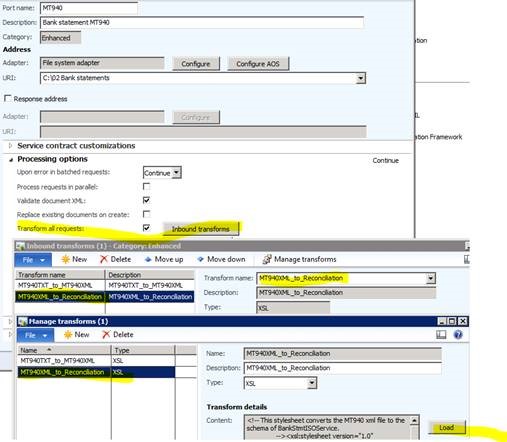
     Bank-recon-screen-shot.jpg

    After activating the port and importing the account statement, I could verify the expected result; the credit amounts on file were imported as credit on the bank statement ""

    Hope this helps the users over Dynamics Community.

    Regards

    Muhammad Matloob

Under review

Thank you for your reply! To ensure a great experience for everyone, your content is awaiting approval by our Community Managers. Please check back later.

Helpful resources

Quick Links

Responsible AI policies

As AI tools become more common, we’re introducing a Responsible AI Use…

Neeraj Kumar – Community Spotlight

We are honored to recognize Neeraj Kumar as our Community Spotlight honoree for…

Leaderboard > 🔒一 Microsoft Dynamics AX (Archived)

#1
Martin Dráb Profile Picture

Martin Dráb 4 Most Valuable Professional

#1
Priya_K Profile Picture

Priya_K 4

#3
MyDynamicsNAV Profile Picture

MyDynamicsNAV 2

Last 30 days Overall leaderboard

Featured topics

Product updates

Dynamics 365 release plans



