web
You’re offline. This is a read only version of the page.
close
Skip to main content

Notifications

Announcements

No record found.

Community site session details

Community site session details

Session Id :
Microsoft Dynamics AX (Archived)

AP GL difference help

(0) ShareShare
ReportReport
Posted on by

Good evening colleagues,

can you please suggest which way to move in order to investigate further.

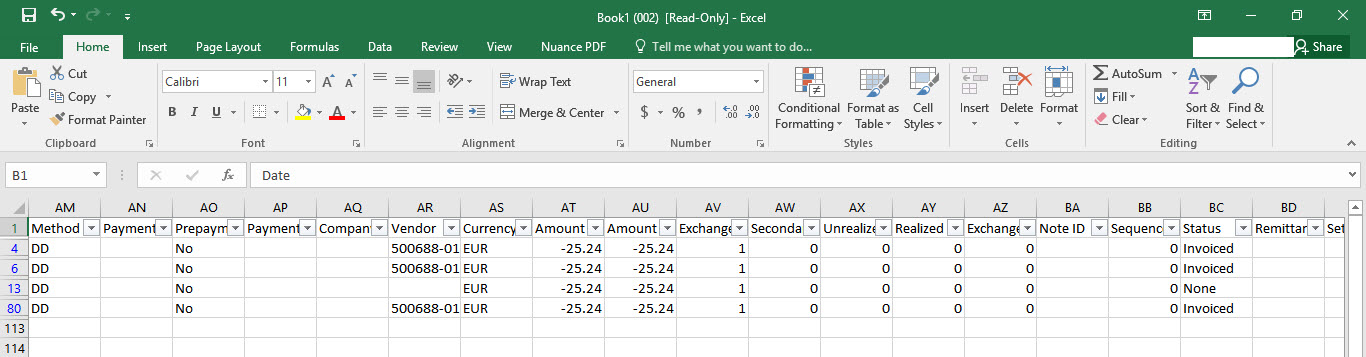
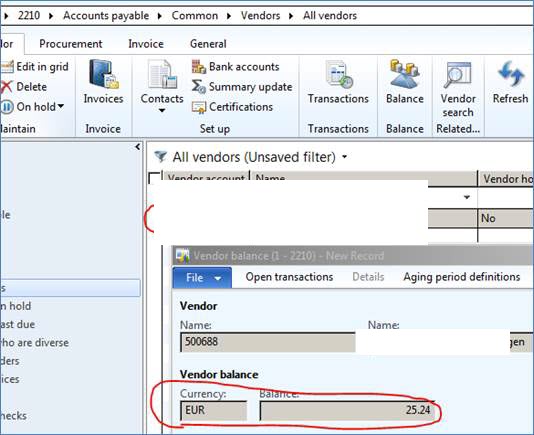
We are having difference between AP and GL ledgers of €25.24 in P10 (October). It’s caused by vendor xxxxx, there are no transactions open on this vendor and each of this vendor’s transactions looks booked correctly, however, AP ledger still showing balance of 25.24.

It seems that the problem is very recent so it restricts the range of action: difference must have been caused in P10 (October) postings as there was no AP GL difference in P9 (September).

I think it's hard to reproduce because I do not have a standard environment, I only have a copy of the production env. every x weeks.
6433.image003.jpg

2018_2D00_11_2D00_05_5F00_19_2D00_55_2D00_47.jpg

2018_2D00_11_2D00_05_5F00_19_2D00_56_2D00_28.jpg


many thanks,

best regards

*This post is locked for comments

I have the same question (0)
  • André Arnaud de Calavon Profile Picture
    301,035 Super User 2025 Season 2 on at

    Hi F.G.,

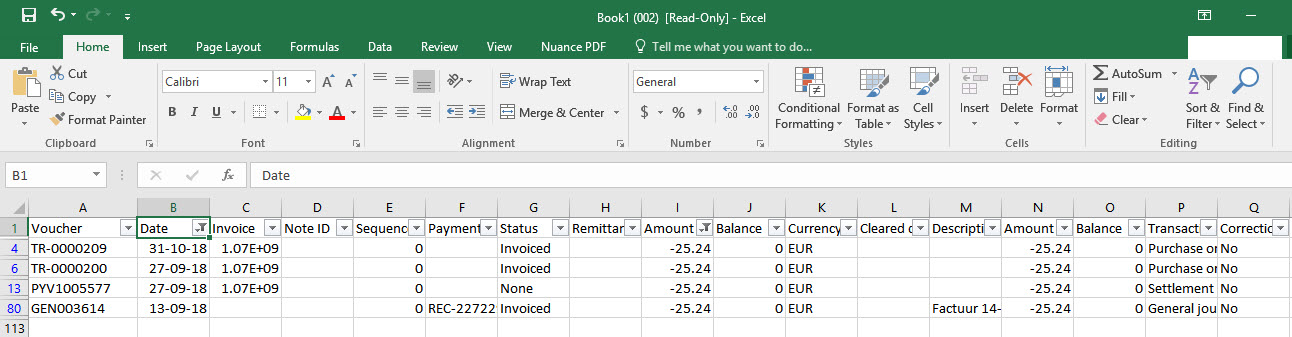
    You showed some transactions with a filter in Excel on the amount. Also, I don't know the source of these Excel sheets. Can you verify if you open the Transactions from this vendor if there are really no open transactions? On the vendor transactions form, you can select to show the open transactions only. What exact version of AX 2012 are you running?

  • Ludwig Reinhard Profile Picture
    Microsoft Employee on at

    Hi,

    Does the standard AP-GL reconciliation report that is available in GL show the same difference?

    Have yo ualready checked the AP summary account(s) for manual transactions posted?

    Best regards,

    Ludwig

  • Community Member Profile Picture
    on at

    ood morning Andre,

    the excel list is an export of AX ''Vendor Transaction'' table, below print screen of Period 9 and Period 10 - the balance for the Vendor - according to AX is zero.

    2018_2D00_11_2D00_06_5F00_09_2D00_31_2D00_01_5F00_open_5F00_only.jpg

    2018_2D00_11_2D00_06_5F00_09_2D00_31_2D00_01_5F00_open_5F00_only.jpg

    according at the Vendor/Ledger reconciliation report there is no difference.

    many thanks,

    FG

  • Community Member Profile Picture
    on at

    Hi Ludwig,

    thanks for your suggestion.

    AP/GL reconciliation report shows no difference so I assume there is a data corruption in place.

    Thanks

    Regards

    FG

  • Suggested answer
    Ludwig Reinhard Profile Picture
    Microsoft Employee on at

    Hello FG,

    Can you run the vendor balance list report filtered for vendor 500688 and run the vendor statement report for the same vendor.

    If both show the same result then there might be a problem with the display field in the vendor balance form.

    Best regards,

    Ludwig

  • Suggested answer
    André Arnaud de Calavon Profile Picture
    301,035 Super User 2025 Season 2 on at

    Hi FG,

    Have a look at LCS issue search. There are quite some articles with fixes related to incorrect balances for vendors. You can narrow down on your exact AX 2012 version.

  • Ludwig Reinhard Profile Picture
    Microsoft Employee on at

    Hello FG,

    Have you been able to overcome or dig down deeper into the issue?

    Best regards,

    Ludwig

  • Community Member Profile Picture
    on at

    Hi Ludwig,

    not yet - we are digging in the matter.

    Thanks

    Regards

  • Suggested answer
    guk1964 Profile Picture
    10,888 on at

    If you know the period and the vendor then the Vendor Balances list report as suggested is a good place to start to see what ahs happened in the period for that vendor.

    If running other reports then you might find it useful to read my previous post https://community.dynamics.com/ax/f/33/t/238269

    Link the vendor transactions in the VendTrans and the GeneralJournalAccountEntry, by the  createdTransactionId to also verify that for the  transactions related to a particular vendor, that the postings all went to that correct main account.

    To link the vendor transactions in the VendTrans with those in the GeneralJournalAccountEntry, use createdTransactionId to isolate transactions related to a particular vendor, then you can see whether all the postings went to that particular main account.

  • Community Member Profile Picture
    on at

    Hi Magic,

    thanks for the heads up.

    after digging in the vouchers, he issue is in GEN003614 (P9) but I still don’t see the reason for having wrong balance on this vendor, all transactions showing correct GL postings...

    culprit.jpg

    Thanks

    FG

Under review

Thank you for your reply! To ensure a great experience for everyone, your content is awaiting approval by our Community Managers. Please check back later.

Helpful resources

Quick Links

Responsible AI policies

As AI tools become more common, we’re introducing a Responsible AI Use…

Neeraj Kumar – Community Spotlight

We are honored to recognize Neeraj Kumar as our Community Spotlight honoree for…

Leaderboard > 🔒一 Microsoft Dynamics AX (Archived)

#1
Martin Dráb Profile Picture

Martin Dráb 4 Most Valuable Professional

#1
Priya_K Profile Picture

Priya_K 4

#3
MyDynamicsNAV Profile Picture

MyDynamicsNAV 2

Last 30 days Overall leaderboard

Featured topics

Product updates

Dynamics 365 release plans