Hi,
We are experimenting issue when importing data in order to update Account records. The first issues have started end of February, so I don't know if there was a change made by Microsoft that could impact data import.
We have always followed the same process without having issue. And all the sudden, it has stopped working.
What we de:
1. Create a custom view to keep only the fields and accounts we need to update
2. Export the data into an Excel spreadsheet
3. Update the data into the Excel spreadsheet
4. Import data from the view by clicking on 'Import from Excel'
5. Select the spreadsheet just updated
6. Review mapping. Even by having some Primary Fields not mapped, has never prevented the import to be successful. We make sure that the Source fields are correctly mapped
7. Finish import.
Before, we only had to wait a couple of minutes to have the import completed with a majority of success. Since the end of February, the import remains at the Submitted status, with no failure or success.
We have noticed a change though, which is with the Map field when opening the Import. It used to be empty but we see now 'Modified_Automatic Mapping (xxx).
Screenshot when review the mapping
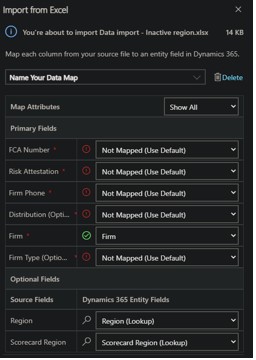
Import successful with the Map field empty

Screenshot for an import that stays with the Submitted status, and with the 'Modified_Automatic Mapping' value in the Map field

Is anyone facing the same issue, or might be aware of how to fix it?
Thank you for your help







