web
You’re offline. This is a read only version of the page.
close
Skip to main content

Notifications

Announcements

No record found.

Community site session details

Community site session details

Session Id :
Customer experience | Sales, Customer Insights,...
Answered

Why are appointments created via a workflow not syncing into Outlook?

(0) ShareShare
ReportReport
Posted on by 171

Hello,

I have a workflow which basically creates three new appointments when a tick box is ticked on a form and the workflow works and the appointments show up correctly within my Dynamics 365 calendar however, they do not show up on my Outlook calendar. 

If however I create an appointment within Dynamics manually, that work fine and syncs with Outlook within 15 minutes. 

I have noticed that when I create an appointment manually the status is set as 'Scheduled' however, when they are created via the workflow they are set as 'Open'. Just to test weather that makes a difference, I have created a second workflow which basically changes the status of the appointments from 'Open' to 'Scheduled' as soon as the new appointments are created however, that didn't help and the appointments still don't sync with Outlook. 

I have checked the mailboxes for all users and can confirm that server side synchronisation is set up correctly for everyone. 

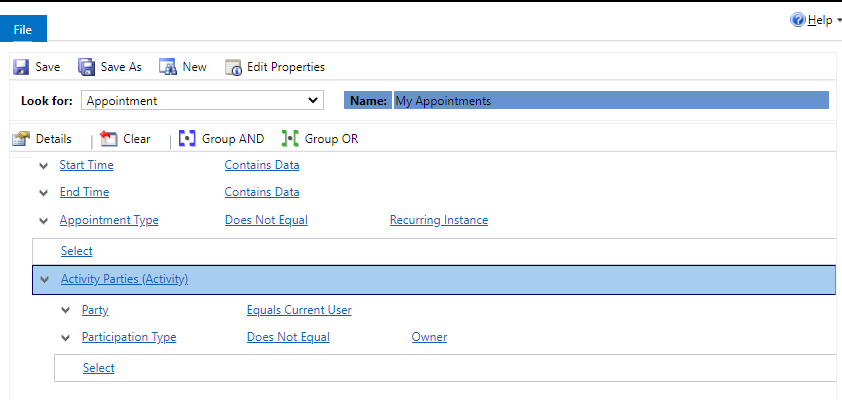
I can't seem to see anything within the sync filters that would be causing this, please see below. These are all default, I haven't changed anything here. 
pastedimage1596193043209v1.png

Any idea what I'm doing wrong or have I missed something?

Many thanks for your help in advance. 

I have the same question (0)
  • Verified answer
    Ricardo Gimenez Profile Picture
    on at

    Hello,

    Could you please check if the appointment organizer is the defined correctly for the appointments created through the workflow. Please, check if the organizer defined is the same user that you trying to sync the appointment record to mailbox. Also, will be good to check if all conditions on the filter (image) is accomplished in the appointment created by flow.

    Thanks,

  • Kamilcmm Profile Picture
    171 on at

    Hi Ricardo,

    Thanks for your help.

    I have noticed that I don't have the 'Organizer' field on the appointment form and when I added it, I noticed that this field is empty when the appointments are created via a workflow. I then changed the workflow to set the organiser based on whoever created the order and it now syncs fine.

    Many thanks,

    Kamil

Under review

Thank you for your reply! To ensure a great experience for everyone, your content is awaiting approval by our Community Managers. Please check back later.

Helpful resources

Quick Links

Responsible AI policies

As AI tools become more common, we’re introducing a Responsible AI Use…

Neeraj Kumar – Community Spotlight

We are honored to recognize Neeraj Kumar as our Community Spotlight honoree for…

Leaderboard > Customer experience | Sales, Customer Insights, CRM

#1
Tom_Gioielli Profile Picture

Tom_Gioielli 70 Super User 2025 Season 2

#2
Gerardo Rentería García Profile Picture

Gerardo Rentería Ga... 33 Most Valuable Professional

#3
Daniyal Khaleel Profile Picture

Daniyal Khaleel 32 Most Valuable Professional

Last 30 days Overall leaderboard

Product updates

Dynamics 365 release plans



