web
You’re offline. This is a read only version of the page.
close
Skip to main content

Announcements

No record found.

News and Announcements icon
Community site session details

Community site session details

Session Id :
Finance | Project Operations, Human Resources, ...
Answered

Adding automated task to vendor invoice workflow

(0) ShareShare
ReportReport
Posted on by

Hello,

I'd like to add an automated task to the vendor invoice workflow in AX 2012 R3 but when I go to modify my workflow, I don't see my new task as an option to add to the workflow. 

I'm following instructions from here: 

https://docs.microsoft.com/en-us/dynamicsax-2012/developer/how-to-create-a-workflow-automated-task

I've created a new class which implements WorkflowElementExecutionEventHandler.  I've basically duplicated the VendInvoicePolicyTaskEventHandler, changed the name, and added my own little hello world code to the execute method.  

I've created a new automated task under AOT\Workflow\Automated Tasks.  I've basically duplicated the VendInvoicePolicyEvaluationTask, changed the name, and pointed it to my new class.  I've ensured the Document is VendInvoiceDocument, the same as VendInvoicePolicyEvaluationTask which is the document that I'd like to associate my task with.  

I've performed an incremental CIL and tried restarting the AOS.  When I go to edit the workflow, I can see the "Evaluate policy rules for invoices" automated task but mine is not an option to add to the workflow: 
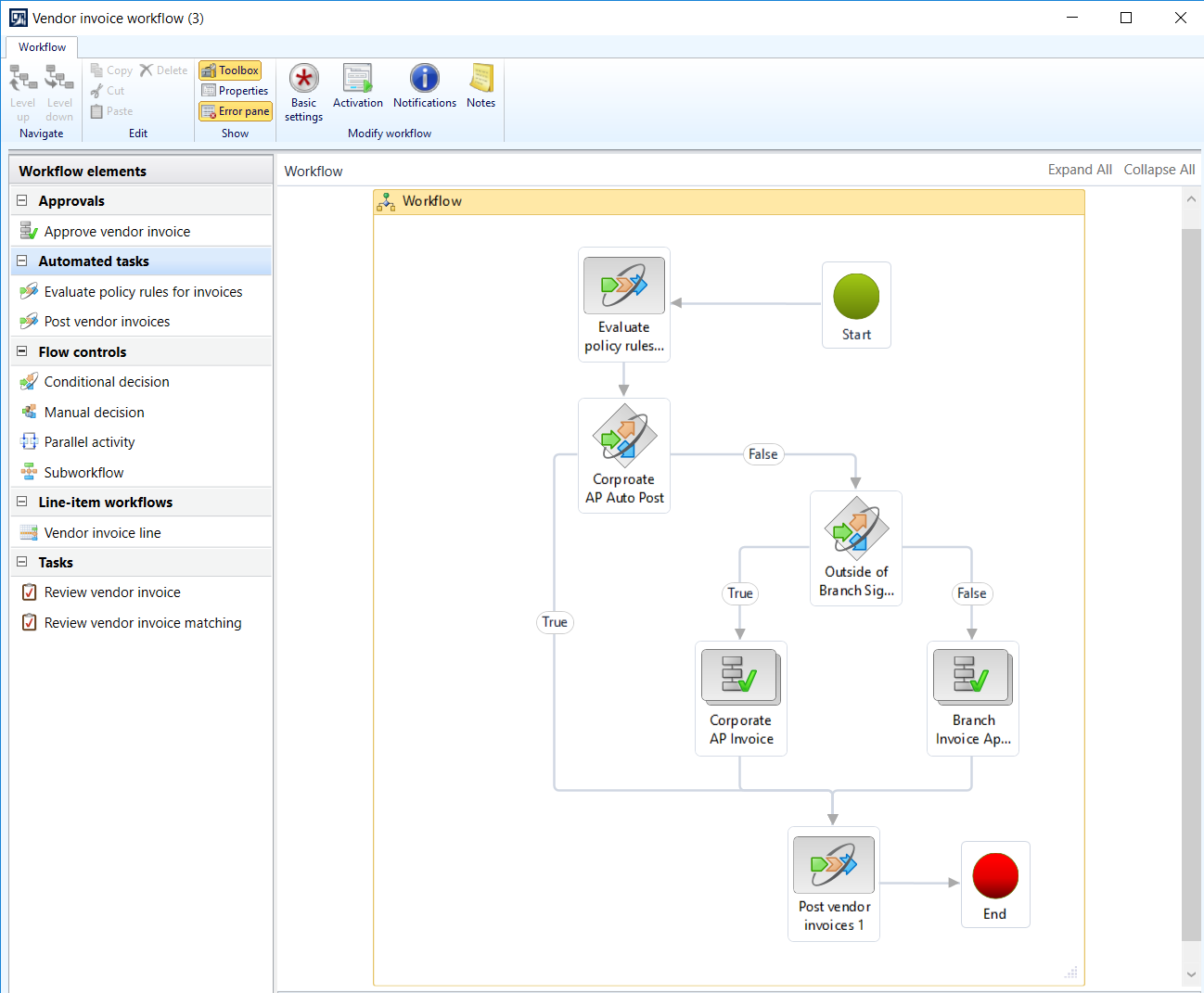
pastedimage1576009004621v1.png

Any ideas why my task is not showing up in the workflow editor?  Is there something obvious that I'm missing?  Any help is greatly appreciated!

I have the same question (0)
  • Suggested answer
    Ludwig Reinhard Profile Picture
    Microsoft Employee on at

    Hello Brawndo,

    Did you try a full CIL and restarted your machine?

    Can you also let us know what kind of automation you created? (Just interested ;-)

    Best regards,

    Ludwig

  • Verified answer
    kvnkk Profile Picture
    800 on at

    Hi,

    Can you cross check below point. whether you have created or not??

    After an automated task is created, you can add the automated task to a workflow type in the Supported Elements node. 

    Regards,

    KVNKK

  • Greg's Mom Profile Picture
    on at

    Thank you guys.  I had completely missed the point of adding the automated task to the supported elements node under the Workflow\Workflow types node.  Thank you very much for pointing that out.  

  • Greg's Mom Profile Picture
    on at
    [quote user="Ludwig Reinhard"]

    Hello Brawndo,

    Did you try a full CIL and restarted your machine?

    Can you also let us know what kind of automation you created? (Just interested ;-)

    Best regards,

    Ludwig

    [/quote]

    Thank you for your suggestion, Ludwig.  The automation that I'm creating is as described in my other post from yesterday to validate vendor invoices prior to them going through the approval process: 
    https://community.dynamics.com/ax/f/microsoft-dynamics-ax-forum/374829/vendor-invoice-validation-before-workflow-approval

    I'm creating an automated task to perform the vendor invoice validations similar to what occurs during posting in the check method of the PurchInvoiceJournalCreate class.  I'm not 100% sure how I can call this code to just validate the invoice without performing the posting.  This will be my focus today

Under review

Thank you for your reply! To ensure a great experience for everyone, your content is awaiting approval by our Community Managers. Please check back later.

Helpful resources

Quick Links

Introducing the 2026 Season 1 community Super Users

Congratulations to our 2026 Super Stars!

Meet the Microsoft Dynamics 365 Contact Center Champions

We are thrilled to have these Champions in our Community!

Congratulations to the March Top 10 Community Leaders

These are the community rock stars!

Leaderboard > Finance | Project Operations, Human Resources, AX, GP, SL

#1
Giorgio Bonacorsi Profile Picture

Giorgio Bonacorsi 659

#2
André Arnaud de Calavon Profile Picture

André Arnaud de Cal... 465 Super User 2026 Season 1

#3
Syed Haris Shah Profile Picture

Syed Haris Shah 304 Super User 2026 Season 1

Last 30 days Overall leaderboard

Product updates

Dynamics 365 release plans
