Hello Dynamics 365 Experts,
I am facing a challenge on my local Dynamics 365 FO OneBox development machine. I simply downloaded the VHD file for version PU41 and App version 10.0.17 from LCS and setup it on our local server. Everything is running fine except DMF.
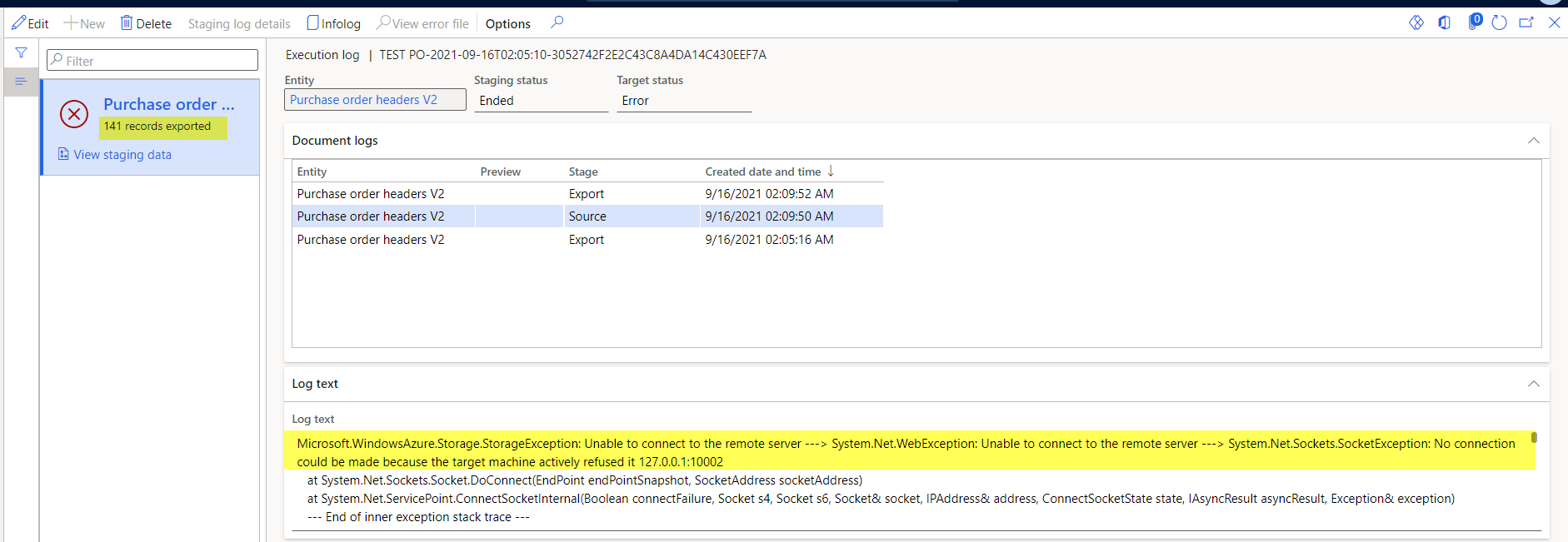
Whenever I create an export job for any entity and execute it, all the data is copied into the staging tables fine, but it fails at the step "Copy from Staging to Target" with error message.
"Microsoft.WindowsAzure.Storage.StorageException: Unable to connect to the remote server ---> System.Net.WebException: Unable to connect to the remote server ---> System.Net.Sockets.SocketException: No connection could be made because the target machine actively refused it 127.0.0.1:10002"
On Internet everywhere it is mentioned that this issue is due to Azure Storage Emulator. So I verified and tried following points and still it is giving the same error.
- AzureStorageEmulator working fine
- Downloaded the latest AzureStorageEmulator and installed it.
- Stopped -> Cleared data -> initialize again -> start AzureStorageEmulator again (Through commands)
- Changed the ports for ASE and tried above steps again.
Above all steps I have tried and Azure Storage Emulator is working fine but still I am facing the same issue. So if anyone has any idea about this issue, please let me know.