web
You’re offline. This is a read only version of the page.
close
Skip to main content

Announcements

No record found.

News and Announcements icon
Community site session details

Community site session details

Session Id :
Finance | Project Operations, Human Resources, ...
Answered

Leave and Absence-Use Full Time Equivalency

(0) ShareShare
ReportReport
Posted on by 103

HI,

I'm trying to use the new Leave & Absence plan option 'Use Full Time Equivalency' but without success:

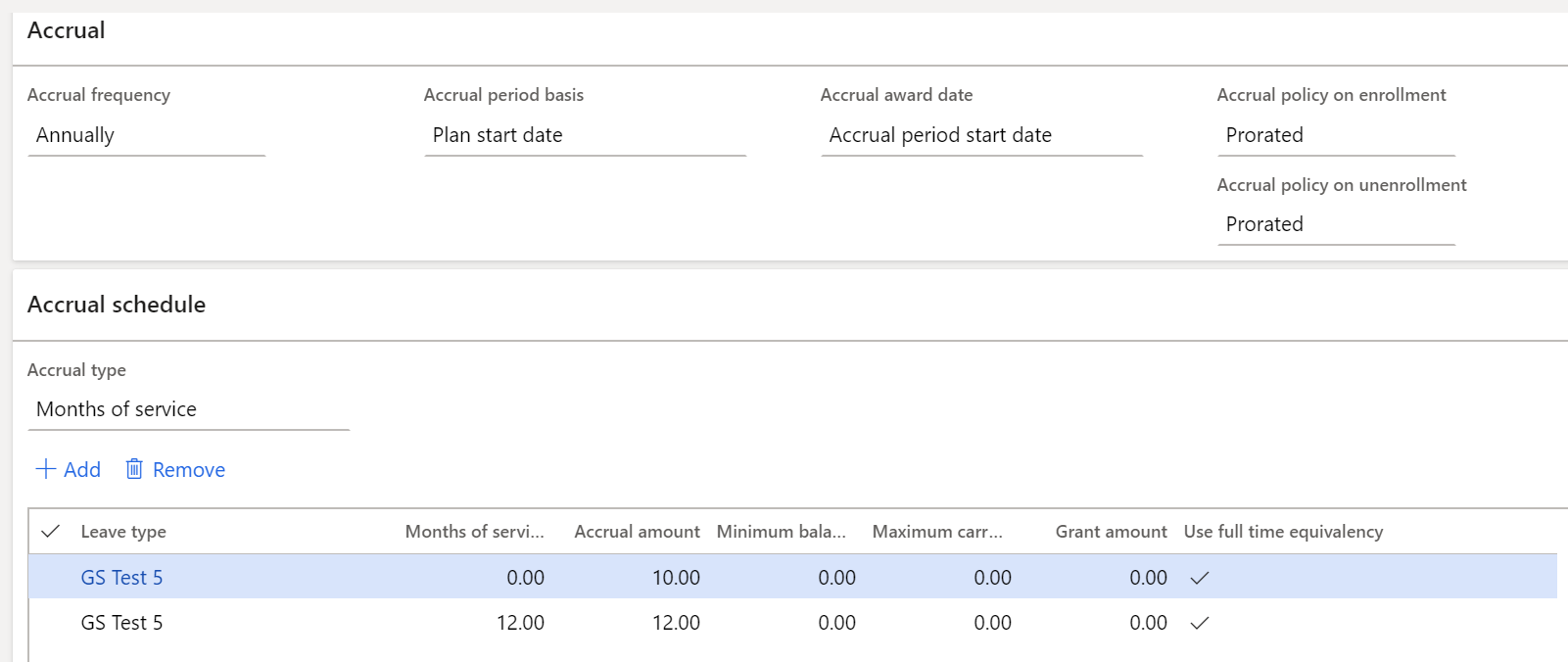
* I have a Plan set to annually accrue from the Start Date, (01/01/20)
pastedimage1593504933811v1.png

* The plan accrues 10 hours from the Start Date and the new Full Time Equivalency is ticked

* I have an employee assigned to a Position with a Full Time Equivalent of 0.5, (Part Time)

* This employee has been employed for 6 months

* I enrolled this employee from 01/01/20 and ran the accrual

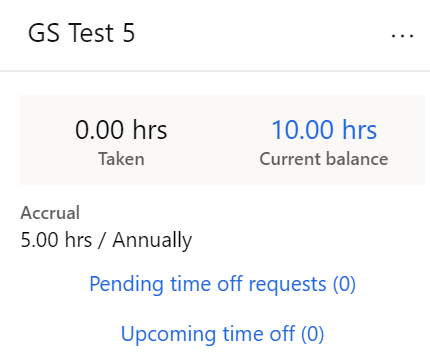
* The result shows an annual accrual of 5 hours, (which I was hoping for) but a balance of the full 10 hours:
pastedimage1593505230092v2.png

Can anybody explain why I am getting a balance of 10, when I am expecting half this, i.e. 5 hours?

Thanks in advance...

I have the same question (0)
  • qianwang Profile Picture
    7,168 on at

    Hi Mancini,

    I checked the results in Employee Details --> View Time Off --> Balance tab and they are correct.

    I can't find the second screenshot you shared. Where did you open it?

    Regards,

    QianQW

  • Mancini Magic Profile Picture
    103 on at

    Hi QianQW

    Many thanks for replying.  The second screenshot was taken from the People workspace on the Leave and Absence tab.

    If I drill into the No. of Employees Enrolled from the Leave Plan, open the employee and go to View Time Off > Balance tab, I still see that the accrual rate is 5 but the balance is 10:

    pastedimage1593589940921v1.png

    Am I misunderstanding the calculation?

    Best regards

  • qianwang Profile Picture
    7,168 on at

    Hi Mancini,

    After my many tests, I found that the results were always inconsistent.

    Please raise a ticket to Microsoft for help.

    Regards,

    QianQW

  • Mancini Magic Profile Picture
    103 on at

    Thank you so much for checking, QianQW.  I thought that I wasn't understanding the functionality correctly.

    I will raise a ticket.

    Best regards

  • Verified answer
    Mancini Magic Profile Picture
    103 on at

    I submitted this to Microsoft as a possible issue and a Dynamics 365 for Operations support engineer investigated and found that the system was behaving correctly:  When generating a new Position, using the Create New Position form, in the background the Full-time Equivalent value defaults to 1.  Even if you then go into the newly-created Position record and amend the FTE value to a part-time value, e.g. 0.5, in the background, Dynamics HR still holds the FTE default value of 1.0 up until the date that it has been changed to part-time.  This can be viewed by going from the Position form to Changes Timeline > Manage Changes:

    8512.Picture1.jpg

    When the accrue leave plans is run, the routine will take the original FTE value into consideration up to the date that it was changed to part-time, hence accruing more days than expected.  To alleviate this, either update the value in the Manage Changes form before accruing, or personalise the Create New Position form and add the FTE field so that the value can be amended as part of the initial new position creation.  Thanks to Microsoft for investigating this.

  • qianwang Profile Picture
    7,168 on at

    Hi Mancini Magic,

    Got it! Thank you, Mancin. Thank you for the update.

Under review

Thank you for your reply! To ensure a great experience for everyone, your content is awaiting approval by our Community Managers. Please check back later.

Helpful resources

Quick Links

Introducing the 2026 Season 1 community Super Users

Congratulations to our 2026 Super Stars!

Meet the Microsoft Dynamics 365 Contact Center Champions

We are thrilled to have these Champions in our Community!

Congratulations to the March Top 10 Community Leaders

These are the community rock stars!

Leaderboard > Finance | Project Operations, Human Resources, AX, GP, SL

#1
Giorgio Bonacorsi Profile Picture

Giorgio Bonacorsi 669

#2
André Arnaud de Calavon Profile Picture

André Arnaud de Cal... 445 Super User 2026 Season 1

#3
Syed Haris Shah Profile Picture

Syed Haris Shah 331 Super User 2026 Season 1

Last 30 days Overall leaderboard

Product updates

Dynamics 365 release plans
