web
You’re offline. This is a read only version of the page.
close
Skip to main content

Notifications

Announcements

No record found.

Community site session details

Community site session details

Session Id :
Microsoft Dynamics CRM (Archived)

Quick Campaign Using Email Template Can't change Sender/From using lookup

(1) ShareShare
ReportReport
Posted on by 55

Hello All,

I am having an issue with Dynamics CRM Online (2016.1).

When I create a new Quick Campaign using a Global (Contact) email template, the lookup that allows me to change the sender is disabled. I'm sure this used to work, has anyone else experienced this or now how to change this as I wish to send it from a Queue.
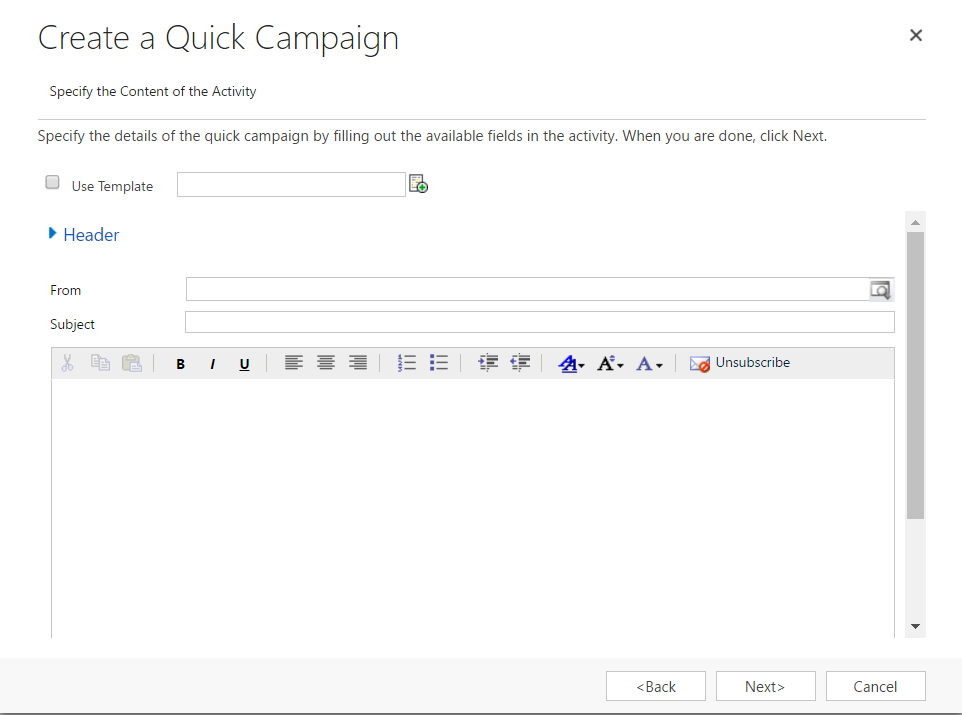
Quick_2D00_Campaign_2D00_Email_2D00_Template_2D00_Sender.PNG

*This post is locked for comments

I have the same question (0)
  • Suggested answer
    Dynamics_Alok Profile Picture
    1,746 on at

    When you would insert Use Template ,it will give you opportunity to select From .

    FYI 

    5557.template.png

  • Suggested answer
    Zohaib Uddin Khan Profile Picture
    2,822 on at

    I tested the scenario as per the below image and From field is editable. Thanks.

    3644.Capture1.PNG

  • Andrew Monkey Profile Picture
    55 on at

    I can set who the records are assigned too, but on the next screen the from field is read only. I presume this should be something I can change? Any ideas why this isn't editable?

    I know I can send direct mail and get the option to choose who it is sent from but I am trying to do a Mail out from a marketing list using a quick campaign (which I have done previously without this issue)

  • Community Member Profile Picture
    on at

    Hi, Andrew, I have the same problem. Did you resolve the issue?

  • Community Member Profile Picture
    on at

    I am also having this issue.

    Have been using Quick Create Campaigns in this way for years, and only just noticed this problem today.

    Keen to find solution ASAP.

    Thanks.

  • Frank Lee Profile Picture
    4,617 on at

    What CRM version are you using?  Just checked our CRM Online environments (v8.2.2 and v9.0.1) and the From field allows editing within the Quick Campaign process.

  • Suggested answer
    Community Member Profile Picture
    on at

    I am using Microsoft Dynamics 365 Version 1612 (8.2.1.176) (DB 8.2.1.176) on-premises.

    My developer found a solution overnight which has successfully fixed this bug: community.dynamics.com/.../203704

  • Verified answer
    Andrew Monkey Profile Picture
    55 on at

    solution from Microsoft support:

    What you need to do is as follows:

    Create a new solution and add in the 'from' field from the email entity - just that nothing else from the email entity

    Export the solution as an unmanaged solution

    Edit customizations.xml and look for the line that says

    <LookupTypes />

    Replace that line with:

    <LookupTypes>              

    <LookupType id="00000000-0000-0000-0000-000000000000">8</LookupType>

    <LookupType id="00000000-0000-0000-0000-000000000000">2020</LookupType>

    </LookupTypes>

    Put the new customizations.xml back in the solution zip file replacing the existing one

    Import the solution back in

  • Community Member Profile Picture
    on at

    Hi, thank you guys for the response. Unfortnately the suggested solution does not work for me.

    Do you have any other idea how to fix it?

    Best regards,

    Monika

    (My version: 1612 (8.2.2.112) (DB 8.2.2.112) on-premise.)

  • Suggested answer
    Sectoral Profile Picture
    25 on at

    Hi all, I know I'm 3 years late on this, but I found the solution. This is a permission issue and can be solved by granting the Send Email as Another User permission. This is a property of a Security Role; navigate to the Business Management Tab > Miscellaneous Privileges Section:

    pastedimage1587674865583v1.png

    I am using Dynamics 365 v9.0 on premise, but I suspect this permission has been around for a while.

Under review

Thank you for your reply! To ensure a great experience for everyone, your content is awaiting approval by our Community Managers. Please check back later.

Helpful resources

Quick Links

Responsible AI policies

As AI tools become more common, we’re introducing a Responsible AI Use…

Neeraj Kumar – Community Spotlight

We are honored to recognize Neeraj Kumar as our Community Spotlight honoree for…

Leaderboard > 🔒一 Microsoft Dynamics CRM (Archived)

#1
SA-08121319-0 Profile Picture

SA-08121319-0 4

#1
Calum MacFarlane Profile Picture

Calum MacFarlane 4

#3
Alex Fun Wei Jie Profile Picture

Alex Fun Wei Jie 2

Last 30 days Overall leaderboard

Featured topics

Product updates

Dynamics 365 release plans



