web
You’re offline. This is a read only version of the page.
close
Skip to main content

Notifications

Announcements

No record found.

Community site session details

Community site session details

Session Id :
Microsoft Dynamics AX (Archived)

Removing/ hiding a form's title string

(0) ShareShare
ReportReport
Posted on by

I need to hide/ remove a form's title string.
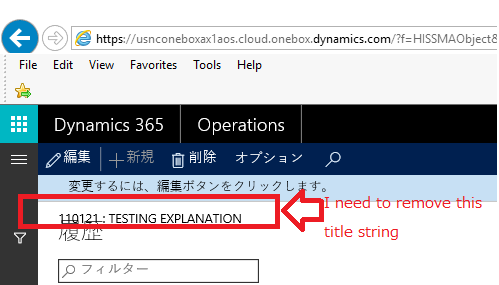
2605.test.png

Above, as you can see, is the part which I need to hide/ remove. That is not equivalent to a Title Data Source which we could set by providing a datasource. The one I am pointing out to, is a form's caption. Even if I leave the form's caption blank, it will return the path where I navigated from by showing the record's primary key information.

I have also made sure that the "Title Data Source" field and the "Data Source" field inside the Design Form view has been left blanked out.

_21714C98_2.png

I did some digging through the forum/ googling, but all I could find is

element.design().caption("Test"); //I even tried removing the "Test" within the bracket, but in the end I ended up a string with the name of the form as the caption...


I have also tried:

element.design().caption().visible(false);//same goes with this. It's reporting a syntax error...

Any help is much appreciated, thanks in advance.

*This post is locked for comments

I have the same question (0)
  • Mea_ Profile Picture
    60,284 on at

    Hi Lincoln Poh,

    It looks like titlefield 1 and 2 from title datasource, did you try to change title datasource property on a form design ?

  • Community Member Profile Picture
    on at

    Hello ievgen,

    Thanks for the response.

    Nope, that is not title from a data source.

    If you were to look carefully, that would be the string located below it, which I forced it to show a label.

    The one above is the default system given string, which we would receive when jumping from one form to another form, showing it's path.

    Once again, thanks for the response.

  • Community Member Profile Picture
    on at

    Could anyone please help me out with this? Is it even possible to edit out the form's title out right now?

  • Community Member Profile Picture
    on at

    Sorry for bumping for help, but if anyone has any idea, please do go ahead and post your solution.

    In the meantime, I think this has something to do with WinAPI....I might be wrong though.

  • Mea_ Profile Picture
    60,284 on at

    There is no WinAPI anymore. Do you want to hide "110121 : TEST EXPLANATION" ?

  • Community Member Profile Picture
    on at

    Thanks for the reply again, ievgen!

    Does WinAPI belongs to versions lower than the current AX?

    Also, yes, I do want to hide  "110121 : TEST EXPLANATION".

  • Community Member Profile Picture
    on at

    Once again, Im sorry for the bump, but I am still in search for a solution to this problem.

    Thank you all professionals in advance.

  • Community Member Profile Picture
    on at

    Bumping to receive help.

    If this is forbidden, I will create a new thread.

  • Community Member Profile Picture
    on at

    bump...

  • Community Member Profile Picture
    on at

    bumped.

Under review

Thank you for your reply! To ensure a great experience for everyone, your content is awaiting approval by our Community Managers. Please check back later.

Helpful resources

Quick Links

Responsible AI policies

As AI tools become more common, we’re introducing a Responsible AI Use…

Neeraj Kumar – Community Spotlight

We are honored to recognize Neeraj Kumar as our Community Spotlight honoree for…

Leaderboard > 🔒一 Microsoft Dynamics AX (Archived)

#1
Martin Dráb Profile Picture

Martin Dráb 4 Most Valuable Professional

#1
Priya_K Profile Picture

Priya_K 4

#3
MyDynamicsNAV Profile Picture

MyDynamicsNAV 2

Last 30 days Overall leaderboard

Featured topics

Product updates

Dynamics 365 release plans



