web
You’re offline. This is a read only version of the page.
close
Skip to main content

Notifications

Announcements

No record found.

Community site session details

Community site session details

Session Id :
Customer experience | Sales, Customer Insights,...
Answered

email notification not firing on field update

(1) ShareShare
ReportReport
Posted on by 50

I have a pretty simple workflow created for sending an email when a ticket (Case) field contains a specific value. 

Specifically, If Ticket:Shipping Facility = Therapath, then send email. 

It is set to start when the record is created and also when the fields change with Shipping Facility checked. 
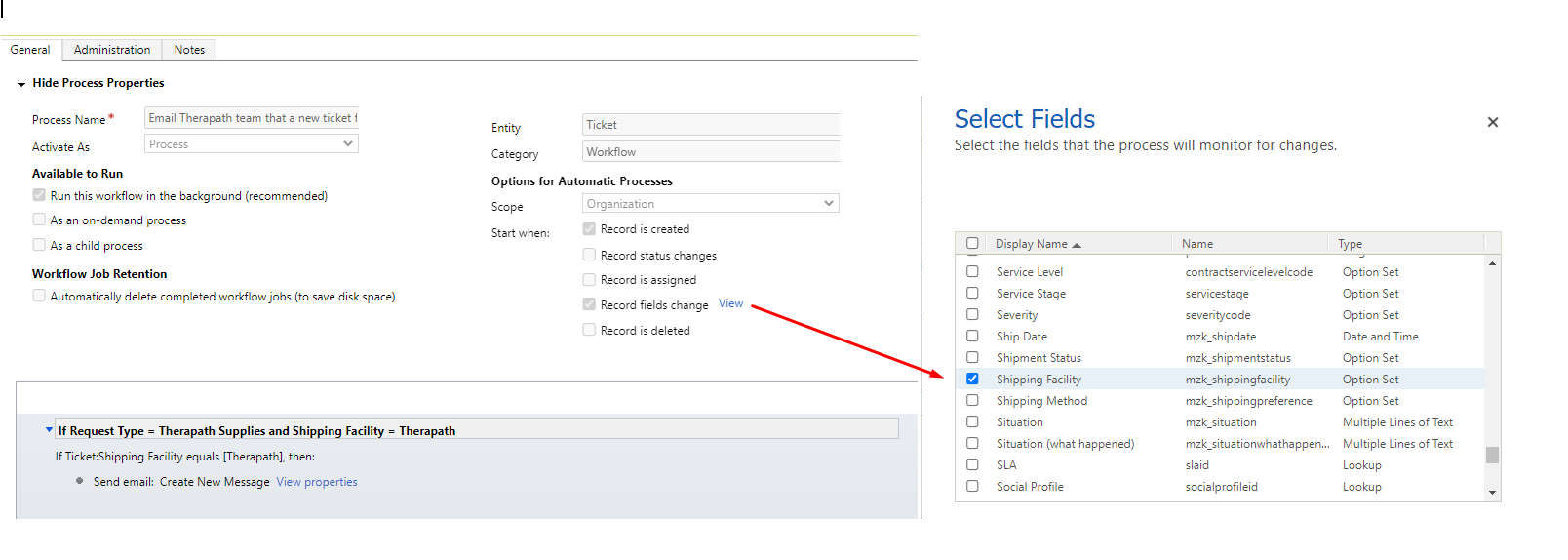
pastedimage1650931530080v1.png

If I create the ticket (Case) the first time with the correct value for shipping facility, the email notification fires as expected. If only it works that way with most users, I could stop there :)

But let's say, the user saves the record with the wrong value for shipping facility and then updates it later; the email notification is not sent out. 

Whether the record was created with the correct value or updated to have the correct value, I need an email notification to get sent. 

I have the same question (0)
  • Amit Katariya007 Profile Picture
    10,409 Super User 2025 Season 2 on at

    Hello Tammy,

    Does this workflow is working for the Admin? if yes then can you check who is the owner of the workflow.

    because it is possible that end users does not have enough permissions to send email on behalf of the record which is not own by them.

    Check out below articles also.

    www.loganconsulting.com/.../

    xrmdynamicscrm.wordpress.com/.../

  • Suggested answer
    Nya Profile Picture
    29,060 on at

    Hi Tammy,

    Maybe you can try the followings:

    1. Convert the workflow to a Real-time one.
    2. Delete the trigger "Record is created", which means that only trigger the workflow when the field is changed.
    3. Change the field to one whose data type is not "Option Set", e.g. Single line of text.

    Please feedback your attempts so that I can locate the problem.

  • Tammy Locashio Profile Picture
    50 on at

    Hi Nya, Is there an issue with using a Option set field in a workflow? This is the only field I can use for this because when the staff chooses the one option, the email needs to go to a team of employees who do not have access to CRM. They take action based on the email and do not access CRM.

  • Tammy Locashio Profile Picture
    50 on at

    The email is only sent out on the create of the ticket and only when the correct option is chosen.

    If a user created the ticket with the other option and saves, but then edits the option (update) then the email notification is not sent.

    I need the email to be sent whether on create or on update when the correct value is chosen.

  • Suggested answer
    Bipin D365 Profile Picture
    28,983 Moderator on at

    HI,

    Did you check the process session/System jobs?

    Do you see any failure system jobs ?

    Please mark my answer verified if this is helpful!

    Regards,

    Bipin Kumar

    Follow my Blog: xrmdynamicscrm.wordpress.com/

  • Verified answer
    Nya Profile Picture
    29,060 on at

    Hi Tammy,

    I tested the case in a similar way with a custom option set field with items A B and C.

    pastedimage1651051616946v1.png

    When the field changes and equals to A, the description field will be updated to "Succeed".

    But according to my test, only when the field is changed from A to B or C (instead of being changed into A), the description will be update.

    pastedimage1651051803955v2.png

    And then I converted it into a real-time workflow.

    It works as expected. I.e. the workflow will be triggered when the option set is changed and the latest value is A.

    So you can convert your workflow into a real-time one.

    Just deactivate it and click the "Convert to a real-time workflow" in the top.

    pastedimage1651052271491v3.png

  • Tammy Locashio Profile Picture
    50 on at

    No the job is not listed as failing.

  • Tammy Locashio Profile Picture
    50 on at

    Hi Nya, Thank you! Converting it to a real time workflow did the trick. I need to read more about that.  

Under review

Thank you for your reply! To ensure a great experience for everyone, your content is awaiting approval by our Community Managers. Please check back later.

Helpful resources

Quick Links

Responsible AI policies

As AI tools become more common, we’re introducing a Responsible AI Use…

Neeraj Kumar – Community Spotlight

We are honored to recognize Neeraj Kumar as our Community Spotlight honoree for…

Leaderboard > Customer experience | Sales, Customer Insights, CRM

#1
Tom_Gioielli Profile Picture

Tom_Gioielli 81 Super User 2025 Season 2

#2
Gerardo Rentería García Profile Picture

Gerardo Rentería Ga... 49 Most Valuable Professional

#3
#ManoVerse Profile Picture

#ManoVerse 40

Last 30 days Overall leaderboard

Product updates

Dynamics 365 release plans



