web
You’re offline. This is a read only version of the page.
close
Skip to main content

Notifications

Announcements

No record found.

Community site session details

Community site session details

Session Id :
Microsoft Dynamics AX (Archived)

0% VAT/sales tax not getting posted to the sub ledger in D365

(0) ShareShare
ReportReport
Posted on by 168

When recording a purchase, where resulting tax code is a 0% tax, no posting is created in the tax sub-ledger (the Posted VAT / Posted Sales Tax forms).

So for example:

Sales Tax Group = AP-DOM (Domestic)

Item Sales Tax Group  = WITHOUT (0% tax)

according to setup, resulting sales tax code is InVAT0 (this code is part of both the sales tax group and item sales tax group)

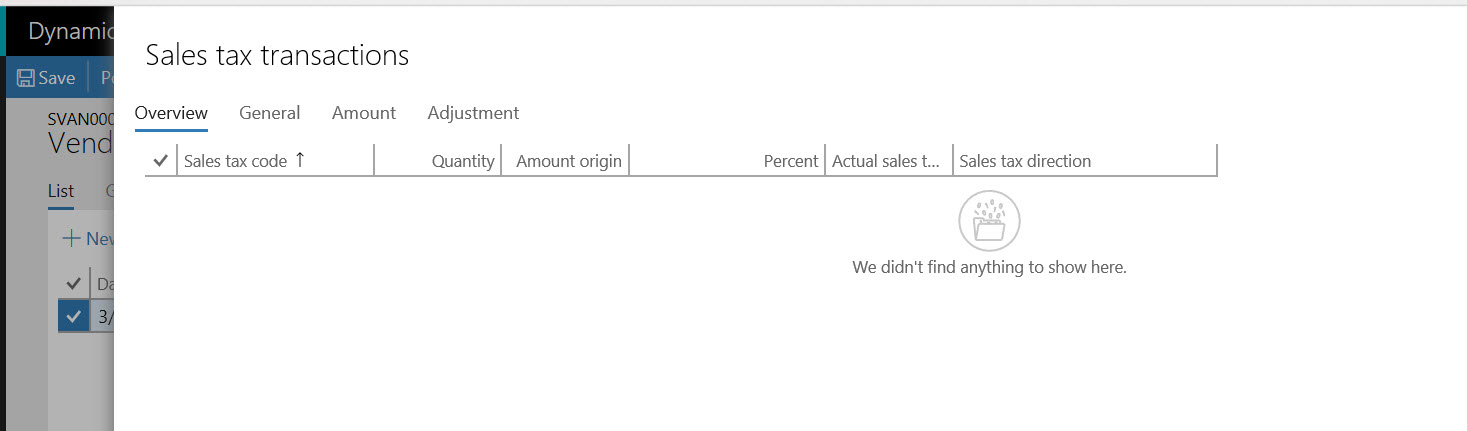
However, pressing "Sales Tax" button on the journal shows NO SALES TAX posting, and after posting the journal, no new line is created in the Posted Sales Tax form.  

This looks like a change from the behavior in AX 2012 - as even 0% tax transaction are recorded (as they need to .... it's a legal requirement).

I noticed it in our own test environment, but managed to easily recreate the issue in the Microsoft own demo environment in company DEMF, using the setting in the example above.

Anyone is seeing that in their own D365 environment?

2018_2D00_03_2D00_29_5F00_12_2D00_58_2D00_05.jpg

2018_2D00_03_2D00_29_5F00_13_2D00_02_2D00_17.jpg

*This post is locked for comments

I have the same question (0)
  • Verified answer
    André Arnaud de Calavon Profile Picture
    301,130 Super User 2025 Season 2 on at

    Hi Zvika,

    At my customer it is working correctly in D365. There are a lot of Tax transactions with 0%. Did you actually setup a percentage of zero on the Tax code? What exact version are you running? This customer is working with the July 2017 release (7.2).

  • Suggested answer
    ZvikaR Profile Picture
    168 on at

    You are correct! the missing part is creating the line in the "Values" form with 0%

    The slightly tricky part is that a row is not going to be created there if you do not need to fill any other field on that row (such as from/to date) - nothing will get saved.

    So one has to work around it, put some value in the value field, save, and then change back to 0%.

    Once this is done the posting into VAT sub ledger happens.

    Thanks much!

Under review

Thank you for your reply! To ensure a great experience for everyone, your content is awaiting approval by our Community Managers. Please check back later.

Helpful resources

Quick Links

Responsible AI policies

As AI tools become more common, we’re introducing a Responsible AI Use…

Neeraj Kumar – Community Spotlight

We are honored to recognize Neeraj Kumar as our Community Spotlight honoree for…

Leaderboard > 🔒一 Microsoft Dynamics AX (Archived)

#1
Martin Dráb Profile Picture

Martin Dráb 4 Most Valuable Professional

#1
Priya_K Profile Picture

Priya_K 4

#3
MyDynamicsNAV Profile Picture

MyDynamicsNAV 2

Last 30 days Overall leaderboard

Featured topics

Product updates

Dynamics 365 release plans