web
You’re offline. This is a read only version of the page.
close
Skip to main content

Notifications

Announcements

No record found.

Community site session details

Community site session details

Session Id :
Finance | Project Operations, Human Resources, ...
Suggested Answer

Project for the web: task's msdyn_progress and msdyn_effortremaining can't be updated via API

(1) ShareShare
ReportReport
Posted on by 12

Hi all

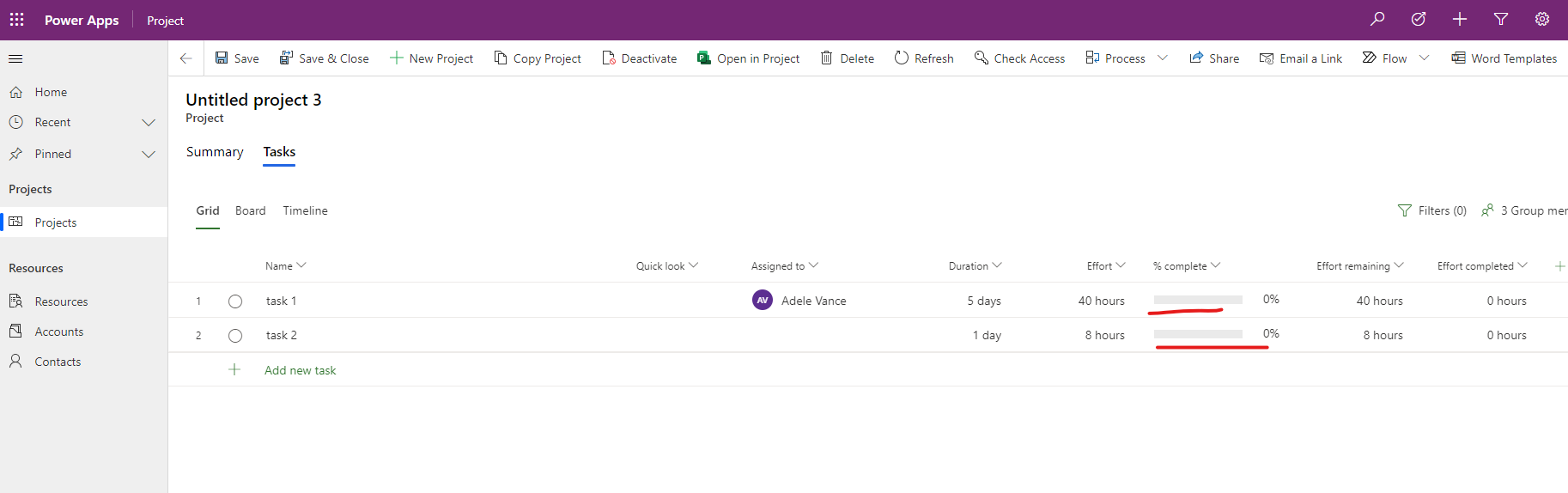
Using code from the article Use Project schedule APIs to perform operations with Scheduling entities we faced up with an issue that tasks progress is not updated in Project for the web

It works fine when progress should either 0% or 100%, but does not when it should be somewhere in between (1-99%). It looks like any values greater than 0 and less than 1 just ignored by API

The task's msdyn_effortremaining field can't be updated at all

Are we missing something? Maybe there is some related entity that should be updated as well?

Here is the piece of code we are using and bellow is the result

task3["msdyn_subject"] = "Updated Task";
task3["msdyn_effort"] = 8d;
task3["msdyn_effortremaining"] = 4m;
task3["msdyn_progress"] = 0.5m;
task3["msdyn_start"] = DateTime.Now.AddDays(1);
var task3UpdateResponse = CallPssUpdateAction(task3, operationSetId);

Screenshot-2021_2D00_08_2D00_04-143606.png

I have the same question (0)
  • apa Profile Picture
    8,284 Moderator on at

    Hi Andrey Ignatenko. First off vanilla P4W works a bit differently than P4W in Project Operations, when it comes to % complete. In ProjOps, that column is solely driven by approved time entries and in vanilla P4W its value can be changed manually.

    So that said, to update % complete in vanilla P4W, you can update the msdyn_progress column. Changes to that column are then reflected in columns msdyn_effortcompleted and msdyn_effortremaining if the schedule mode is fixed duration. It's not immediately clear to me how you are trying to get % complete updated. Can you clarify which column you're updating in your code or are you changing values in all the columns you've listed in your code?

    At the moment the only restricted column seems to be msdyn_effortcompleted for the project task table so that can't be edited with the Schedule APIs. 

  • Andrey Ignatenko Profile Picture
    12 on at

    HI Antti Pajunen 

    First of all thanks for the reply.

    So yes, we are using vanilla P4W.

    ...you can update the msdyn_progress column.

    Changes to that column are then reflected in columns msdyn_effortcompleted and msdyn_effortremaining if the schedule mode is fixed duration.

    I ensured that the Fixed duration schedule mode is applied for the project according to your statement

    It's not immediately clear to me how you are trying to get % complete updated.

    Can you clarify which column you're updating in your code or are you changing values in all the columns you've listed in your code?

    Yes, I tried to update all the fields listed above with one API request.

    Hovewer even if I update only msdyn_progress field (task1 and task2 are existing tasks I created manually on UI) - nothing happens. Please see the code below and the second screenshot

    var task1 = GetTask(project.ToEntityReference(), "B648C920-93F6-EB11-A80F-000D3A3B998B");
    var task2 = GetTask(project.ToEntityReference(), "46ECD337-94F6-EB11-A80F-000D3A3B998B");

    task1["msdyn_progress"] = 0.3m;
    task2["msdyn_progress"] = 0.4m;

    var task1UpdateResponse = CallPssUpdateAction(task1, operationSetId);
    var task2UpdateResponse = CallPssUpdateAction(task2, operationSetId);

    Is there anything you could advice?

    Thanks

    Andrey Ignatenko
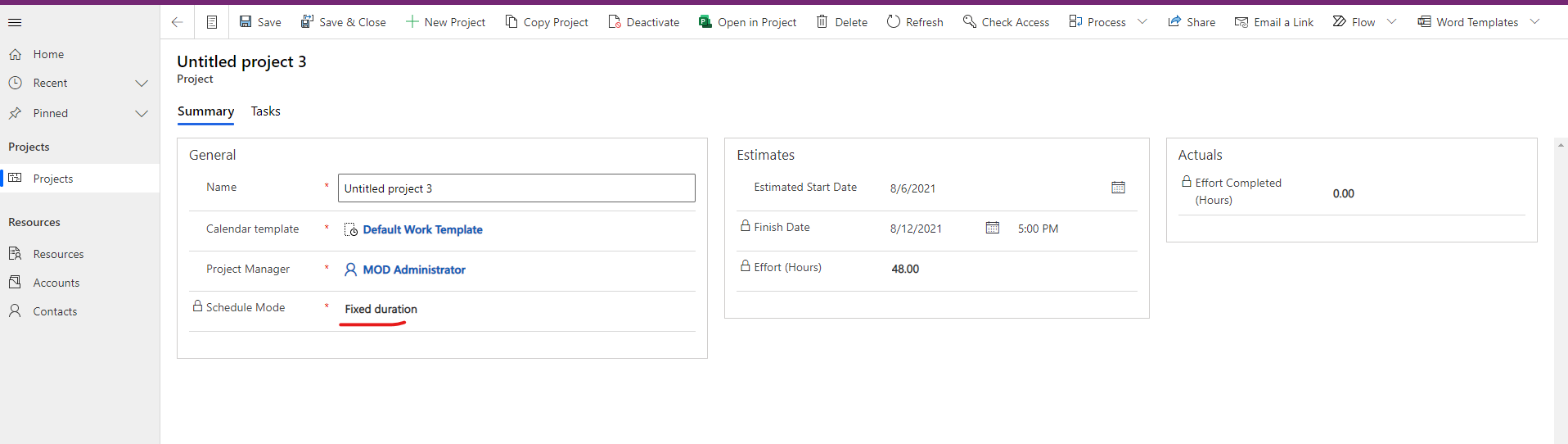
    pastedimage1628241549087v2.png

    pastedimage1628242800055v4.png

  • apa Profile Picture
    8,284 Moderator on at

    Andrey Ignatenko I'm not a C# expert but your values are 0.3m and 0.4m. I looked at how how they're stored in the DB; please see image below. I don't know if this has an impact on the outcome or not though.

    I'd try to repro the issue in Postman. If it works there, then I'd suspect it to be an issue with the code. Are you getting any errors when executing the OperationSet and pushing in the updated values?

    progress-value.png

  • Andrey Ignatenko Profile Picture
    12 on at

    Antti Pajunen oh, sorry for confusion. In this case  0.3m and 0.4m literally means 0.3 and 0.4 respectively.

    Are you getting any errors when executing the OperationSet and pushing in the updated values?

    No, there aren't any errors during calling task update API (msdyn_PssUpdateV1) neither completing Operation Set (msdyn_ExecuteOperationSetV1). APIs work just fine.

    As I said above if msdyn_progress is set either to 0 or to 1 (which corresponds to 100%) then progress is updated successfully on P4W UI

    I'd try to repro the issue in Postman. If it works there, then I'd suspect it to be an issue with the code.

    Yes, it works fine. Below you can see the JSON sent to msdyn_PssUpdateV1 API

    {
    	"OperationSetId": "a92bc0f5-94f6-eb11-94ef-000d3a5660d8",
    	"Entity": {
    		"@odata.type": "Microsoft.Dynamics.CRM.msdyn_projecttask",
    		"msdyn_projecttaskid": "B648C920-93F6-EB11-A80F-000D3A3B998B",
    		"msdyn_project@odata.bind": "msdyn_projects(cf1c7d9f-65f9-4f29-917f-e159108b0a7a)",
    		"msdyn_progress": 0.3
    	}
    }

    Thanks
    Andrey Ignatenko

  • apa Profile Picture
    8,284 Moderator on at

    Ok so with the above JSON, did % complete update to 30 % for that task?

  • Andrey Ignatenko Profile Picture
    12 on at

    nope, and it's the issue

    Thanks

    Andrey Ignatenko

  • apa Profile Picture
    8,284 Moderator on at

    Ok in that case I'd open a support request. If it doesn't update anything and returns a 200, I can't really think of ay reason why it doesn't work.

  • Andrey Ignatenko Profile Picture
    12 on at

    Antti Pajunen thanks a lot for the help

    Is there a way to track the support request's status from our side? Any public link or something?

    Thanks

    Andrey Ignatenko

  • apa Profile Picture
    8,284 Moderator on at

    Andrey Ignatenko I tried this in my environment and what I'm seeing is that when I try to update % complete, it gets reset to 0 %. It's a consistent repro.

  • apa Profile Picture
    8,284 Moderator on at

    About the SR. You need to open it from the tenant's Power Platform Admin Center.

Under review

Thank you for your reply! To ensure a great experience for everyone, your content is awaiting approval by our Community Managers. Please check back later.

Helpful resources

Quick Links

Responsible AI policies

As AI tools become more common, we’re introducing a Responsible AI Use…

Neeraj Kumar – Community Spotlight

We are honored to recognize Neeraj Kumar as our Community Spotlight honoree for…

Leaderboard > Finance | Project Operations, Human Resources, AX, GP, SL

#1
Martin Dráb Profile Picture

Martin Dráb 660 Most Valuable Professional

#2
André Arnaud de Calavon Profile Picture

André Arnaud de Cal... 549 Super User 2025 Season 2

#3
Sohaib Cheema Profile Picture

Sohaib Cheema 307 User Group Leader

Last 30 days Overall leaderboard

Product updates

Dynamics 365 release plans