web
You’re offline. This is a read only version of the page.
close
Skip to main content

Notifications

Announcements

No record found.

Community site session details

Community site session details

Session Id :
Microsoft Dynamics AX (Archived)

How to: Lookup multiple tables InventTable and PurchTable

(0) ShareShare
ReportReport
Posted on by 100

I have to create lookup from 2 datasource.

I find this tutiorial: https://community.dynamics.com/ax/b/daxbeginners/archive/2014/05/20/how-to-create-form-lookup-lookup-multiple-tables.aspx

but I don't know how to do it.

1. In the AOT, create a query.

2. Drag and drop InventTable into Data Sources. Set the Fields properties Dynamic toNo.
Now, drag and drop the fields ItemId and NameAlias and Product to Fields.

3. Now, it’s time to create the relationship between InventTable and PurchTable [I don't know how?]
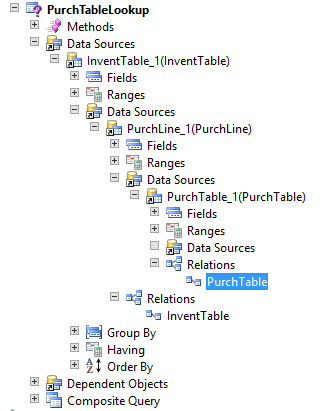
when I create View I ony one datasource
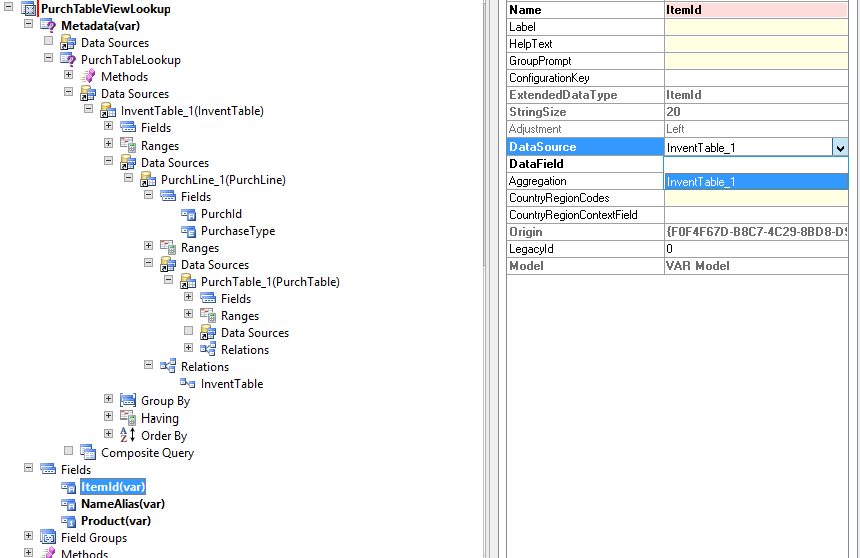
Next I have to create lookup form in fields: 

(InventTable,ItemId)

(InventTable,defaultProductName)

(InventTable,itemGroupId)

(InventTable,NameAlias)

(InventTable,Product)

(PurchTable ,PurchaseType)

What can I do, when next to i View i see only one datasouses InventTable_1, why i don't see PurchTable_1?

thank you very much to help.

*This post is locked for comments

I have the same question (0)
  • Community Member Profile Picture
    on at

    Why you want to doing some View ? oO

    You neednt this, I think. You can build this lookup from code, without View.

    Use this solution: stackoverflow.com/.../how-to-create-a-lookup-with-fields-from-more-than-one-datasource

  • Suggested answer
    Martin Dráb Profile Picture
    237,884 Most Valuable Professional on at

    PurchTable itself doesn't have any reference to InventTable. But it can have multiple PurchLine records (linked through PurchId) and they have reference to InventTable (ItemId field).

  • Suggested answer
    Community Member Profile Picture
    on at

    To link PurchTable to InventTable,

    I suggest you should consider PurchLine table also in the query

    InventTable will get related to PurchLine using ItemId

    and PurchLine table will get related to PurchTable using PurchId

    The you will be able to get PurchaseType from PurchTable in your lookup.

    For lookup using multiple table you have excellent example with you

    Please verify and update us if you need more details

  • Krzys123 Profile Picture
    100 on at

    OK, I type wrong relations, actuali I have

    InventTable_1.ItemId == PurchLine_1.ItemId

    PurchLine_1.PurchId == PurchTable_1.PurchId

    , but I have too most duplicates record, but I can't use exist join.

    What can I do to?

  • Suggested answer
    Community Member Profile Picture
    on at

    Yes this will give duplicate records as PurchLine table will have multiple lines for same item.

    I suggest not to use exist join as with Exist Join you will get data from the parent table only child table will not return data

    I suggest you to utilize Group By on ItmeID and PurchaseType, this is help you get appropriate records

    Please verify and update us if you need more details

Under review

Thank you for your reply! To ensure a great experience for everyone, your content is awaiting approval by our Community Managers. Please check back later.

Helpful resources

Quick Links

Responsible AI policies

As AI tools become more common, we’re introducing a Responsible AI Use…

Neeraj Kumar – Community Spotlight

We are honored to recognize Neeraj Kumar as our Community Spotlight honoree for…

Leaderboard > 🔒一 Microsoft Dynamics AX (Archived)

#1
Martin Dráb Profile Picture

Martin Dráb 4 Most Valuable Professional

#1
Priya_K Profile Picture

Priya_K 4

#3
MyDynamicsNAV Profile Picture

MyDynamicsNAV 2

Last 30 days Overall leaderboard

Featured topics

Product updates

Dynamics 365 release plans



