web
You’re offline. This is a read only version of the page.
close
Skip to main content

Notifications

Announcements

No record found.

Community site session details

Community site session details

Session Id :
Finance | Project Operations, Human Resources, ...
Answered

Classes are deleted, but it still work in D365.

(0) ShareShare
ReportReport
Posted on by 962

Hi All

          I am facing a weird issue.

          I wrote some classes for DocuRef. However, I found my code will cause error. Then I delete them. The error still keep showing up.

          I cannot find my classes in Application Explorer, however, when I open table DocuRef and click "Find All Reference", My classes are all there.

          I have already tried Build Model and Sync. but cannot solve the issue. Does Anyone know how to solve this issue?
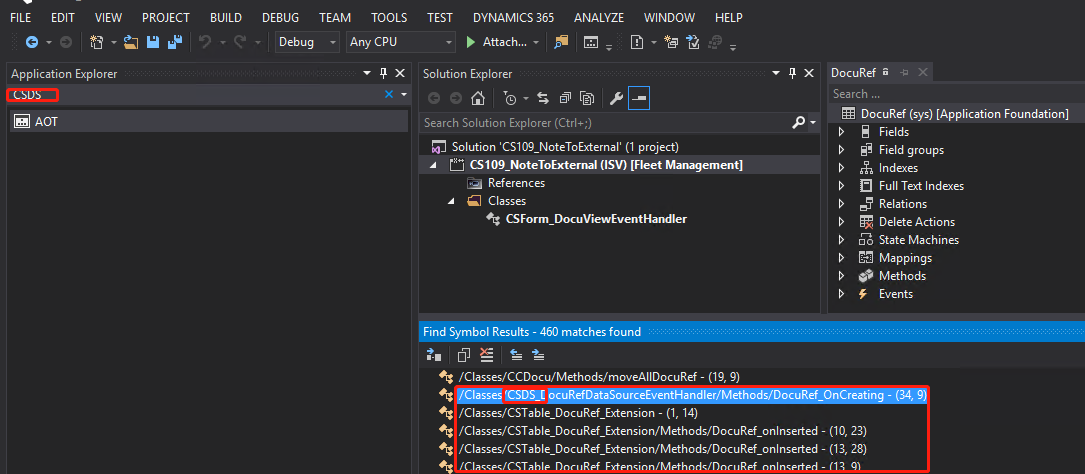
pastedimage1580865267541v1.png

Best Regards,

JustZM

I have the same question (0)
  • Verified answer
    Sukrut Parab Profile Picture
    71,710 Moderator on at

    Looks like your objects are deleted , however cross reference data is still there . Try building app foundation  because docuref belongs to it and see if that helps. If nothing helps  build your entire package.

  • André Arnaud de Calavon Profile Picture
    301,148 Super User 2025 Season 2 on at

    Hi JustZM,

    Instead of using the Build option to compile the solution, did you also try Rebuild? This will first cleanup old compiled coding before creating new objects.

  • Suggested answer
    Martin Dráb Profile Picture
    237,976 Most Valuable Professional on at

    If the code of the class still applies at runtime, it means that you're still binaries generated before deleting the class. You must build the whole package that contained the class. Note that building or re-building the solution isn't sufficient, because it builds only what's inside your solution and the class isn't there.

    If you're interested in details, building a solution builds all netmodules which contains objects in the solution. It might happen that one of these netmodules contained the deleted class and therefore it'll fix the problem, but it's just luck. To be sure, you must build the package from scratch.

    Also pay attention to whether the build completed successfully.

  • Suggested answer
    nmaenpaa Profile Picture
    101,162 Moderator on at

    Build the package / model where the class was. Make sure to check the "Update cross references" checkbox in the build settings.

  • Carlo T Profile Picture
    30 on at

    Was there a solution to this problem? I'm having exactly the same.

  • Martin Dráb Profile Picture
    237,976 Most Valuable Professional on at

    Yes, the thread has a verified answer, plus additional explanation.

Under review

Thank you for your reply! To ensure a great experience for everyone, your content is awaiting approval by our Community Managers. Please check back later.

Helpful resources

Quick Links

Responsible AI policies

As AI tools become more common, we’re introducing a Responsible AI Use…

Neeraj Kumar – Community Spotlight

We are honored to recognize Neeraj Kumar as our Community Spotlight honoree for…

Leaderboard > Finance | Project Operations, Human Resources, AX, GP, SL

#1
André Arnaud de Calavon Profile Picture

André Arnaud de Cal... 449 Super User 2025 Season 2

#2
Martin Dráb Profile Picture

Martin Dráb 422 Most Valuable Professional

#3
BillurSamdancioglu Profile Picture

BillurSamdancioglu 239 Most Valuable Professional

Last 30 days Overall leaderboard

Product updates

Dynamics 365 release plans



