web
You’re offline. This is a read only version of the page.
close
Skip to main content

Notifications

Announcements

No record found.

Community site session details

Community site session details

Session Id :
Microsoft Dynamics CRM (Archived)

CRM 2016 Sandbox WorkerProscess

(0) ShareShare
ReportReport
Posted on by 617

Good day!

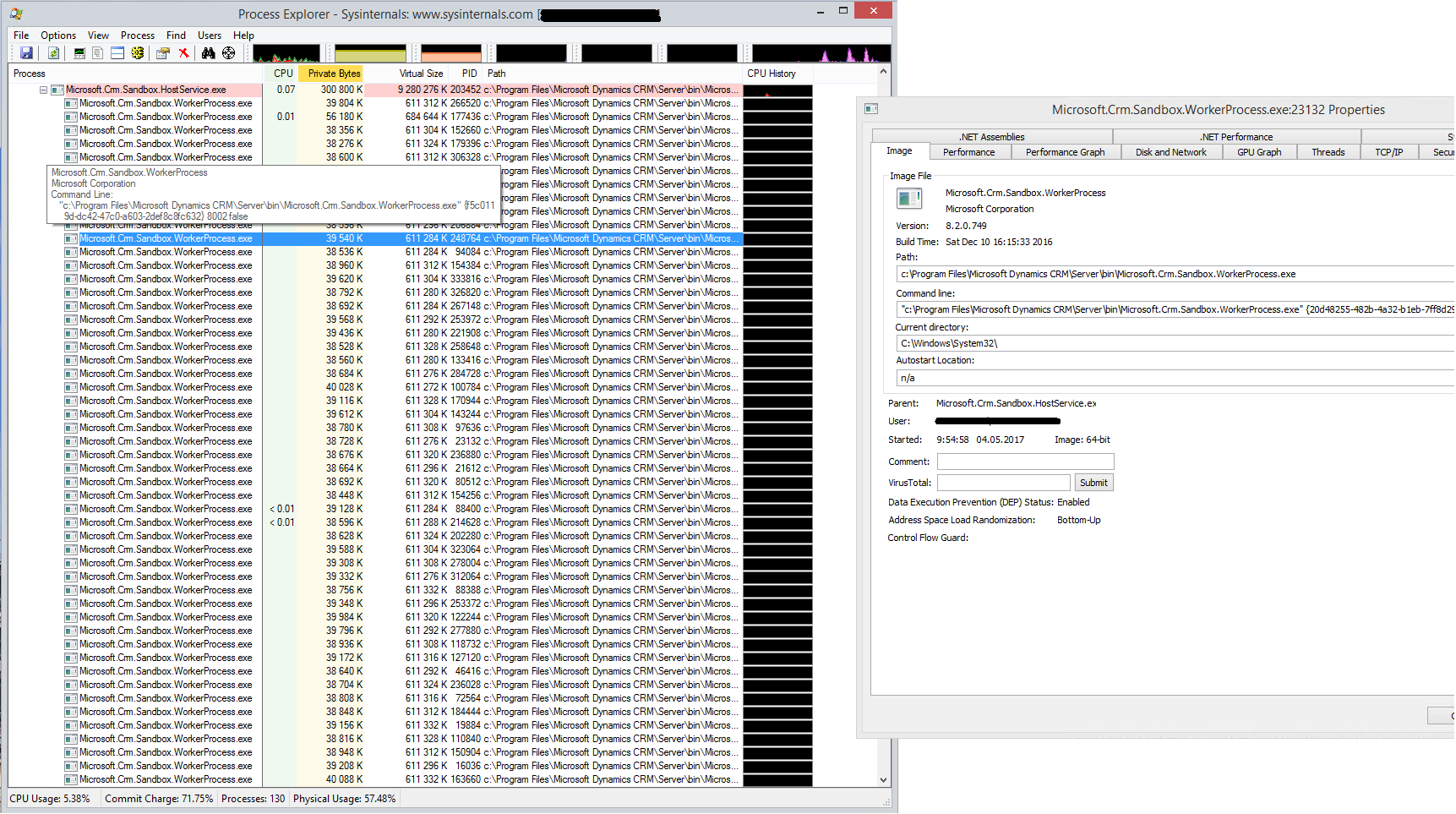
After update crm16  to update 2, there are a lot of processes Microsoft.Crm.Sandbox.WorkerProcess.exe  running on a server (it's about 80 processes).

They take about 3GB of memory (not less). Each process starts with it's own ID and open it's own port.

Is it normal? Why is so many processes are running? Why CRM need to open so much ports? What means ID in a commandLine of a process?
6116.1.png

Nobody can help?

Somebody, who updated to CRM 2016 update2 can say, is it all right with his processes?

*This post is locked for comments

I have the same question (0)
  • ashlega Profile Picture
    34,477 on at

    Hi joman,

     I've never seen 80 sandbox processes, but I saw a few when I tried to debug a plugin in the sandbox. At some point, CRM would spawn another process and the older one might not disappear right away. Wondering if you tried rebooting the server and it just kept happening after that?

  • joman Profile Picture
    617 on at

    Before i updated CRM, all was fine. Is was 2 processes (sometimes 3-4).

    After updating CRM (December 2016 update for Dynamics 365 KB3205084 Build 8.2.0000.0749) this trouble appears.

    After reboot (or restart Microsoft.Crm.Sandbox.HostService service) all processes are drop down and starting again.

    Here is a picture:

    6116.1.png

  • joman Profile Picture
    617 on at

    Nobody can help??

  • ashlega Profile Picture
    34,477 on at

    Hey,  I'm just wondering.. since it does look like a problem of some sort.. did you check windows event logs on the server?

  • joman Profile Picture
    617 on at

    "it does look like a problem"

    1. 80 opened ports on a server is not a problem?

    2. Now to debug a plug-in i need to join all 80 processes. I think it's very much.

    3. 3 GB ram - to much for 1 manual plug-in and no manual workflows (other plug-in and workflows are standard. System is new!) don't you think that?

    Yes i checked event logs. There are no errors, except one:

    MSCRMMonitoringTest 18702
    Monitoring test failed: Test Title: Verify active crm keys exist for the deployment.: Machine: CRM: ServerRole: AsyncService
    Test Log:
    Key 'CrmTicketKey' is about to expireKey 'CrmWRPCTokenKey' is activeKey 'CrmEmailCredentialsKey' is activeKey 'CrmTicketKey' is about to expireKey 'CrmStaticVersionScaleGroupKey' is activeKey 'CrmWRPCTokenKey' is active.

    This error happens once a day about 13:04:31.
    Other logs from MSCRMMonitoringTest are normal:

    Monitoring test succeeded: Test Title: Verify active crm keys exist for the deployment.: Machine: CRM: ServerRole: AsyncService
    Test Log:
    Key 'CrmTicketKey' is activeKey 'CrmWRPCTokenKey' is activeKey 'CrmEmailCredentialsKey' is activeKey 'CrmTicketKey' is activeKey 'CrmStaticVersionScaleGroupKey' is activeKey 'CrmWRPCTokenKey' is activeAll crm keys are active in the deployment.
  • Gopalan Bhuvanesh Profile Picture
    11,401 on at

    Hi

    You can also try checking the Statistics (which was running and how many times) in the Advanced Find:

    SandboxExecutionCapture.PNG

  • joman Profile Picture
    617 on at

    Thanks. I checked!

    There is only my plug-in modules in this view (with no conditions) and there are not very much executions:

    Total 6 modules and about 700 executions in total.

    So if it was 6 processes on a server, I'll no panic, but 80 executing processes - is to much.

  • joman Profile Picture
    617 on at

    Removed CRM from server and install it again. And again same problem.

    Does anybody installed Dynamics 16 update 2? Do you have same problem, or no?

  • joman Profile Picture
    617 on at

    No answers again :(

    Does anybody installed Dynamics 16 update 2? Do you have same problem, or no??

  • Community Member Profile Picture
    on at

    HI Joman,

    I've gone through the detail you provided in the post. It seems that I can fix your problem, but I need to check some of the configuration settings in your system. Is it possible for you to provide me team viewer access of your system so that I can look into it and figure it out.

    Please let me know if it is possible for you then I'll provide you my contact as team viewer details can not be shared in group.

Under review

Thank you for your reply! To ensure a great experience for everyone, your content is awaiting approval by our Community Managers. Please check back later.

Helpful resources

Quick Links

Responsible AI policies

As AI tools become more common, we’re introducing a Responsible AI Use…

Neeraj Kumar – Community Spotlight

We are honored to recognize Neeraj Kumar as our Community Spotlight honoree for…

Leaderboard > 🔒一 Microsoft Dynamics CRM (Archived)

#1
SA-08121319-0 Profile Picture

SA-08121319-0 4

#1
Calum MacFarlane Profile Picture

Calum MacFarlane 4

#3
Alex Fun Wei Jie Profile Picture

Alex Fun Wei Jie 2

Last 30 days Overall leaderboard

Featured topics

Product updates

Dynamics 365 release plans



