web
You’re offline. This is a read only version of the page.
close
Skip to main content

Notifications

Announcements

No record found.

Community site session details

Community site session details

Session Id :
Finance | Project Operations, Human Resources, ...
Answered

How To Add Another Address For The Bank Accounts Table?

(0) ShareShare
ReportReport
Posted on by 1,036

Greetings dears!

I want to create another address tab for the bank accounts table.

As you know BankAccountTable form only uses a single address pattern.

But I need to have other addresses registered for the bank account.

I tried to duplicate the address tab.

Then create a new Location field in BankAccountTable called CustomLocation (BankAccountTable.CustomLocation).

And created a new relation for the new field in BankAccountTable, the relation is with LogisticsPostalAddress.Location (BankAccountTable.CustomLocation ==> LogisticsPostalAddress.Location).

I updated the link in the LogisticsPostalAddressSingleGridFormPart to be "CustomLocation" instead of original "Location".

But the result is that I am getting the same address record on both tabs now, the same address record in the original address is coming to the custom address tab also.

What am I doing wrong in my relation?

Any advice is appreciated!

Thanks in advance !

I have the same question (0)
  • Gunjan Bhattachayya Profile Picture
    35,423 on at

    Hi Momochi,

    I answered a very similar question recently regarding this topic. Please check this thread and see if it helps you.

  • Momochi Profile Picture
    1,036 on at

    Hi Gunjan!

    Thanks for your time to help !

    I followed what you suggested in the thread you referred me to.

    - I created a new field in BankAccountTable called it "CustomLocation".

    - And then created a new relation in the BankAccountTable and the relation is: (BankAccountTable.CustomLocation ==> LogisticsPostalAddress.Location).

    - I duplicated the FormPart tab on the BankAccountTable form and updated the "Link" to the new field I created in "BankAccountTable.CustomLocation"

    - I made a duplicate to the menu item "LogisticsPostalAddressSingleFormPart". called it "CustomLogisticsPostalAddressSingleFormPart"

    - And then made the CoC class that contains the method buildLogisticsPostalAddressQuery(QueryBuildDataSource _queryBuildDataSource).

    And the code inside the CoC method is as follows:

    public void buildLogisticsPostalAddressQuery(QueryBuildDataSource _queryBuildDataSource)
        {
            next buildLogisticsPostalAddressQuery(_queryBuildDataSource);
            if(this.args().menuItemName() == menuitemdisplaystr(CustomLogisticsPostalAddressSingleFormPart))
            {
                _queryBuildDataSource.clearRanges();
                if (this.args().dataset() == tableNum(BankAccountTable))
                {
                    BankAccountTable callerRecord = this.args().record();
                    _queryBuildDataSource.addRange(fieldnum(LogisticsPostalAddress, Location)).value(SysQuery::value(callerRecord.CustomLocation));
                }
                else
                {
                    _queryBuildDataSource.addRange(fieldnum(LogisticsPostalAddress, Location)).value(SysQuery::valueEmptyString());
                }
            }
        }

    Now the new custom address form part is showing an empty value.

    But when I add a new address, the original address gets updated and the new custom address form part still empty....

    What am I missing or doing wrong?

  • Gunjan Bhattachayya Profile Picture
    35,423 on at

    Hi Momochi,

    When you add a new address, is the CustomLocation field getting updated, or is it updating the Location field only?

  • Momochi Profile Picture
    1,036 on at

    Hi Gunjan,

    It's only updating the Location field only.

    The CustomLocation field in BankAccountTable is 0.

  • Gunjan Bhattachayya Profile Picture
    35,423 on at

    Hi Momochi,

    The issue is that on creating a new record, the Location field of the caller record is getting set by default, This is being done in the callerWrite method in LogisticsLocationFormHandler class.

    pastedimage1643583706352v1.png

    You will have to look for a way to update the new field in this case. You might start by creating new menu items for New, Edit, Clear etc. The ones being used here are as per this method BankAccountTable.

    pastedimage1643584538314v2.png

    You might need to use a new EnumType parameter on the menu item and then create a CoC on logisticsPostaladdressFormOpen method in LogisticsPostalAddressFormHandler class.

    I will try to check if there is some way we can update the new address field using a new field.

  • Momochi Profile Picture
    1,036 on at

    If I went by the other approach you suggested which is to add the LogisticsPostalAddress as a datasource in the form, similar to ProjTable form, I would have to add the action pane buttons for (Add, Edit, Clear).

    Add and edit both of them buttons menu items object is "LogisticsPostalAddressFormHandler" class.

    But how am I gonna be able to to tell this handler class to take the value of the "CustomLocation" field in BankAccountTable, and not the original "Location" field?

  • Momochi Profile Picture
    1,036 on at

    Unfortunately, I tried doing the duplication approach in order to modify the callerWrite() code to get the CustomLocationMap. I had to also duplicate the form LogisticsPostalAddress in order to make the logic go for the duplicated formHandlers with the modified logic.

    Sadly, LogisticsPostalAddress uses methods which are defined as "Internal" which can't be used outside of their original standard model.

    So I hit the wall with this approach. ‍♂️

  • Gunjan Bhattachayya Profile Picture
    35,423 on at

    I am going to try once and check if I can find another way to add an address.

  • Rafia Mohammed Profile Picture
    266 on at

    Hello Gunjan,

    As I have already posted the same, am still looking for the solution. Is working fine but when we are going to create new record in vendbankaccounts am able to see only the past data which i have filled in. Am unable to clear the data when we are going to create new record. Will be waiting for your guidance. Thank you.

  • Verified answer
    Gunjan Bhattachayya Profile Picture
    35,423 on at

    I think I found a solution for this -

    1. Created an extension for base enum - LogisticsLocationAddressActionButtons and added two new elements "CustomNew" and "CustomEdit".
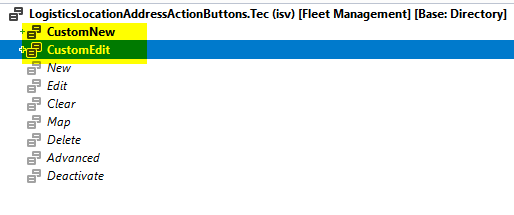
    pastedimage1644184230774v1.png

    2. Created a three display menu items - 

    a. TecLogisticsPostalAddressSingleFormPart which references LogisticsPostalAddressSingle form.

    b. TecLogisticsPostalAddressNewBankAccountTabl, which is a copy of LogisticsPostalAddressNewBankAccountTabl menu item with enum parameter set to "CustomNew".
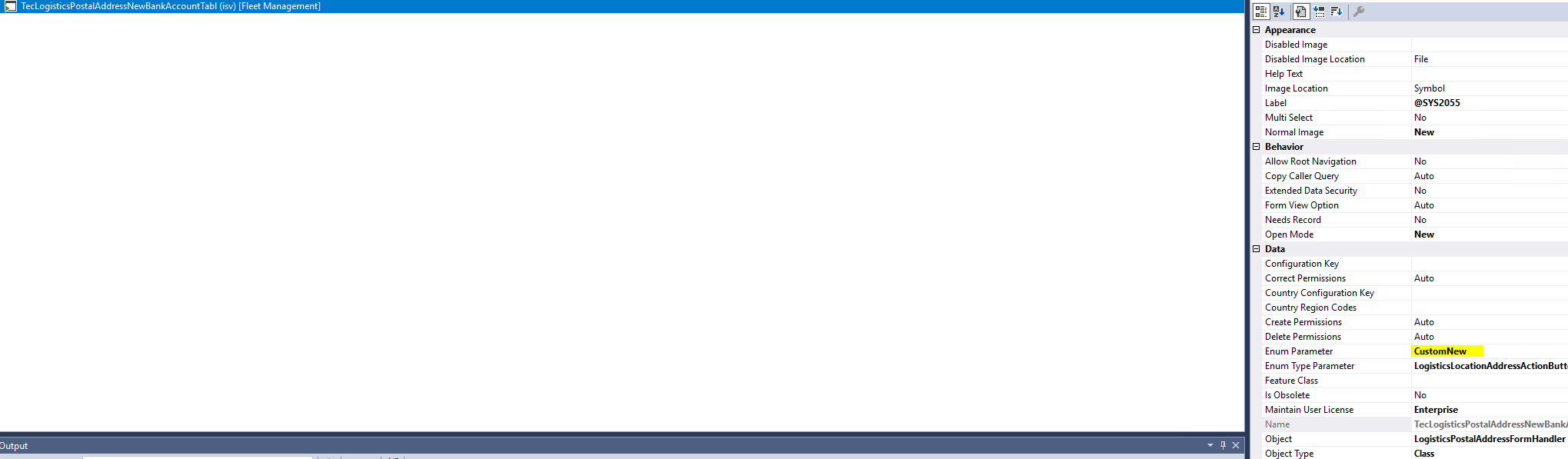
    pastedimage1644184474541v2.png

    c. TecLogisticsPostalAddressEditBankAccountTab, which is a copy of LogisticsPostalAddressEditBankAccountTab menu item with enum parameter set to "CustomEdit".
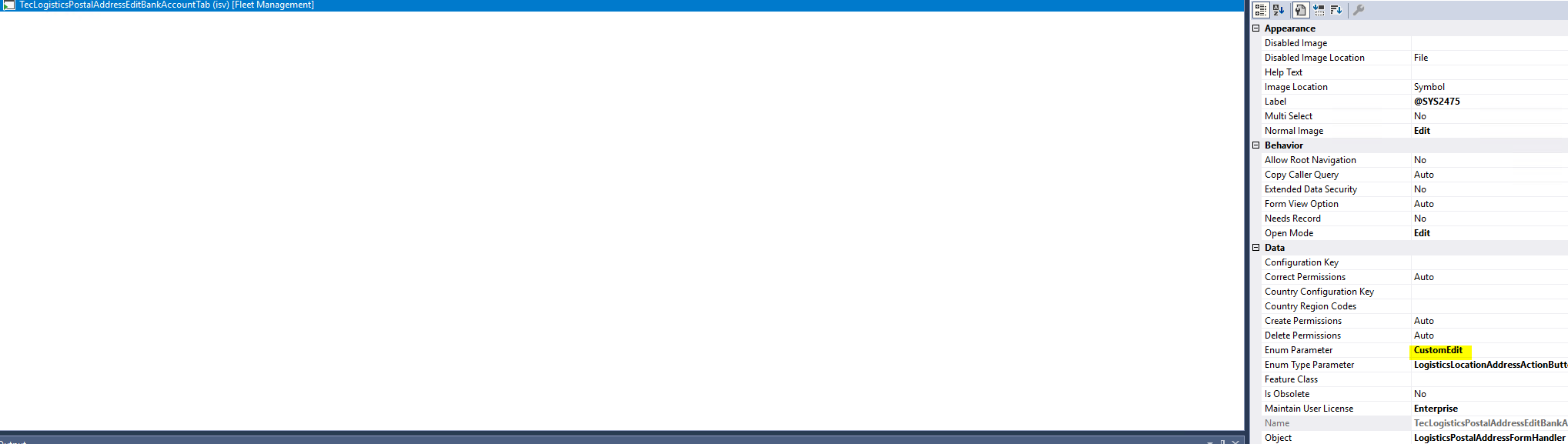
    pastedimage1644184605200v3.png

    3. Created an extension of BankAccountTable table and added a new field (TecLocation) with a foreign key relation to LogisticsLocation.

    4. Created an extension of BankAccountTable form and added a new tab page with the form part menu item created earlier. We used the new field for the link. 
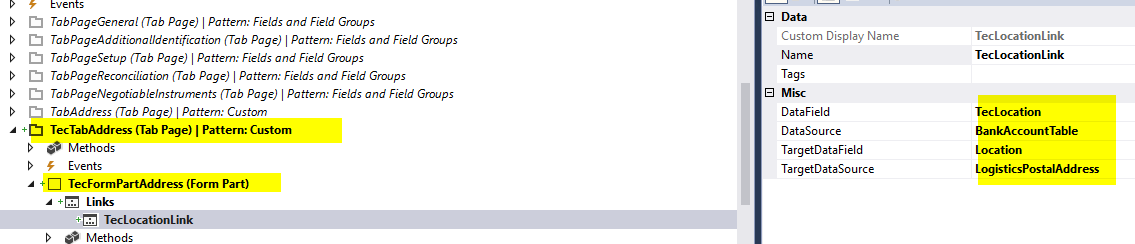
    pastedimage1644185108282v4.png

    5. Created an extension of class LogisticsLocationFormHandler and added the following methods - 

    a. parmIsCustomAddress- This method is for identifying is the class instance will be used for custom address.

    b. callerWriteCustom - this method is for writing into the custom field of the existing table.

    [ExtensionOf(classStr(LogisticsLocationFormHandler))]
    final class TecLogisticsLocationFormHandler_Extension
    {
        public boolean isCustomAddress;
    
        public boolean parmIsCustomAddress(boolean _isCustomAddress = isCustomAddress)
        {
            isCustomAddress = _isCustomAddress;
            return isCustomAddress;
        }
    
        public void callerWriteCustom()
        {
            FormDataSource callerFormDataSource;
            BankAccountTable    bankAccountTable;
    
            ttsbegin;
            callerRecordMap = this.getCallerRecord();
    
            if (callerRecordMap.TableId == tableNum(BankAccountTable))
            {
                bankAccountTable = callerRecordMap as BankAccountTable;
    
                bankAccountTable.TecLocation = location;
                bankAccountTable.write();
            }
    
            // reset the dirty state of the dataSource before calling research
            if (FormDataUtil::isFormDataSource(callerRecordMap))
            {
                callerFormDataSource = FormDataUtil::getFormDataSource(callerRecordMap);
                callerFormDataSource.forceWrite(false);
            }
    
            this.callerResearch();
            ttscommit;
    
            // set the form dataSource as dirty and refresh form's country/region code cache
            if (callerFormDataSource)
            {
                callerFormDataSource.forceWrite(true);
                callerFormDataSource.formRun().flushCountryRegionCodeCache();
            }
        }
    
    }

    6.Created an extension for form LogisticsPostalAddressSingle and added code to determine if the caller menu item is the new one we created and for setting the menu items created for New and Edit.

    [ExtensionOf(formStr(LogisticsPostalAddressSingle))]
    final class TecLogisticsPostalAddressSingle_Extension
    {
        public boolean isCustomAddress;
    
        public boolean parmIsCustomAddress(boolean _isCustomAddress = isCustomAddress)
        {
            isCustomAddress = _isCustomAddress;
            return isCustomAddress;
        }
    
        public void init()
        {
            if(this.args().menuItemName() == menuitemdisplaystr(TecLogisticsPostalAddressSingleFormPart))
            {
                this.parmIsCustomAddress(true);
            }
    
            next init();
    
            if (this.args().dataset() == tableNum(BankAccountTable) && isCustomAddress)
            {                        
                newAddress.menuItemName(menuitemdisplaystr(TecLogisticsPostalAddressNewBankAccountTabl));
                editAddress.menuItemName(menuitemdisplaystr(TecLogisticsPostalAddressEditBankAccountTab));
            }
    
            addressController.parmIsCustomAddress(isCustomAddress);
        }
    
        public void buildLogisticsPostalAddressQuery(QueryBuildDataSource _queryBuildDataSource)
        {
            next buildLogisticsPostalAddressQuery(_queryBuildDataSource);
            if(this.parmIsCustomAddress())
            {
                _queryBuildDataSource.clearRanges();
                if (this.args().dataset() == tableNum(BankAccountTable))
                {
                    BankAccountTable callerRecord = this.args().record();
                    _queryBuildDataSource.addRange(fieldnum(LogisticsPostalAddress, Location)).value(SysQuery::value(callerRecord.TecLocation));
                }
                else
                {
                    _queryBuildDataSource.addRange(fieldnum(LogisticsPostalAddress, Location)).value(SysQuery::valueEmptyString());
                }
            }
        }
    
    }

    7. Created an extension of class LogisticsPostalAddressFormHandler to handle adding the custom address.

    [ExtensionOf(classStr(LogisticsPostalAddressFormHandler))]
    final class TecLogisticsPostalAddressFormHandler_Extension
    {
        protected static void logisticsPostaladdressFormOpen(Args _args, boolean _showForm, LogisticsPostalAddressFormHandler _addressController)
        {
            next logisticsPostaladdressFormOpen(_args, _showForm, _addressController);
    
            switch (_args.parmEnum())
            {
                case LogisticsLocationAddressActionButtons::CustomNew  :
                case LogisticsLocationAddressActionButtons::CustomEdit :
                    LogisticsPostalAddressFormHandler::openCustomForm(_args, _showForm);
                    break;
            }
        }
    
        public static void openCustomForm(Args _args, boolean _showForm = true)
        {
            Args                                args;
            FormRun                             addressForm;
            LogisticsPostalAddressFormHandler   singleAddressCtrlr;
    
            singleAddressCtrlr = _args.parmObject() as LogisticsPostalAddressFormHandler;
    
            // can't be called without a controller
            if (!singleAddressCtrlr)
            {
                throw error(Error::wrongUseOfFunction(funcname()));
            }
    
            singleAddressCtrlr.setOpenMode(_args.openMode());
    
            args = new Args();
            args.name(formstr(LogisticsPostalAddress));
            args.record(_args.record());
            args.openMode(_args.openMode());
            args.parmObject(singleAddressCtrlr);
            args.caller(_args.caller());
    
            addressForm = classfactory.formRunClass(args);
    
            if (addressForm)
            {
                addressForm.init();
                if (_showForm)
                {
                    addressForm.run();
                    addressForm.wait();
    
                    if (addressForm.closedOk())
                    {
                        // This will make sure that the main entity is updated with the postal address location
                        if (singleAddressCtrlr && args.openMode() != OpenMode::View)
                        {
                            singleAddressCtrlr.callerWriteCustom();
                        }
    
                        // Refresh the address display
                        if (args.record() && FormDataUtil::isFormDataSource(args.record()))
                        {
                            FormDataSource callerDatasource = args.record().dataSource() as FormDataSource;
                            callerDatasource.reread();
                        }
                    }
                }
            }
        }
    
    }

    You can create new enum elements in the base enum extension for map and clear operations and add logic for those functions.

Under review

Thank you for your reply! To ensure a great experience for everyone, your content is awaiting approval by our Community Managers. Please check back later.

Helpful resources

Quick Links

Responsible AI policies

As AI tools become more common, we’re introducing a Responsible AI Use…

Neeraj Kumar – Community Spotlight

We are honored to recognize Neeraj Kumar as our Community Spotlight honoree for…

Leaderboard > Finance | Project Operations, Human Resources, AX, GP, SL

#1
Martin Dráb Profile Picture

Martin Dráb 664 Most Valuable Professional

#2
André Arnaud de Calavon Profile Picture

André Arnaud de Cal... 522 Super User 2025 Season 2

#3
Sohaib Cheema Profile Picture

Sohaib Cheema 303 User Group Leader

Last 30 days Overall leaderboard

Product updates

Dynamics 365 release plans



