web
You’re offline. This is a read only version of the page.
close
Skip to main content

Notifications

Announcements

No record found.

Community site session details

Community site session details

Session Id :
Microsoft Dynamics NAV (Archived)

How to handle blank cell while importing excel in NAV

(0) ShareShare
ReportReport
Posted on by 4,188

Hi All,

I've created an action button which imports excel file in page in NAV. I've followed this article https://chrisdsilvablog.wordpress.com/2017/11/10/importing-excel-file-in-microsoft-dynamics-nav-using-excel-buffer/

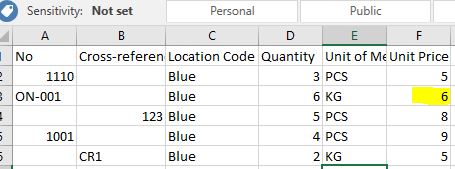
This is my excel sheet.
7120.issue.JPG

Here, on the third line No is blank, Now while importing the system gets the value 6 instead of fetching the blank value.

Any suggestion how to fetch the blank value from excel?

*This post is locked for comments

I have the same question (0)
  • Suggested answer
    Andrey Baludin Profile Picture
    3,941 on at

    Hi!

    Change GetValueAtCell function a little bit:

    IF ExcelBuff1.GET(RowNo, ColNo) THEN

     EXIT(ExcelBuff1."Cell Value As Text");

    EXIT('');

  • CDsilva Profile Picture
    4,188 on at

    Hi Andry,

    The system doesn't recognize empty values '' it  assigns the last value 6 in my case. I tried your code EXIT(''); but it didnt help

  • Andrey Baludin Profile Picture
    3,941 on at

    have you also remove ; after THEN ?

  • CDsilva Profile Picture
    4,188 on at

    I dont want to skip '' empty lines. If its blank I want the system to take Cross reference No. How will I assign the blank value to a variable?

  • Verified answer
    Andrey Baludin Profile Picture
    3,941 on at

    IF GetValueAtCell(RowNo, 1) <> '' THEN

     EVALUATE(Record.No, GetValueAtCell(RowNo, 1))

    ELSE

     EVALUATE(Record.No, GetValueAtCell(RowNo, 2));

    But in article there is no info how you get total rows quantity. Possibly the reason is that you count them by non-empty rows in column 1 ?

  • Verified answer
    CDsilva Profile Picture
    4,188 on at

    I resolved my issue

    I created a text variable NofromEx. Here if system receives blank value it is assigned to NofromEx and I handled my code as if NofromEx='' then take cross reference no.

    Thank for the help Andry!

    GetValueAtCell(RowNo : Integer;ColNo : Integer) : Text

    IF ExcelBuff1.GET(RowNo,ColNo) THEN

     EXIT(ExcelBuff1."Cell Value as Text")

    ELSE

    NofromEx:='';

Under review

Thank you for your reply! To ensure a great experience for everyone, your content is awaiting approval by our Community Managers. Please check back later.

Helpful resources

Quick Links

Responsible AI policies

As AI tools become more common, we’re introducing a Responsible AI Use…

Neeraj Kumar – Community Spotlight

We are honored to recognize Neeraj Kumar as our Community Spotlight honoree for…

Leaderboard > 🔒一 Microsoft Dynamics NAV (Archived)

Last 30 days Overall leaderboard

Featured topics

Product updates

Dynamics 365 release plans



