web
You’re offline. This is a read only version of the page.
close
Skip to main content

Notifications

Announcements

No record found.

Community site session details

Community site session details

Session Id :
Microsoft Dynamics AX (Archived)

Retail POS : adding new additional fields to customer search

(0) ShareShare
ReportReport
Posted on by

Dear All,

I am a beginner for the Retail POS customization. :)

I want to add two more additional fields on the Customer Search screen on the Retail POS.

So far what i did was to adding the fields (ID and the Document No) on the screen via Visual Studio and upon customization the screen looks like as below :
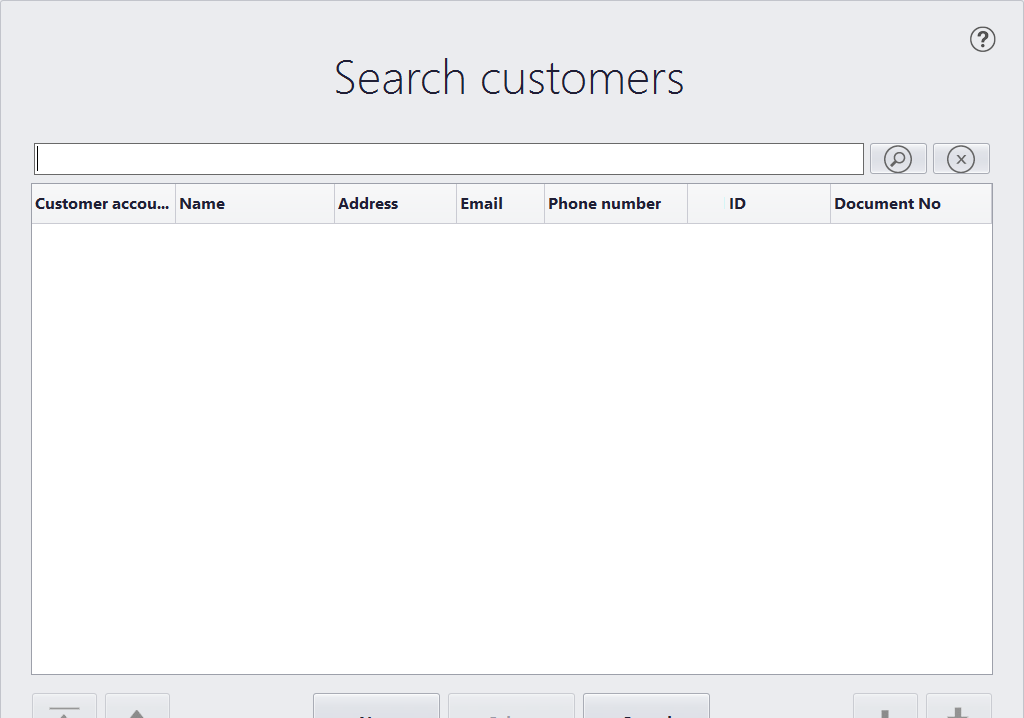
questinos.png

Now the next step is to bind those fields with the database.

With the research i did so far it seems i might have to customize the Microsoft.Dynamics.Retail.Pos.DataManager. I am not sure whether i am right or not. 

how can i proceed on this? 

thanks in advance,

Ammar

*This post is locked for comments

I have the same question (0)
  • Community Member Profile Picture
    on at

    i forgot to mention that the fields from the Dynamics side is being added under miscellaneous details (Customer) and is as follows:

    ssds.png 

  • Rodolfo Recalde Profile Picture
    on at

    Hi Ammar,

    I'll try to guide you with some basic steps.

    A. Install Visual Studio. Check the appropriate version of VS as the version of AX. for example: AX 2012 R3, use Visual Studio 2013 Update 4. If in doubt, see the System Requirements.

    B. Install Retail SDK component. Not forget to install the CUs and KBs of the respective component, according your version of AX.

    C. For design purposes, it is highly recommended to use the Dev Express plugin. You must purchase this plugin. Stay tuned the version of the DevExpress as your version of AX. 

    https://www.devexpress.com/Support/Center/Question/Details/T111667

    D.  In your specific case, you must open > C: \ [...\...\...] Retail SDK [CU] \ POS Plug-ins \ Services Solution > Custumer project > WinFormsTouch folder > frmCustomerSearch.cs

    for more details about development in the POS, see this link

    I Hope this Helps!

    Regards,

    Rodolfo Recalde.

  • Community Member Profile Picture
    on at

    thanks a lot Rodolfo. Appreciate your reply. Please find my comments in bold as below:

    A. Yes i have installed VS 2013 with update 4 and working fine.

    B. Yes i have installed the SDK Componenents and can able to find the Custome project. I m doing my modifications on it.

    C. Yes i do have the devexpress installed and configured.

    D.  In your specific case, you must open > C: \ [...\...\...] Retail SDK [CU] \ POS Plug-ins \ Services Solution > Customer project > WinFormsTouch folder > frmCustomerSearch.cs

    yeah i m in this folder and was able to debug the solution after attaching the Visual Studio 2013 debugger with POS.exe process.

    My development environment is ready and its functinoal. Now for time being my requirement is how to get the data for the ID and Document No fields (Customer Search screen) from the POS database.

    thanks,

    Ammar

  • Rodolfo Recalde Profile Picture
    on at

    Sorry, but I could not exactly understand your goal.

    For you add more fields to your customer research, or modify the query, you should check on your Channel DB, the following procedure:

    [CRT]. [CUSTOMERSEARCH]

    The procedures that make the search within the [CRT]. [CUSTOMERSEARCH] are

    [CRT] .GETPARTYBYCUSTOMER
    [CRT] .GETPARTYBYCONTACT
    [CRT] .GETPARTYBYADDRESS
    [CRT] .GETPARTYBYLOYALTYCARD

    Maybe you can create a new procedure for your specific query. If you add another column, you should treat the return.

    I Hope this Helps!

    Regards,

    Rodolfo Recalde.

  • Community Member Profile Picture
    on at

    thank you very much Rodolfo for your reply.

    Lets assume that i modified the stored procedure. so how can i get the results to the Grid on the frmCustomerSearch.cs form?

    thanks,

    Ammar

  • Verified answer
    Rodolfo Recalde Profile Picture
    on at

    Try modifed the stored procedure.

    You will recover this query, in [customerList = customerDataManager.GetCustomerList(...]

    check frmCustomerSearch class,  GetCustomerResultList method.

    customerResultList is DataSource at customer grid. [this.grCustomers.DataSource = this.customerResultList;]

    I hope this helps!

    Regards,

    Rodolfo Recalde.

  • Community Member Profile Picture
    on at

    thanks a lot Rodolfo. Let me try your option. I will update you with regard to this very soon.

    thank you very much.

  • Iulian Cordobin Profile Picture
    8,201 on at

    However, this is where we stop with the implementation because the GetCustomerList returns to us a generic list with a hardcoded type parameter used in the compiled (no source code) POS.DataManager dll (that is the CustomerSearchResult).

    Anyone actually got this working (without workarounds like getting the data in a second step, etc)?

  • Mohamad Barada Profile Picture
    180 on at

    Hello Ammar,

    I know this is very old but I was wondering if you managed to solve this case and how you could fill data in the 2 new added fields to Customer Search cause My team is facing same issue and they are new to Retail Customizations

Under review

Thank you for your reply! To ensure a great experience for everyone, your content is awaiting approval by our Community Managers. Please check back later.

Helpful resources

Quick Links

Responsible AI policies

As AI tools become more common, we’re introducing a Responsible AI Use…

Neeraj Kumar – Community Spotlight

We are honored to recognize Neeraj Kumar as our Community Spotlight honoree for…

Leaderboard > 🔒一 Microsoft Dynamics AX (Archived)

#1
Martin Dráb Profile Picture

Martin Dráb 4 Most Valuable Professional

#1
Priya_K Profile Picture

Priya_K 4

#3
MyDynamicsNAV Profile Picture

MyDynamicsNAV 2

Last 30 days Overall leaderboard

Featured topics

Product updates

Dynamics 365 release plans
