web
You’re offline. This is a read only version of the page.
close
Skip to main content

Announcements

No record found.

News and Announcements icon
Community site session details

Community site session details

Session Id :
Microsoft Dynamics AX (Archived)

Getting error on batch job execution

(0) ShareShare
ReportReport
Posted on by

Hi,

I am getting an error while executing a specific batch job on 2012 R3 environment. Actual process is import vendors from cross company using DMF . The batch job was executing successfully till last week  after that it was withhold state for time being. Now trying to start again and job getting executed and an error occurred on log. 

Getting an error as mentioned below.
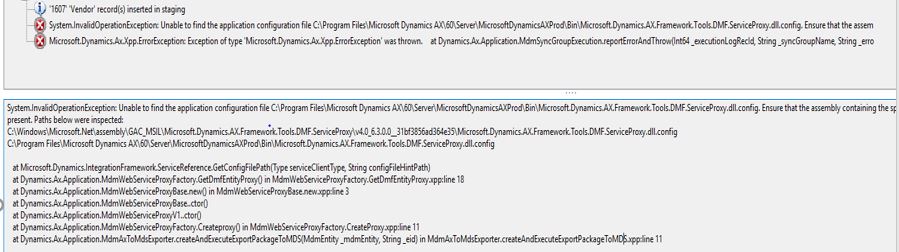
Issue-Arised.JPG

Error description from info log:

Error 1:

System.InvalidOperationException: Unable to find the application configuration file C:\Program Files\Microsoft Dynamics AX\60\Server\MicrosoftDynamicsAX\Bin\Microsoft.Dynamics.AX.Framework.Tools.DMF.ServiceProxy.dll.config. Ensure that the assembly containing the specific service client type has an application configuration source file present. Paths below were inspected:

C:\Windows\Microsoft.Net\assembly\GAC_MSIL\Microsoft.Dynamics.AX.Framework.Tools.DMF.ServiceProxy\v4.0_6.3.0.0__31bf3856ad364e35\Microsoft.Dynamics.AX.Framework.Tools.DMF.ServiceProxy.dll.config

C:\Program Files\Microsoft Dynamics AX\60\Server\MicrosoftDynamicsAXProd\Bin\Microsoft.Dynamics.AX.Framework.Tools.DMF.ServiceProxy.dll.config

   at Microsoft.Dynamics.IntegrationFramework.ServiceReference.GetConfigFilePath(Type serviceClientType, String configFileHintPath)

at Dynamics.Ax.Application.MdmWebServiceProxyFactory.GetDmfEntityProxy() in MdmWebServiceProxyFactory.GetDmfEntityProxy.xpp:line 18

   at Dynamics.Ax.Application.MdmWebServiceProxyBase.new() in MdmWebServiceProxyBase.new.xpp:line 3

   at Dynamics.Ax.Application.MdmWebServiceProxyBase..ctor()

   at Dynamics.Ax.Application.MdmWebServiceProxyV1..ctor()

   at Dynamics.Ax.Application.MdmWebServiceProxyFactory.Createproxy() in MdmWebServiceProxyFactory.CreateProxy.xpp:line 11

   at Dynamics.Ax.Application.MdmAxToMdsExporter.createAndExecuteExportPackageToMDS(MdmEntity _mdmEntity, String _eid) in MdmAxToMdsExporter.createAndExecuteExportPackageToMDS.xpp:line 11

Error 2:

Microsoft.Dynamics.Ax.Xpp.ErrorException: Exception of type 'Microsoft.Dynamics.Ax.Xpp.ErrorException' was thrown.

   at Dynamics.Ax.Application.MdmSyncGroupExecution.reportErrorAndThrow(Int64 _executionLogRecId, String _syncGroupName, String _error) in MdmSyncGroupExecution.reportErrorAndThrow.xpp:line 19

   at Dynamics.Ax.Application.MdmAxToMdsExporter.Run() in MdmAxToMdsExporter.run.xpp:line 30

   at Dynamics.Ax.Application.MdmSynchronizer.synchronize(Object[] _arg) in MdmSynchronizer.synchronize.xpp:line 290

   at MdmSynchronizer::synchronize(Object[] )

   at Microsoft.Dynamics.Ax.Xpp.ReflectionCallHelper.MakeStaticCall(Type type, String MethodName, Object[] parameters)

   at Microsoft.Dynamics.Ax.Xpp.PredefinedFunctions.runas(String userId, Int32 classId, String staticMethodName, Object[] parms, String company, String language, String partitionKey)

   at Dynamics.Ax.Application.MdmSynchronizer.Run() in MdmSynchronizer.run.xpp:line 23

   at Dynamics.Ax.Application.BatchRun.runJobStaticCode(Int64 batchId) in BatchRun.runJobStaticCode.xpp:line 54

   at Dynamics.Ax.Application.BatchRun.runJobStatic(Int64 batchId) in BatchRun.runJobStatic.xpp:line 13

   at BatchRun::runJobStatic(Object[] )

   at Microsoft.Dynamics.Ax.Xpp.ReflectionCallHelper.MakeStaticCall(Type type, String MethodName, Object[] parameters)

   at BatchIL.taskThreadEntry(Object threadArg)

FYI,

1. Data Import/Export framework and AOS services running on same machine.

2. Done full CIL.

3. Restarted the AOS and Data Import/Export framework services .

4. As mentioned in the first error description "Microsoft.Dynamics.AX.Framework.Tools.DMF.ServiceProxy.dll.config" dll file copied and pasted to  Dynamics AX folder. C:\Program Files\Microsoft Dynamics AX\60\Server\MicrosoftDynamicsAX\Bin\Microsoft.Dynamics.AX.Framework.Tools.DMF.ServiceProxy.dll.config

Thanks in advance,

Mani

*This post is locked for comments

I have the same question (0)
  • André Arnaud de Calavon Profile Picture
    304,496 Super User 2026 Season 1 on at

    Hi Mani,

    Can you tell if something was changed in the time before it was working and when it got stuck? You can try to re-install or repair the DIXF binary setup files.

  • Mea_ Profile Picture
    60,286 on at

    Do you have more than 1 AOS ? it maybe a case when you don't have required components installed on one of them.

  • Community Member Profile Picture
    on at

    Hello Andrew,

    Its seems the database got restored from production to test environment. After that this job got stuck its. Yes I have repaired that DIXF as you mentioned . Now I am getting new error on the log info .  

    Error 1:

    System.ServiceModel.FaultException`1[Microsoft.Dynamics.AX.Framework.Tools.DMF.ServiceProxy.DMFServiceReference.ExceptionData]: Exception from HRESULT: 0xC0202040 (Fault Detail is equal to Microsoft.Dynamics.AX.Framework.Tools.DMF.ServiceProxy.DMFServiceReference.ExceptionData).

    Error 2:

    Microsoft.Dynamics.Ax.Xpp.ErrorException: Exception of type 'Microsoft.Dynamics.Ax.Xpp.ErrorException' was thrown.

      at Dynamics.Ax.Application.MdmSyncGroupExecution.reportErrorAndThrow(Int64 _executionLogRecId, String _syncGroupName, String _error) in MdmSyncGroupExecution.reportErrorAndThrow.xpp:line 19

      at Dynamics.Ax.Application.MdmAxToMdsExporter.Run() in MdmAxToMdsExporter.run.xpp:line 30

      at Dynamics.Ax.Application.MdmSynchronizer.synchronize(Object[] _arg) in MdmSynchronizer.synchronize.xpp:line 290

      at MdmSynchronizer::synchronize(Object[] )

  • André Arnaud de Calavon Profile Picture
    304,496 Super User 2026 Season 1 on at

    Hi Mani,

    Do you have this issue in the test or production environment? If you have it in test, then please tell if both the business and model databases were restored with a proper AOS shutdown and restart.

  • Community Member Profile Picture
    on at

    Hello Andre,

    I found the solution that the User roles are not assigned to the service account on the SQL MDS webservice .

    • System Administration

    • Version Management

    • Integration Management

    • Explorer

    Now the issue resolved and the  job getting executed successfully. Again , the synchronization of records are not happening properly.

    Lets say i have created two sync group - publishA company, SubscribeB comapany.

    Case 1:

    When i modified the vendor records in published company(A) its getting inserted into DMFVendorentity_Leaf table on MDS database and updates the changes on the respective records on B company .

    Case 2:

    I created a new vendor with bank details in the A company.  once the batch job executed i can see only the DMFvendbankaccount_Leaf table updated in the MDS db but Vendor record not even inserted into the DMFVendorEntity_Leaf  table and also not inserted into into B company .

    I don't know what i am missed

    regards,

    Mani

Under review

Thank you for your reply! To ensure a great experience for everyone, your content is awaiting approval by our Community Managers. Please check back later.

Helpful resources

Quick Links

Introducing the 2026 Season 1 community Super Users

Congratulations to our 2026 Super Stars!

Meet the Microsoft Dynamics 365 Contact Center Champions

We are thrilled to have these Champions in our Community!

Congratulations to the March Top 10 Community Leaders

These are the community rock stars!

Leaderboard > 🔒一 Microsoft Dynamics AX (Archived)

#1
CP04-islander Profile Picture

CP04-islander 26

#2
Michel ROY Profile Picture

Michel ROY 14

#3
imran ul haq Profile Picture

imran ul haq 8

Last 30 days Overall leaderboard

Featured topics

Product updates

Dynamics 365 release plans
