web
You’re offline. This is a read only version of the page.
close
Skip to main content

Notifications

Announcements

No record found.

Community site session details

Community site session details

Session Id :
Microsoft Dynamics AX (Archived)

Using Plan Group in Formula

(0) ShareShare
ReportReport
Posted on by

Hi,

I have following formula for item Test1 : 
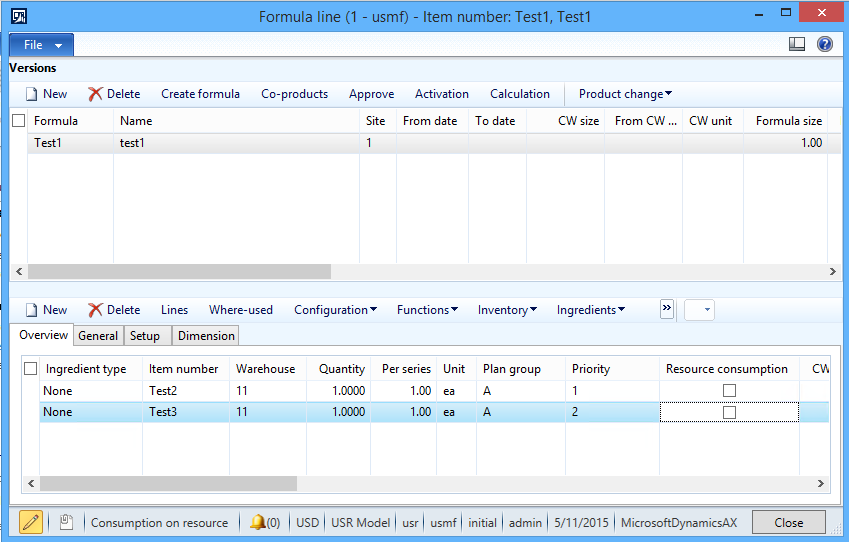
Formula.png

I want to modelling formula like this : Item1 only needs 100 pcs of materials (it could be Test2 OR Test3). If one of those materials have insufficient stock, system will consider the availability of the alternate item. 

Item Test3 is an alternate item for Test2, so I set the same Plan Group for both item and I give Test3 higher priority than Test2. 

Test2 have 20 pcs on stock, and Test3 have zero stock. Then I create Sales Order 100 unit for item Test1. When I run Master Scheduling, system suggest to produce 100 pcs of Test1 and buy 180 pcs item Test3. 

What I want is system only suggest 80 for item Test3, because it only need 100 pcs of the materials. Can anyone help me to make the right formula setup?

Thanks in advance

*This post is locked for comments

I have the same question (0)
  • Fredrik Sætre Profile Picture
    12,644 on at

    I do not believe that the planning engine is clever enough to figure this out. You would probably get a requirement for one part of each of these items...

    Could you use an item with variants to solve this instead of having 2 items?

  • Tim Schofield Profile Picture
    on at

    Hi, I think your setup is wrong. You don't specify a BOM line quantity on the alternate item in the Plan group (your item TEST3).  I've just copied your setup (but left TEST3 Quantity blank). When I had 20 of TEST2 and 0 of TEST3 on hand I got a planned purchase order for 80 TEST2. But when I had 20 of TEST2 and 50 of TEST3 on hand I got a planned purchase order of 30 for TEST2 and the Inquires > Derived requirements on the planned batch order were for 50 of TEST2 and 50 of TEST3 - so that made sense too, it allocated all the other items in the plan group - then suggested buying the primary (Priority = 1) item.

    Tim

  • Community Member Profile Picture
    on at

    Hi Fredrik,

    Can you give me more detailed explanation about using variant in this case?

    Hi Tim,

    Unfortunately, quantity needed could be different for item TEST2 and TEST3. If I use TEST2, I only need 1 pcs, but if I use TEST3, I could need 2 pcs. I can't leave TEST3 quantity blank.

    Is this possible to achieve?

    Thank you

  • Tim Schofield Profile Picture
    on at

    No - I don't think it's clever enough to do that - you'll have to put a dummy alternate item like in your BOM (like TEST3-Kitting) and make 1 of them from 2 TEST3.

  • Community Member Profile Picture
    on at

    Hi Tim,

    I give a try on what you suggested earlier. I have blank quantity for TEST3.

    I have 20 of TEST2  and 50 of TEST3 on hand, when I run Master Schedulling, system suggest 80 of TEST2. I didn't get the same result as you had. My TEST3 on hand is not taken into consideration.

    Do you change another setup besides blank quantity for TEST3?

  • Community Member Profile Picture
    on at

    Hi,

    Were you able to find the correct set-up for the above scenario?

    The result i got was similar with yours--- it seems that it does not consider my second priority.

    Hope you can share with us how you resolve this case. :)

Under review

Thank you for your reply! To ensure a great experience for everyone, your content is awaiting approval by our Community Managers. Please check back later.

Helpful resources

Quick Links

Responsible AI policies

As AI tools become more common, we’re introducing a Responsible AI Use…

Neeraj Kumar – Community Spotlight

We are honored to recognize Neeraj Kumar as our Community Spotlight honoree for…

Leaderboard > 🔒一 Microsoft Dynamics AX (Archived)

#1
Priya_K Profile Picture

Priya_K 4

#1
Martin Dráb Profile Picture

Martin Dráb 4 Most Valuable Professional

#3
Ali Zaidi Profile Picture

Ali Zaidi 2

Last 30 days Overall leaderboard

Featured topics

Product updates

Dynamics 365 release plans



