web
You’re offline. This is a read only version of the page.
close
Skip to main content

Notifications

Announcements

No record found.

Community site session details

Community site session details

Session Id :
Service | Customer Service, Contact Center, Fie...
Answered

Multiple Field Service Apps Showing

(0) ShareShare
ReportReport
Posted on by 15

Hi 

I have one Sandbox environment and i am using Field service, in my app pane, two Field service apps are shown. I am not understanding why there are two apps
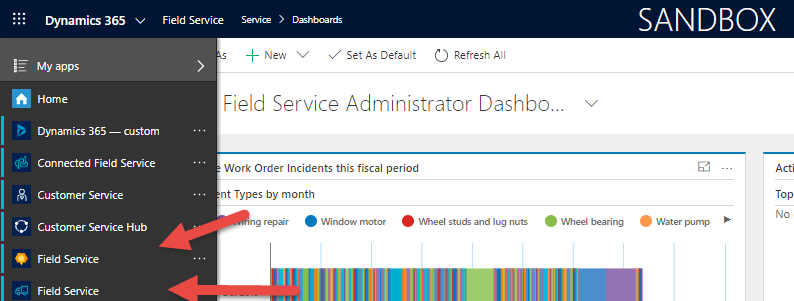
Main-Field-service.png

If i open First app if get Field Service -> Service

second-Field-service.png

and if open  second app, i get Field Service -> Field Service

First-Field-Service.png

So i am confuse in understanding purpose of multiple apps, as per my understanding there should be only one Unified Interface app, why two apps are shown and whats the purpose.

Thanks

I have the same question (0)
  • Suggested answer
    ba365guy Profile Picture
    2,950 on at

    On the first glance what I can say is:

    The one with "truck" icon is the previous version of app.

    The new version of app has a different icon. (The orangish- yellow polygon type)

    Seems you recently applied an update.

    You can have multiple apps running in parallel

  • kashiffayyaz Profile Picture
    15 on at

    Yes i recently updated Sand Box Field service. Can you please explain it little more. Because i have one production environment so i need more explanation in context of production environment.  

  • Verified answer
    ba365guy Profile Picture
    2,950 on at

    App is just a composition of components such as entities, dashboards, forms, views, charts, and business processes.

    Before applying the update to production, please verify if all the components present  in your production work as expected in sandbox (after applying update)

    Microsoft has come up with a new app just to emphasize that Microsoft identifies  the placement / inclusion of components as the most generic considering most of the field service scenarios.

    Any "update" applied technically/functionally updates the components (entities, processes, forms, etc.). App is just a layer / skin to access these components (ofcourse you can control security role wise apps too)

    So once you access the updated solution in sandbox and verify if all the components work as expected (as per production), it should not be much of a concern to apply update in production.

    Please go through the update release notes too in the following link.

    support.microsoft.com/.../microsoft-dynamics-crm-online-releases

    docs.microsoft.com/.../version-history

  • kashiffayyaz Profile Picture
    15 on at

    Thanks

  • Verified answer
    ba365guy Profile Picture
    2,950 on at

    Please close the thread by marking an answer as yes / verified

Under review

Thank you for your reply! To ensure a great experience for everyone, your content is awaiting approval by our Community Managers. Please check back later.

Helpful resources

Quick Links

Responsible AI policies

As AI tools become more common, we’re introducing a Responsible AI Use…

Neeraj Kumar – Community Spotlight

We are honored to recognize Neeraj Kumar as our Community Spotlight honoree for…

Leaderboard > Service | Customer Service, Contact Center, Field Service, Guides

#1
Tom_Gioielli Profile Picture

Tom_Gioielli 75 Super User 2025 Season 2

#2
Siv Sagar Profile Picture

Siv Sagar 52 Super User 2025 Season 2

#3
Daniyal Khaleel Profile Picture

Daniyal Khaleel 42 Most Valuable Professional

Last 30 days Overall leaderboard

Featured topics

Product updates

Dynamics 365 release plans



