web
You’re offline. This is a read only version of the page.
close
Skip to main content

Notifications

Announcements

No record found.

Community site session details

Community site session details

Session Id :
Customer experience | Sales, Customer Insights,...
Suggested Answer

A validation error occurred. The length of the 'company' attribute of the 'contact' entity exceeded the maximum allowed length of '50'.

(0) ShareShare
ReportReport
Posted on by 60

I am working to import contacts and the company name will not import due to this error.  Is there a way to resolve this? 

I have the same question (0)
  • Suggested answer
    Fubar Profile Picture
    2,761 on at

    You are probably attempting to import into the "Company Phone" field (Company in the schema).  You can increase the maximum length of the fields definition or import into the appropriate column most likely ParentCustomerId ("Customer name") - note the latter is a lookup and so won't just take a plain text value the target record must already exist in the system.

  • Mahendar Pal Profile Picture
    45,095 on at

    Hi,

    Could you share some more details about the Company name field is this a lookup or text field? Normally company name is associated with the Account entity but account entity have limit of 160 for the name field )

  • Suggested answer
    Yoshika Suzuki Profile Picture
    on at

    I think that the event can be avoided by setting the maximum length of the field where the error is occurring to 50 or more.

  • LMata Profile Picture
    60 on at

    I don't see where I can do this?  Where is this done?

  • Suggested answer
    PabloCRP Profile Picture
    1,088 on at

    Hi LMata,

    As is been told some records that you are trying to import exceed the max length in company column. I'd like to point you where you can update that max from e.g: 50 to 1000,

    Go to Settings
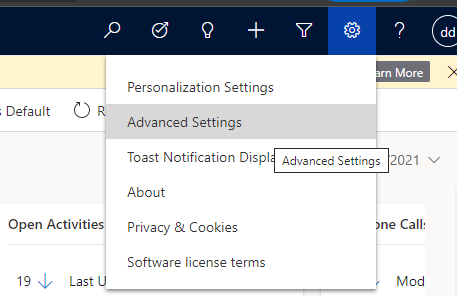
    pastedimage1612990613786v1.png

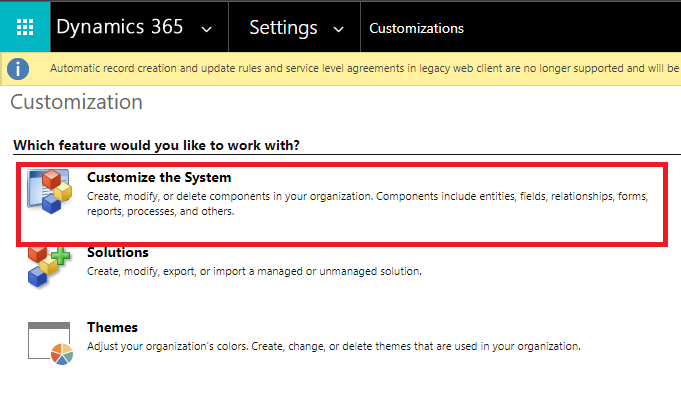
    Select arrow down and click on Customizations
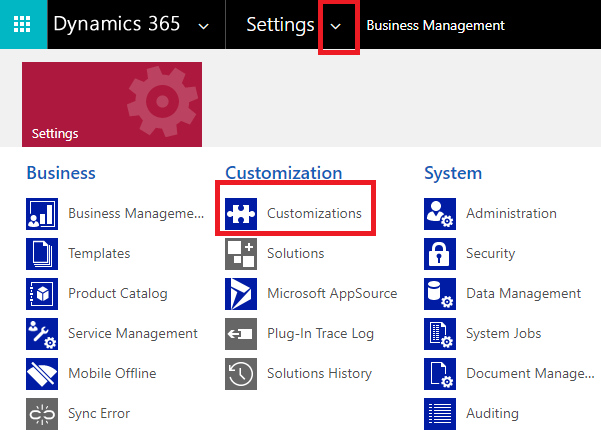
    pastedimage1612990696480v2.png

    Select Customize the system

    pastedimage1612990744421v3.png

    Expand Entities tab and look for contact, click on that.

    pastedimage1612990847119v4.png

    pastedimage1612990869309v5.png

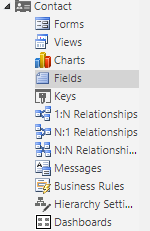
    Click on fields

    pastedimage1612990938565v6.png

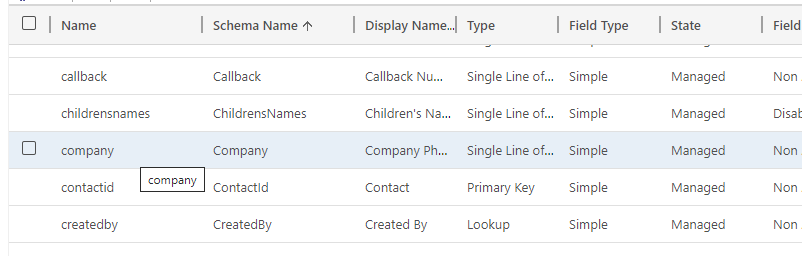
    Look for company column and click it

    pastedimage1612991092031v7.png

    locate Maximum Length* field and set a bigger number e.g:50 to 1000
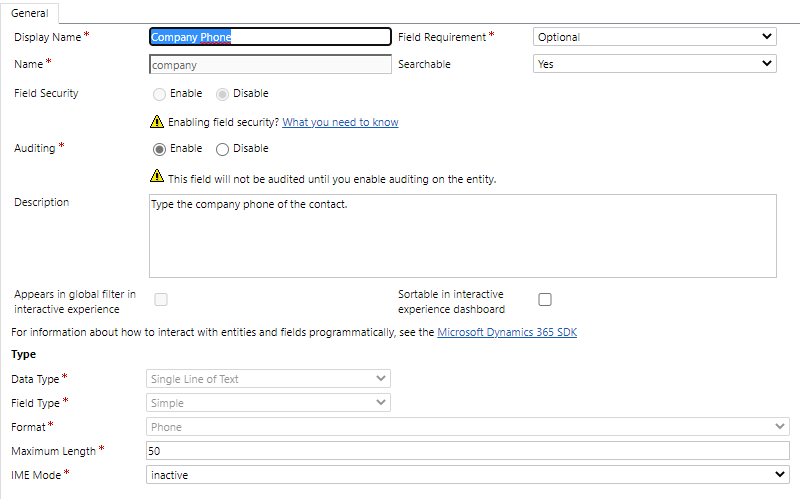
    pastedimage1612991173537v8.png

    click on save and close

    pastedimage1612991251091v9.png

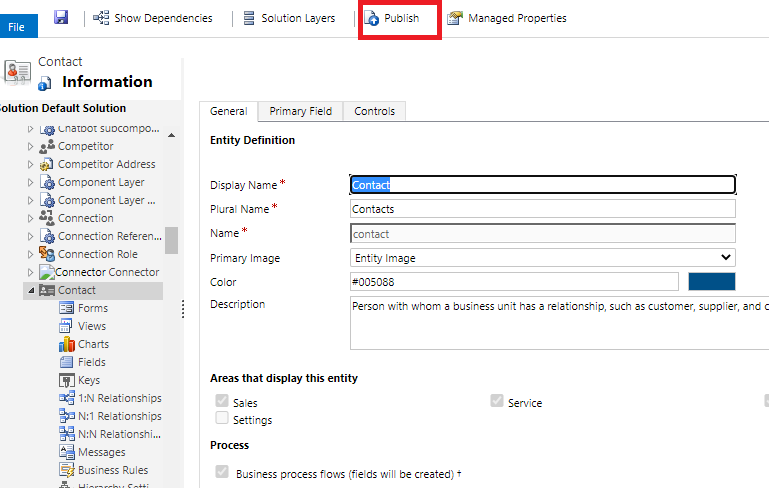
    Back in contact, click on publish 

    pastedimage1612991380243v10.png

    Regards.

    please consider marking as an answer if it was helpful
  • Suggested answer
    Fubar Profile Picture
    2,761 on at

    I believe you may actually have an incorrect mapping.  Phone number fields are 50 long, and there is a Phone number field whose schema name is 'company' and it is trying to import into that field instead of the one you want (which would be the parent.lookup)

  • Suggested answer
    CRMJetty Profile Picture
    3,512 on at

    Hello,

    pls refer below article,

    https://community.dynamics.com/crm/f/microsoft-dynamics-crm-forum/309481/solved-workflow-error-character-limit-in-text-field/896487

    https://community.dynamics.com/crm/f/microsoft-dynamics-crm-forum/206449/business-process-error/538413

    I hope it helps,

    Thanks.

    Please mark as verified if the answer is helpful. Welcome to join hot discussions in Dynamics 365

Under review

Thank you for your reply! To ensure a great experience for everyone, your content is awaiting approval by our Community Managers. Please check back later.

Helpful resources

Quick Links

Responsible AI policies

As AI tools become more common, we’re introducing a Responsible AI Use…

Neeraj Kumar – Community Spotlight

We are honored to recognize Neeraj Kumar as our Community Spotlight honoree for…

Leaderboard > Customer experience | Sales, Customer Insights, CRM

#1
Tom_Gioielli Profile Picture

Tom_Gioielli 171 Super User 2025 Season 2

#2
#ManoVerse Profile Picture

#ManoVerse 83

#3
Jimmy Passeti Profile Picture

Jimmy Passeti 50 Most Valuable Professional

Last 30 days Overall leaderboard

Product updates

Dynamics 365 release plans