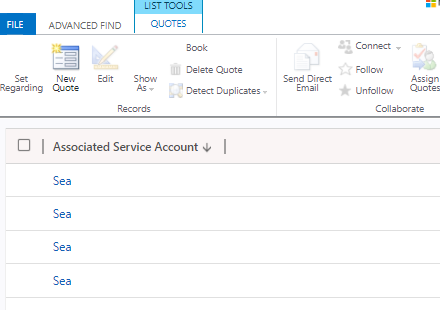
Also my fetchxml (however from quote - I have 4 quotes related to an associatedserviceaccount).
This is the xml
Also my fetchxml (however from quote - I have 4 quotes related to an associatedserviceaccount).
This is the xml
<fetch distinct="true" >
<entity name="quote" >
<attribute name="cus1_associatedserviceaccount" alias="linkedaccount" />
<order attribute="cus1_associatedserviceaccount" descending="true" />
<filter type="and" >
<condition attribute="cus1_associatedserviceaccount" operator="eq" value="093a1cca-8beb-eb11-bacb-0022489ad4de" />
</filter>
<attribute name="quoteid" />
</entity>
</fetch>
giving this result

I know that it's due the (quoteid) that was inserted automatically (I didnt insert it when i created the view in dynamics). I can remove it from the xml
<fetch distinct="true" >
<entity name="quote" >
<attribute name="cus1_associatedserviceaccount" alias="linkedaccount" />
<order attribute="cus1_associatedserviceaccount" descending="true" />
<filter type="and" >
<condition attribute="cus1_associatedserviceaccount" operator="eq" value="093a1cca-8beb-eb11-bacb-0022489ad4de" />
</filter>
</entity>
</fetch>
then i get this result

However i cannot save it to dynamics
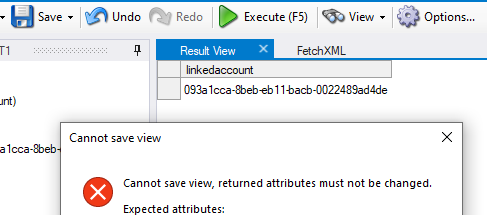
I can then just export the solution from d365 and edit it manually and import it again (This was what i did initially). However it don't work. I get 4 results.
So my initial conclusion is that distinct = true does not work in d365!