web
You’re offline. This is a read only version of the page.
close
Skip to main content

Notifications

Announcements

No record found.

Community site session details

Community site session details

Session Id :
Customer experience | Sales, Customer Insights,...
Answered

Quick create contact form pre-filled informations

(0) ShareShare
ReportReport
Posted on by 20

Hello,

The scenario is:

1) I start to create a contact using the main form

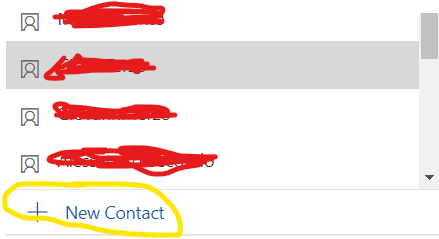
2) In one of the fields of the main form I need to specify who is the manager of this contact. This is  look up field that want me to choose an existing contact or create a new one. In this case I would create a new one:
pastedimage1623145109620v1.png

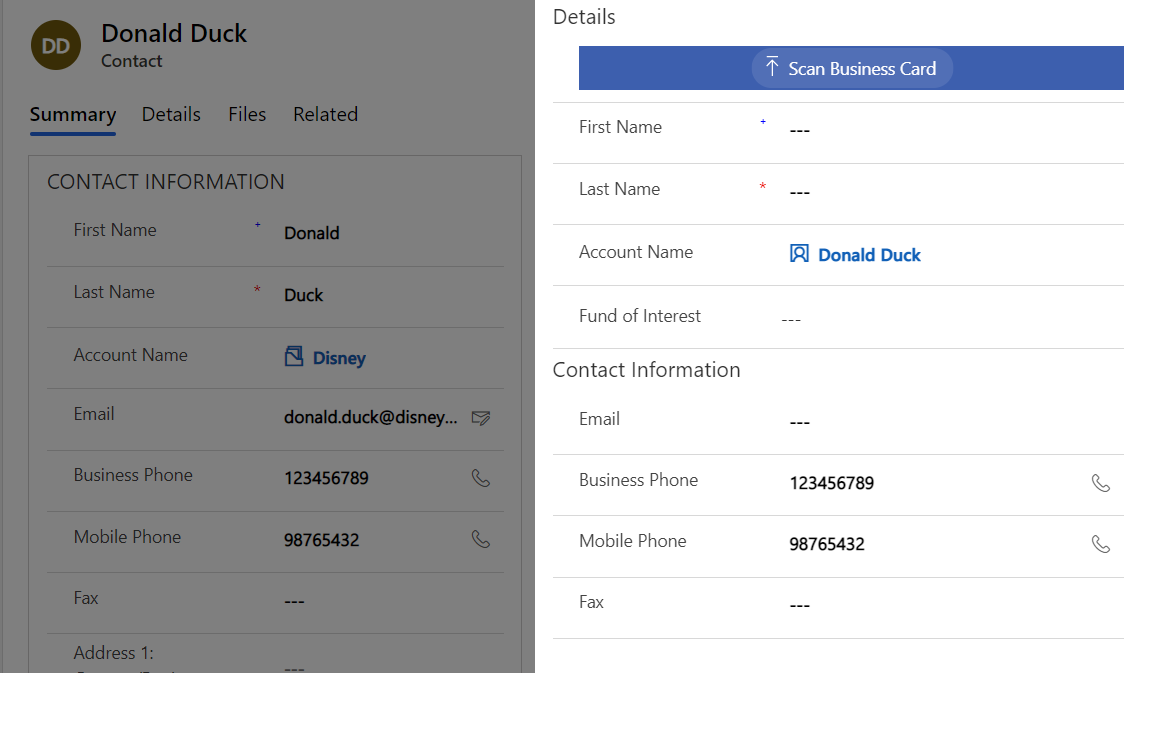
3) Once I click on "+ New Contact"  I have the Quick Create form that is displayed. My problem is that some of the fields are already populated by some informations coming from the main form (which are wrong), see example:
2664.dynamics365.png

Where and how can I stop this inheritance of informations? 

Thank you in advance for your help

I have the same question (0)
  • Verified answer
    Charan Raju C R Profile Picture
    7 Moderator on at

    Hi Antonio,

    Whenever a new N:1 relationship created between contact or account, there will few field mappings gets auto created which cannot be deleted. In your case also, when you create a Manager lookup from Contact to Contact, Account Name (parentcustomerid) is mapped to Contact from where you're trying to create manager record.

    In order to resolved this problem, create a javascript function to set Account Name field value on load of Quick Create form accordingly.

    Please refer this discussion link for more details: community.dynamics.com/.../default-lookup-mapping

  • antonio2712 Profile Picture
    20 on at

    Thank you Charan,

    In this case I have three contacts (area manager, district manager and sales) that I need to link to a contact, I use three distincs fields (all of them are lookup fields for other contacts). I am wondering: is there a better way to do this?

  • Charan Raju C R Profile Picture
    7 Moderator on at

    Unfortunately, I don't see any better solution to this problem apart from using javascript as suggested in that thread.

Under review

Thank you for your reply! To ensure a great experience for everyone, your content is awaiting approval by our Community Managers. Please check back later.

Helpful resources

Quick Links

Responsible AI policies

As AI tools become more common, we’re introducing a Responsible AI Use…

Neeraj Kumar – Community Spotlight

We are honored to recognize Neeraj Kumar as our Community Spotlight honoree for…

Leaderboard > Customer experience | Sales, Customer Insights, CRM

#1
Tom_Gioielli Profile Picture

Tom_Gioielli 171 Super User 2025 Season 2

#2
#ManoVerse Profile Picture

#ManoVerse 83

#3
Jimmy Passeti Profile Picture

Jimmy Passeti 50 Most Valuable Professional

Last 30 days Overall leaderboard

Product updates

Dynamics 365 release plans



