web
You’re offline. This is a read only version of the page.
close
Skip to main content

Announcements

No record found.

News and Announcements icon
Community site session details

Community site session details

Session Id :
Finance | Project Operations, Human Resources, ...
Suggested Answer

Security roles required for Journal payment workflow

(0) ShareShare
ReportReport
Posted on by 160

Hi All,

I am trying to submit a Payment journal to workflow but I am getting an error 

Stopped (error): SysWorkflowQueue-resume X++ Exception: Work item could not be created. Insufficient security permissions for user Greg. Please review the user's security permissions to ensure they are sufficient for this workflow document and then resume the workflow

Please let me know the security roles required.

I have the same question (0)
  • Suggested answer
    SouravDam Profile Picture
    11,732 on at

    Hello Dynamicsuser365,

    Kindly check in below areas if all setups are fine.

    --- Go to System administration > Users > Users. Make sure that this user "Greg" has appropriate roles assigned to approve the payment journal.

    --- Make sure that the user "Greg" is set to enabled in the "Users" form.

    --- Make sure that the Person is assigned to this user in the "Users" form.

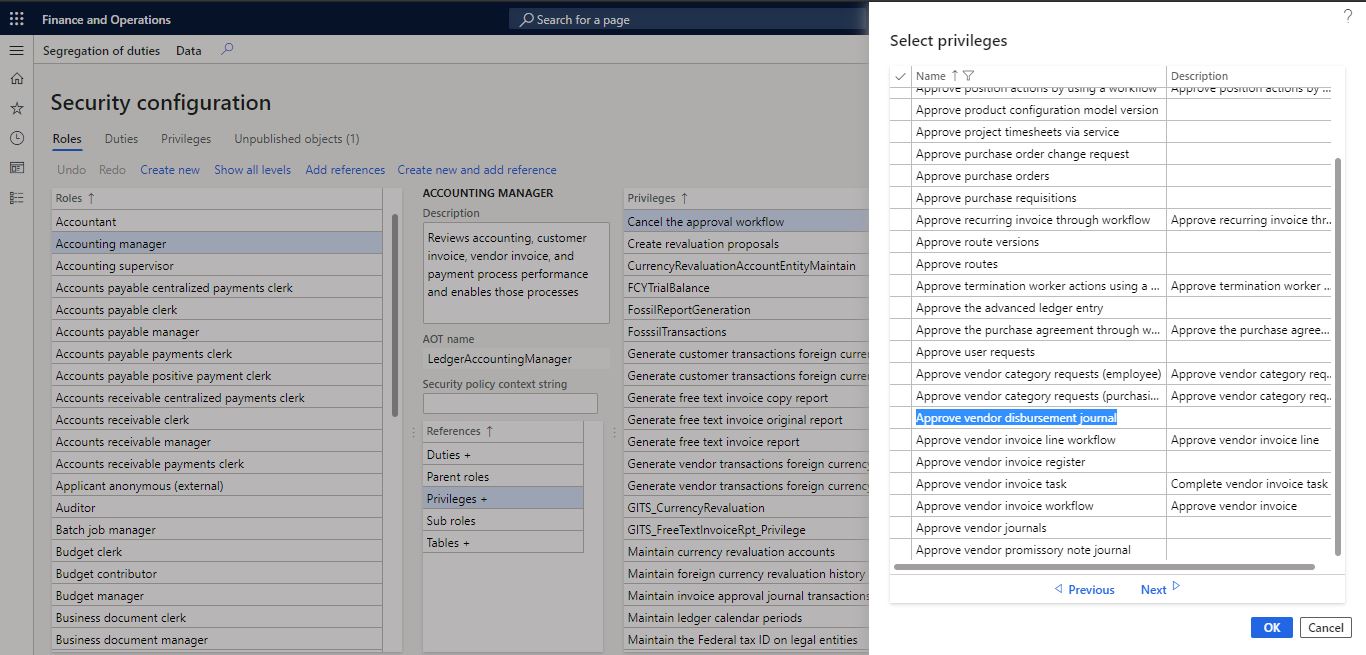
    --- Also check if appropriate privilege is assigned to the user role to approve the payment journal. Below screen shot is taken from D365 for your understanding. Here the privilege is Approve vendor disbursement journal and Approve customer payment journal.
    4011.JPG

    --- Also make sure that the user "Greg" has been granted the access to appropriate organization to approve the payment journal where it was created and submitted for approval. This legal entity specific grant you can set in the "Users" form itself.

    Kindly check and update in this forum.

    Best regards,
    Sourav Dam

    Kindly mark this thread 'Yes' if this is answered your query which may help other community members in this forum.

  • Suggested answer
    julia146 Profile Picture
    Microsoft Employee on at

    You could take a task recording, then use System administration - Security - Security diagnostics for task recordings, it would load the permissions required.

    For example, I select John, it is showing missing permissions, click Add reference, it shows some recommended objects. For example, I add duty: Maintain vendor payments for John‘s role, he could submit workflow. 

    2783.pastedimage1584068486023v1.png

  • André Arnaud de Calavon Profile Picture
    305,125 Super User 2026 Season 1 on at

    Hi Dynamicsuser365,

    More of a general reply from my side in addition: technically, a workflow has multiple menu items linked: The document (e.g. payment journal, purchase order, etc) and outcomes like approve and reject.

    The user should have permissions to all of them. Next to a duty for approving the vendor payments, the user should also have a duty assigned where he/she can open the originating document. In the example Julia, the user would get rights to create and maintain the journal and the lines. 'Inquire into the vendor payment status' will grant only view permissions.

  • Suggested answer
    SouravDam Profile Picture
    11,732 on at

    Hello Dynamicsuser365,

    Is this sorted out? Kindly update us on this.

    Best regards,
    Sourav Dam

    Kindly mark this thread 'Yes' if this is answered your query which may help other community members in this forum.

Under review

Thank you for your reply! To ensure a great experience for everyone, your content is awaiting approval by our Community Managers. Please check back later.

Helpful resources

Quick Links

Introducing the 2026 Season 1 community Super Users

Congratulations to our 2026 Super Stars!

Meet the Microsoft Dynamics 365 Contact Center Champions

We are thrilled to have these Champions in our Community!

Congratulations to the April Top 10 Community Leaders

These are the community rock stars!

Leaderboard > Finance | Project Operations, Human Resources, AX, GP, SL

#1
Giorgio Bonacorsi Profile Picture

Giorgio Bonacorsi 771

#2
André Arnaud de Calavon Profile Picture

André Arnaud de Cal... 629 Super User 2026 Season 1

#3
Subra Profile Picture

Subra 496

Last 30 days Overall leaderboard

Product updates

Dynamics 365 release plans
