When I link an AX project's WBS to MS project on server side it shows sync completed e.g.
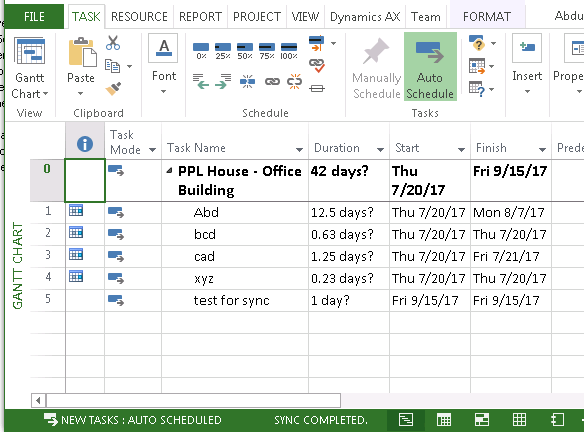
But when I try the same thing on a client PC and try to link AX project’s WBS to client side PC it show synch failed e.g.
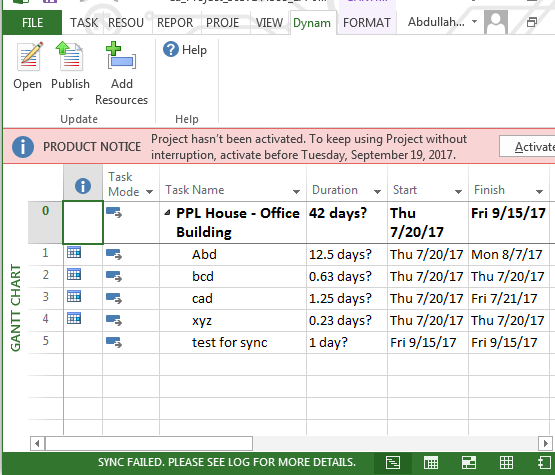
Side-Effects:
- The changes are not reflected in AX unless I close the MS Dynamics AX and restart it on the client i.e. the client side pc’s MS project has access to the .mpp file on the server and also saves the changes to that file but does not sync them with Dynamics AX.
- When I try to link a project with MS Project which I not already linked with MS Project on client, Dynamics fails to create a .mpp filed and therefore MS project opens an empty project.
- I am unable to publish any project from MS Project on client’s PC to Dynamics AX.
Please note:
- Server Side OS: Windows Server 2008 R2 Enterprise, Client Side OS: Windows 7/8, MS Dynamics 2012 R3 and MS Project 2013 Professional are installed on both sides.
- I have reviewed the Event Viewer’s Windows Logs as well as Application Logs of MS Dynamics AX and MS Office as well as Telemetry Log for Office on both server and client side very carefully and the only thing I am able to find is a warning on server
Service: NetTcpBinding_ProjectService
Binding: Failed to locate service
Remote Address: net.tcp://servname:8201/DynamicsAx/Services/AifProject
Identity: schemas.xmlsoap.org/.../spn, host/SERVNAME.Domain.local
Found in cache: False
Failure of this service might be the root cause of my sync failed problem but the issue is I am unable to fix this problem.
Any help on this matter will be really appreciated whether it is on how to fix this service failure or some other work around on how to successfully use MS Project on client side.
*This post is locked for comments
I have the same question (0)









 Share
Share Report
 All responses (
 Answers (


 4
4

