web
You’re offline. This is a read only version of the page.
close
Skip to main content

Notifications

Announcements

No record found.

Community site session details

Community site session details

Session Id :
Finance | Project Operations, Human Resources, ...
Suggested Answer

Windows 11 and Integration Manager

(1) ShareShare
ReportReport
Posted on by 977

I have a site on GP 18.5 and they just implemented Windows 11 on one of their workstations.  They also have a few integrations running through Integration Manager, including one for payroll.  

On the new workstation the payroll integration has been failing.  IM points to a shared database on a separate server.  The integration runs fine on the other Windows 10 machines, but 11 produces the following:
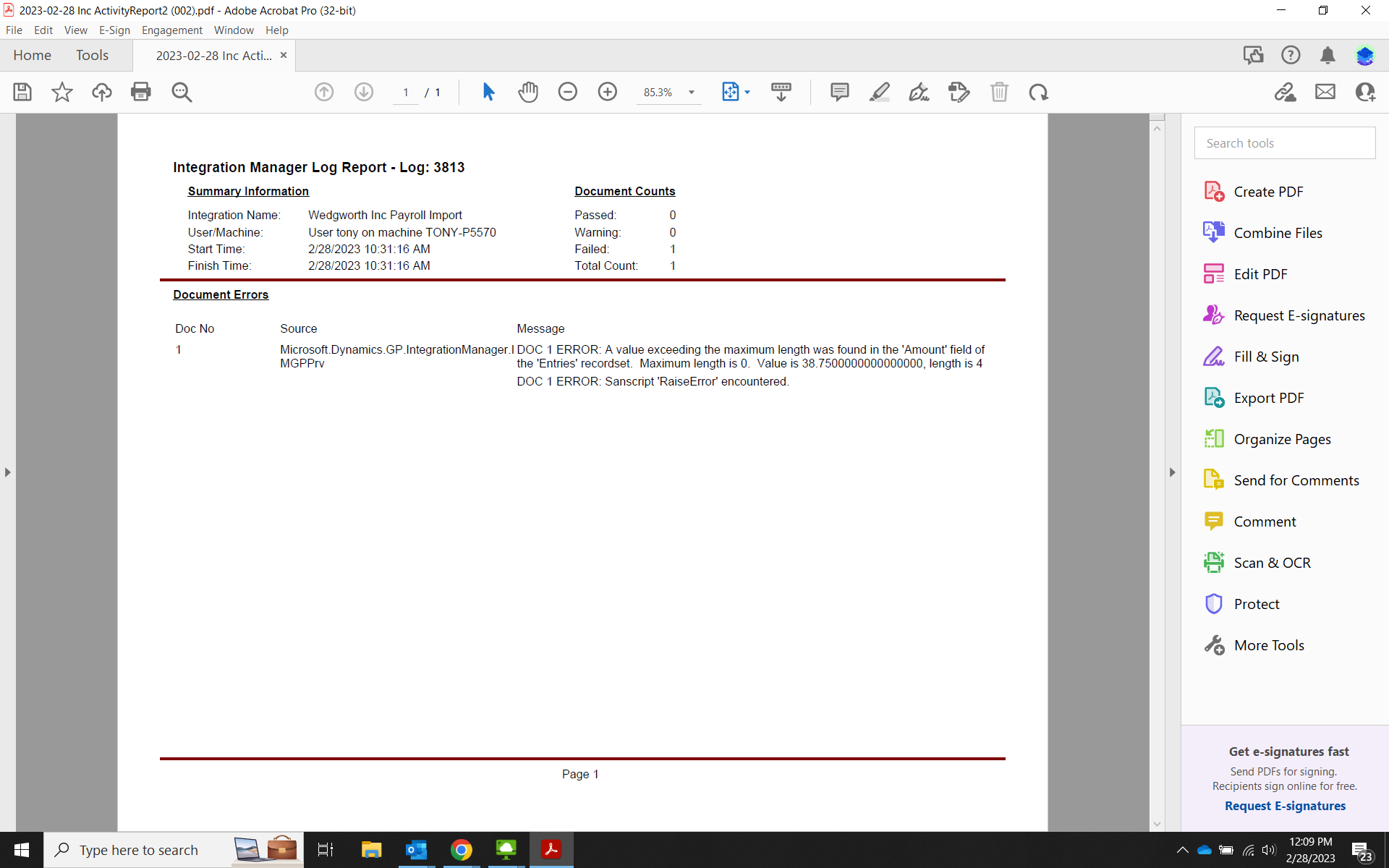
pastedimage1677604211506v1.png

That said, are there any known issues with Integration Manager and Windows 11.  Any suggestions as to how to resolve or work around?  Please advise.  Thank you.

JG

Categories:
I have the same question (0)
  • Suggested answer
    Derek Albaugh Profile Picture
    on at

    Nothing we've seen as of yet. Can you run any of the sample integrations on a Windows 11 machine, as a test, or do you get errors with all of them?

    Odd that Windows 11 would create an error about an actual data value, in this case the 'Amounts' field.

    I can run our sample 'Payroll Transaction' integration on a Windows 11 machine.

    If you launch both GP and IM using 'Run As Administrator', does that make any difference?

  • Suggested answer
    DAnny3211 Profile Picture
    11,397 on at

    hi

    it's possible that the issue is related to compatibility between the version of Integration Manager and Windows 11.

    One suggestion would be to check if the version of Integration Manager being used is compatible with Windows 11. The system requirements for Integration Manager can be found on the Microsoft Dynamics GP documentation website.

    Another suggestion would be to check if the user account on the Windows 11 workstation has the necessary permissions to access the shared database on the separate server. It's possible that the issue is related to a permissions issue rather than a compatibility issue.

    If neither of these suggestions resolves the issue, it may be helpful to review the error message that is being generated to determine if there are any additional details that can provide insight into the cause of the issue.

    DAniele

  • Smormada Profile Picture
    10 on at

    It's frustrating when integrations that were previously working fine encounter issues with new operating systems. Have you checked out turnkeypoint.com/.../ for any known issues or workarounds? They often provide helpful insights and updates on tech-related matters. It might also be worth reaching out to the software provider for Integration Manager to see if they have any specific recommendations for running it on Windows 11. Hopefully, you'll be able to resolve the issue soon and get your payroll integration up and running smoothly.

Under review

Thank you for your reply! To ensure a great experience for everyone, your content is awaiting approval by our Community Managers. Please check back later.

Helpful resources

Quick Links

Responsible AI policies

As AI tools become more common, we’re introducing a Responsible AI Use…

Neeraj Kumar – Community Spotlight

We are honored to recognize Neeraj Kumar as our Community Spotlight honoree for…

Leaderboard > Finance | Project Operations, Human Resources, AX, GP, SL

#1
Martin Dráb Profile Picture

Martin Dráb 660 Most Valuable Professional

#2
André Arnaud de Calavon Profile Picture

André Arnaud de Cal... 549 Super User 2025 Season 2

#3
Sohaib Cheema Profile Picture

Sohaib Cheema 307 User Group Leader

Last 30 days Overall leaderboard

Product updates

Dynamics 365 release plans
