web
You’re offline. This is a read only version of the page.
close
Skip to main content

Notifications

Announcements

No record found.

Community site session details

Community site session details

Session Id :
Microsoft Dynamics AX (Archived)

Note type setting in the Accounts receivable setting screen

(0) ShareShare
ReportReport
Posted on by 824

Hi Everyone,

Does anybody know for what the setting "Note type" stands for in the AR parameter form please?

Accounts receivable>Setup>Accounts receivable parameters, Tab General. Field group Setup.
2017_2D00_12_2D00_07_5F00_13_2D00_07_2D00_56.png

The field description is: "Enter the type of note that should default when entering a hold code comment".

This field is displayed if the retail module is activated and is narrow linked to the Order hold functionality what can be used in the Sales order process.

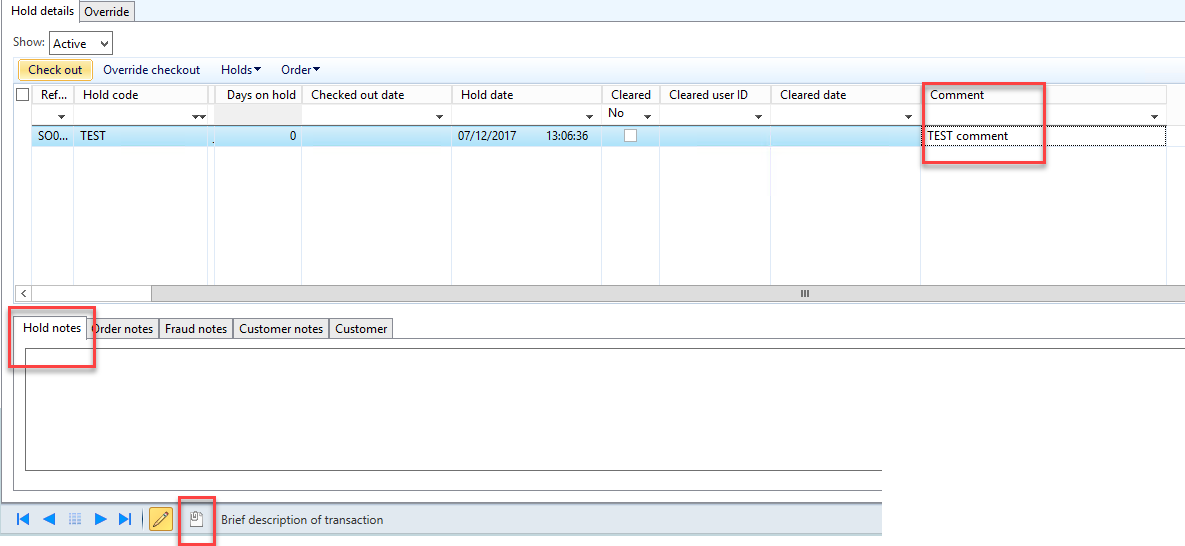
But when I add a comment in the Order hold form, nothing happens and no default note is created???? And document handling remains empty???

2017_2D00_12_2D00_07_5F00_13_2D00_07_2D00_56.png

Thank you so much for helping. Best, Jemm

*This post is locked for comments

I have the same question (0)
  • André Arnaud de Calavon Profile Picture
    301,158 Super User 2025 Season 2 on at

    Hi Jemm,

    The fields Note type and "On hold" sales order status are not standard fields. Check with your partner if they have provided an add-on or customizations.

  • Jemm Profile Picture
    824 on at

    Hi André Arnaud,

    Thank you for the answer.

    Actually, they are standard fields. It is part of the Retail module. And you can use it in the normal sales process. That's why they are displayed in the AR parameters.

  • Verified answer
    Guy Terry Profile Picture
    28,924 Moderator on at

    Hi Jemm,

    The note type is used when entering text into the 'Hold notes' tab of the Order hold form. Check this post by Justin Carter:

    daxdude.blogspot.co.uk/.../ax-2012-r3-order-hold-error-hold-note.html

  • André Arnaud de Calavon Profile Picture
    301,158 Super User 2025 Season 2 on at

    Hi Jemm,

    Thanks. I did check an AX 2012 RTM environment without retail :(

  • Jemm Profile Picture
    824 on at

    Hi André Arnaud,

    Hmm. Strange. Maybe linked with a localization than. I need to investigate.

  • Verified answer
    Guy Terry Profile Picture
    28,924 Moderator on at

    No! André means he checked for the fields in AX 2012 RTM; which is the version of AX 2012 which did not have any Retail functionality. The fields are standard in AX 2012 FP and later.

  • Jemm Profile Picture
    824 on at

    Thank you so much Guy!

Under review

Thank you for your reply! To ensure a great experience for everyone, your content is awaiting approval by our Community Managers. Please check back later.

Helpful resources

Quick Links

Responsible AI policies

As AI tools become more common, we’re introducing a Responsible AI Use…

Neeraj Kumar – Community Spotlight

We are honored to recognize Neeraj Kumar as our Community Spotlight honoree for…

Leaderboard > 🔒一 Microsoft Dynamics AX (Archived)

#1
Martin Dráb Profile Picture

Martin Dráb 4 Most Valuable Professional

#1
Priya_K Profile Picture

Priya_K 4

#3
MyDynamicsNAV Profile Picture

MyDynamicsNAV 2

Last 30 days Overall leaderboard

Featured topics

Product updates

Dynamics 365 release plans



