web
You’re offline. This is a read only version of the page.
close
Skip to main content

Notifications

Announcements

No record found.

Community site session details

Community site session details

Session Id :
Finance | Project Operations, Human Resources, ...
Suggested Answer

Importing bank response file using Electronic reporting

(0) ShareShare
ReportReport
Posted on by 11,633

Hi All,

Has anyone used Electronic reporting to import bank response file? I have configured electronic reporting to create Direct Debit and Direct Credit file and send to Bank afterwards. Now I want to use the same to process Bank responses related to DD and DC files. Has anyone configured this using Electronic reporting? Any link, blog etc. pertinent to this topic?

Thanks,

Baber.

I have the same question (0)
  • Suggested answer
    Rahul Mohta Profile Picture
    21,032 on at
  • syed baber Profile Picture
    11,633 on at

    Hi Rahul,

    I already looked at this link. There is already an option using data management to import bank statements like BAI2 statement and I am not looking for this information. What I want to know is how to import incoming bank response file using Electronic reporting.

    Thanks,

    Baber.

  • Suggested answer
    syed baber Profile Picture
    11,633 on at

    Found this information on docs site, which I think is relevant in my case:

    docs.microsoft.com/.../er-parse-incoming-documents

    Thanks,

    Baber.

  • Suggested answer
    Ludwig Reinhard Profile Picture
    Microsoft Employee on at

    Hello Baber,

    For which country/region do you need this?

    In my home country we don't get those feedback/response files from bank but in other countries companies usually get them.

    As far as I know there are country-specific features available for handling those response files.

    Have you checked those country-specific features on MS docs for your country/region already?

    Best regards,

    Ludwig

  • syed baber Profile Picture
    11,633 on at

    Hi Ludwig,

    I need this for Australia. In our case, we get DEED response file from Bank indicating if there is any error in the account information provided in the direct debit or direct credit file. I haven't checked country specific feature on MS doc, we did check that, when we configured Direct debit/credit file. Is there any specific MS doc site for this purpose or I would be able to just find that by googling it ?

    Thanks,

    Baber.

  • Suggested answer
    Ludwig Reinhard Profile Picture
    Microsoft Employee on at

    Hello Baber,

    I found the following two sites for Australian specific features and SEPA direct debits.

    docs.microsoft.com/.../australia

    docs.microsoft.com/.../sepa-direct-debit-overview

    Unfortunately, both sites don't address the issue that you mention.

    Might be a good reason to open a support ticket with MS and ask for the missing documentation?!

    Best regards,

    Ludwig

  • syed baber Profile Picture
    11,633 on at

    Hi Ludwig,

    Thanks for taking the time and provide these links. Does the link I mentioned above regarding Parsing incoming documents seems more relevant for this purpose? The customer gets the text file and following is the format mapping provided by the bank for DEED response file:

    pastedimage1588568541513v1.png

    Would it be practical to use Electronic reporting to define the format as per the above mapping and then update the application data or just using a custom import function that picks the file from a file server works well here? What are your thoughts ?

    Thanks,

    Baber.

  • Suggested answer
    MhaU Profile Picture
    on at

    Dear Baber,

    Thank you for logging this issue on our community.

    Please take a look here and you will find the features available for Australia:

    docs.microsoft.com/.../australia

    You can download the format from Global repo or LCS and then setup method of payment to use the format:

    pastedimage1588598836288v1.png

    If the format does not meet the bank specific requirement, you can easily customize it by defining a configuration provider, then derive the existing configuration, open in designer and start customization.

    Please let me know if you need any other information and I will be more than happy than assist you further.

  • syed baber Profile Picture
    11,633 on at

    Thanks Mihaela for your response. We had already configured Electronic reporting format for generating Direct debit/credit files for bank with your help last year. Can the same format be used for the response file format that I shared above or should I refer to the link "Parse incoming documents", though it only explains about CSV and Excel format. My customer would be getting the response from Bank in the following format:

    0ENTR2            01WBC       PEXA Fees                 45102645102664730 210120                                        G

    1082-4562197397258N130000000561TESTs CONVEYANCING            ARDD000512456     033-220   701346Property Exchang00000000G

    1013-567835748869N130000018216SAM LAWYERS                  ARDD000512134     033-220   701346Property Exchang00000000G

    Any suggestions/advice in this regard would be highly appreciated.

    Thanks,

    Baber.

  • Suggested answer
    MhaU Profile Picture
    on at

    Dear Baber,

    Thank you for your response.

    We have an import format available for XML file camt054. Please import this and open it in designer to see how it is built. 

    That said you need to create your own format since the one available accepts XML format. Place your cursor on the Payment model click Create configuration:

    pastedimage1588682926992v1.png

    Flag that it supports import format and click create configuration.

    Then start designing the format adding File, sequence and elements just like the bank format is:
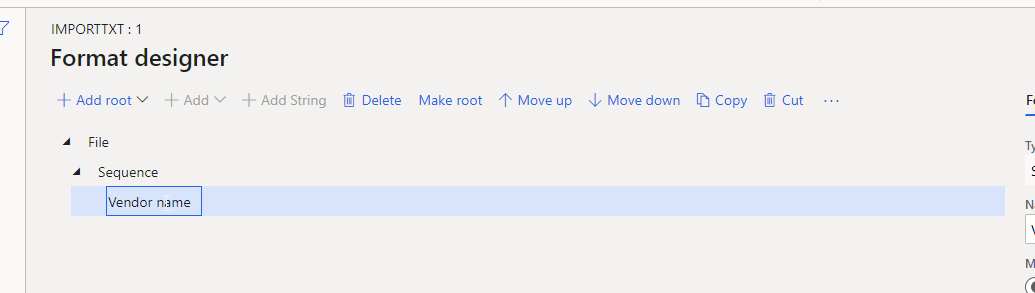
    pastedimage1588683050729v2.png

    Then select map format to model since the mapping is not here, this is an import format:

    pastedimage1588683088538v3.png

    Start using camt054 definition, click on Add

    pastedimage1588683213396v4.png

    Then open in designer and "tell" the application what info you read from the text file to insert into the database. For example I read the vendor name from the text file and want to populate the vendor name:

    pastedimage1588683509063v5.png

    With the import format you just read the file and say where it should be populated. Then you need to derive the payment model mapping to destination ISO20022 and add new rules or modify existing ones if needed. For example if Vendor name is blank then you cannot insert a
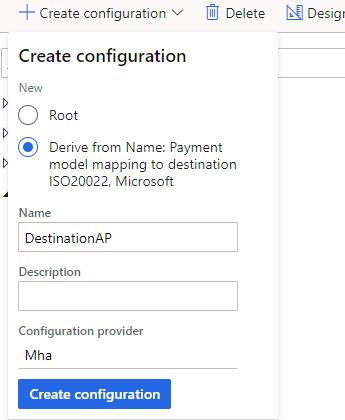
    pastedimage1588683840410v6.png

    Then open in designer this definition Register processed payments ISO20022 CTCopy

    pastedimage1588683957978v7.png

    Please note that I have not tried this yet, never tested but the steps are these ones.

    Give it a try and then let me know how it goes.

Under review

Thank you for your reply! To ensure a great experience for everyone, your content is awaiting approval by our Community Managers. Please check back later.

Helpful resources

Quick Links

Responsible AI policies

As AI tools become more common, we’re introducing a Responsible AI Use…

Neeraj Kumar – Community Spotlight

We are honored to recognize Neeraj Kumar as our Community Spotlight honoree for…

Leaderboard > Finance | Project Operations, Human Resources, AX, GP, SL

#1
Martin Dráb Profile Picture

Martin Dráb 544 Most Valuable Professional

#2
André Arnaud de Calavon Profile Picture

André Arnaud de Cal... 450 Super User 2025 Season 2

#3
Sohaib Cheema Profile Picture

Sohaib Cheema 250 User Group Leader

Last 30 days Overall leaderboard

Product updates

Dynamics 365 release plans



