web
You’re offline. This is a read only version of the page.
close
Skip to main content

Notifications

Announcements

No record found.

Community site session details

Community site session details

Session Id :
Small and medium business | Business Central, N...
Answered

How to ship charge item during drop ship purchase order post?

(0) ShareShare
ReportReport
Posted on by

Hi Expert,

I create a sales order with two items, one is normal item, one is charge item. Mark Normal item to drop ship, and assign this charge item
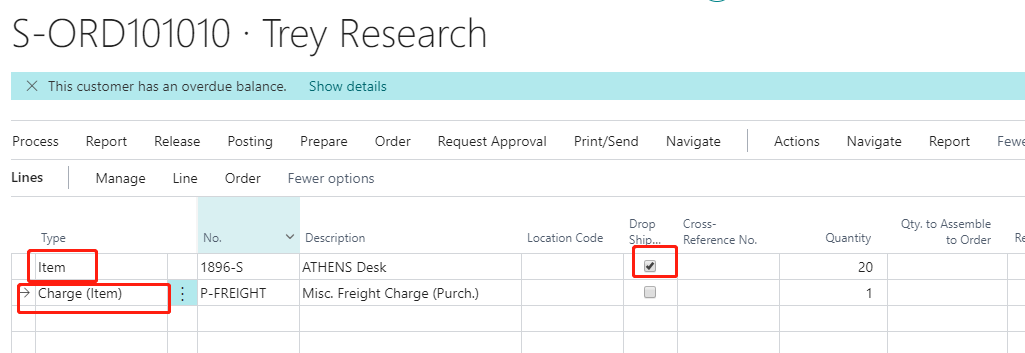
pastedimage1574158438878v1.png

Then, I just create a purchase order and linked above sales order
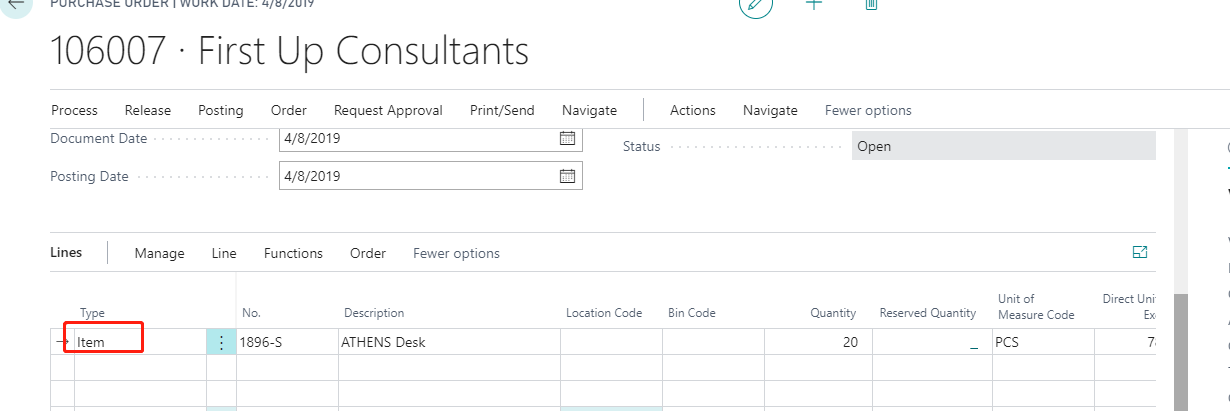
pastedimage1574158573979v2.png

Post this drop ship PO to receipt, then sales order will create shipment automatically. then go to sales order and post sales invoice, it error out: You cannot assign more than 0 units in Document Type = Order, Document No. = S-ORD101010,Line No. = 20000. 

It seems like when I just create shipment through drop ship PO is different with create shipment through sales order for charge item. could anyone shed me some lights on how to use drop ship Po to post charge item when shipment is created?

Thanks,

Ming

I have the same question (0)
  • jerome77 Profile Picture
    on at

    Hi

    I gave a try and looks like I was able to post

    pastedimage1574175009454v1.png

    Used BC14 last CU

    To connect sales order and purchase, did you use ship to field to customer address, added customer number and then get sales order. Did you do the same (I believe so as you have been able to get sales order shipped here)

    What is your version used? Maybe support case could be needed here

    Kind regards

    Jerome

  • Community Member Profile Picture
    on at

    Yes, I used ship to field to customer address, I am in BC version 15.

  • Community Member Profile Picture
    on at

    when you post sales invoice, did you select "invoice" or "Ship and Invoice"?

    pastedimage1574229758494v1.png

  • Divya Singh Profile Picture
    65 on at

    Drop Shipment can be used for non -inventory costs where a company's subsidiary operates as a sales office and does not carry inventory at its own premises.

    Sale Order is fulfilled by drop shipment, and the sales revenue is posted at the subsidiary. Headquarters then sends the subsidiary purchase invoices for the cost price of the items sold. Posted as purchase item charges related to sales, the subsidiary records these charges as sales expenses (non-inventoriable cost) and includes them in profit calculations

  • Community Member Profile Picture
    on at

    Thanks for your reply, if I want to D365BC only create posted purchase receipt for drop ship PO, doesn't create posted posted sales shipment automatically, is there a way to implement this scenario for Drop ship PO?

  • Divya Singh Profile Picture
    65 on at

    Hi

    I have created the entire scenario of Drop Shipment with Item Charge assignment , please follow below link

    https://community.dynamics.com/nav/f/microsoft-dynamics-nav-forum/374231/drop-shipment-order-with-item-charge-assignment

    I hope this will resolve any issue that you are facing

  • Verified answer
    Divya Singh Profile Picture
    65 on at

    Hi

    I have created the entire scenario of Drop Shipment with Item Charge assignment , please follow below link

    community.dynamics.com/.../drop-shipment-order-with-item-charge-assignment

    I hope this will resolve any issue that you are facing

Under review

Thank you for your reply! To ensure a great experience for everyone, your content is awaiting approval by our Community Managers. Please check back later.

Helpful resources

Quick Links

Responsible AI policies

As AI tools become more common, we’re introducing a Responsible AI Use…

Neeraj Kumar – Community Spotlight

We are honored to recognize Neeraj Kumar as our Community Spotlight honoree for…

Leaderboard > Small and medium business | Business Central, NAV, RMS

#1
OussamaSabbouh Profile Picture

OussamaSabbouh 2,238

#2
YUN ZHU Profile Picture

YUN ZHU 773 Super User 2025 Season 2

#3
Sumit Singh Profile Picture

Sumit Singh 630

Last 30 days Overall leaderboard

Featured topics

Product updates

Dynamics 365 release plans



