web
You’re offline. This is a read only version of the page.
close
Skip to main content

Notifications

Announcements

No record found.

Community site session details

Community site session details

Session Id :
Microsoft Dynamics AX (Archived)

Inventory dimension Inventory status must be specified when post movement journal

(0) ShareShare
ReportReport
Posted on by 720

Hi,
I am getting error 'Inventory dimension Inventory status must be specified' when i am posting the movement journal. if i selected 'available/any status' on inventory status field, it is accepting to post the movement journal

My equations is . i am trying to import 20,000 records, but this error is coming only for 204 records,

Inventory status is automatically coming for remaining 19800 lines . Would you please tell me anyone that where system is taking this parameters.

Note:

I have setup default receipt location in Inventory and warehouse manageemnent tab on warehouse master.
I have difined a default inventory status ID 'Available' on warehosue managemetn FastTab in warehouse master.
I have defined the default inventory status ID 'available' on inventory status FastTab in warehouse management parameters
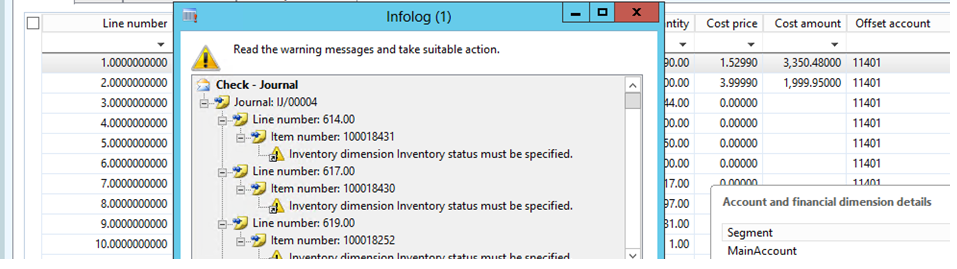
Inventory1.png

Thanks

Rajkumar

*This post is locked for comments

I have the same question (0)
  • Suggested answer
    Community Member Profile Picture
    on at

    did you mean, even the Inventory status field has value "Available" for 204 records, it is still showing error?

    Could you enable "Inventory location" dimension in the grid and validate

  • grajkumarmscax Profile Picture
    720 on at

    If i mentioned inventory status 'available', system is accepting to post. But Why it is not automatically bring the inventory status for 204 records

    Have i missed any setup for those 204 items

    Thanks

    Rajkumar

  • Community Member Profile Picture
    on at

    Hi

    I did a movement journal in my R3 CU10 environment your setups are working perfectly. Just validate if you have correct Storage dimension group specified for those items which has Inventory status enabled.

  • grajkumarmscax Profile Picture
    720 on at

    Hi Manish,

    I have compared those item setups. I think that we should enable the ' Use transportation management processes ' check box'. If we enable this check box, by default, system is bring the inventory status ID when you select item in movement journal.

    let me check complete scenario and then i will confirm it. 

    Image123.png

    Thanks

    Rajkumar

  • Verified answer
    Community Member Profile Picture
    on at

    The items I tested all have this checkbox enabled. This could be the reason

  • Community Member Profile Picture
    on at

    Hi,

    Did you find the reason for this error message? I'm having the same problem, but the "Use transportation management" checkbox didn't help. It's also with inventory adjustment journal.

Under review

Thank you for your reply! To ensure a great experience for everyone, your content is awaiting approval by our Community Managers. Please check back later.

Helpful resources

Quick Links

Responsible AI policies

As AI tools become more common, we’re introducing a Responsible AI Use…

Neeraj Kumar – Community Spotlight

We are honored to recognize Neeraj Kumar as our Community Spotlight honoree for…

Leaderboard > 🔒一 Microsoft Dynamics AX (Archived)

#1
Priya_K Profile Picture

Priya_K 4

#1
Martin Dráb Profile Picture

Martin Dráb 4 Most Valuable Professional

#3
Sukrut Parab Profile Picture

Sukrut Parab 2 Moderator

Last 30 days Overall leaderboard

Featured topics

Product updates

Dynamics 365 release plans
