Hy Andrew,
as the employment of an employee is quite as a history table of employments it can not to be updated using the employee entity, instead we need to use "employment" entities.
The "Employment" entity itself works a little bit different to other entities as my experience this entity is not updatable for this reason.
Inside the (outdated) Employment entiy the keys are defined like this:
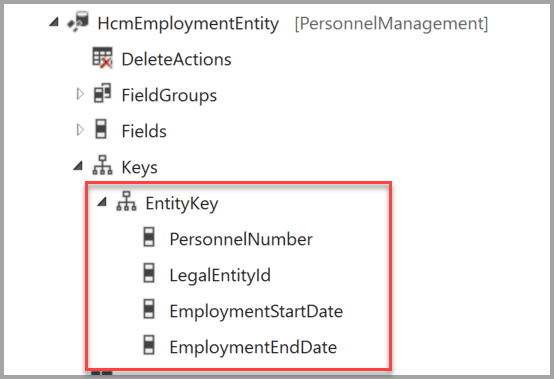
AND additional: Start date and End Date are not allowed to overlap.
So, if a record exists with "No End date", it can not be updated as it is inside the key and usually saved with a value of "2154-12-31T23:59:59Z"
What we need is to end the Employment using another entity where the enddate is not part of the key.
There are two entities we could use, may be also further entities (employee leave, ...), I've not tested.
- Employment per company
- Employment V2
The keys for "Employment per company" are:

and for "Employment V2" are:

1) Employment per Company
So if you only have the "Personalnumber" you need to use the "Employment per Company" entity to update the end date of the employment of the worker.
This works for me to use "Employment per Company" if I set the "start date" and "end date" with a time part, as this is a DateTime Field, may be this will be validated at run time.
The time part depends also from your regional setting for time zone

This imported Excel ended at D365FO with this:

After that you can import a new employment using the "Employment" entity as the example here starting on 03.12.2021.


2) Employment V2
This entity is build in this way, that if you import an employment start date that is after the start date of the existing employment, it will set the end date of the existing employment just before the new imported start date of the employment.


This is of course more comfortable as the first solution as the new employment will be cretaed and also ends the existing employment automatically.


