web
You’re offline. This is a read only version of the page.
close
Skip to main content

Announcements

No record found.

News and Announcements icon
Community site session details

Community site session details

Session Id :
Microsoft Dynamics NAV (Archived)

Trial Balance - Changing a column calculation

(0) ShareShare
ReportReport
Posted on by 2

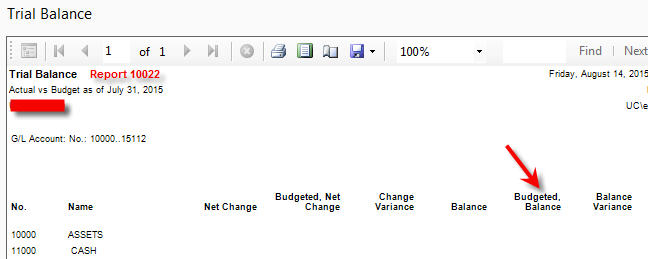
Right now when we run a Trial Balance report (10022), the last two columns are calculated from 01/01/15..31/12/15 even though the first 4 columns are calculated until the "As Of" date specific when running the report. 

We need Budgeted, Balance and Balance Variance to be calculated the same way as the first columns. Would anyone know how I would go about changing this?
TrialBalance.jpg

*This post is locked for comments

I have the same question (0)
  • Verified answer
    Suresh Kulla Profile Picture
    50,269 Super User 2026 Season 1 on at

    Edward,

    I don't think the date calculation is different, the variance column calculation depends on other columns, but i don't think those are different.

  • Verified answer
    edwardl Profile Picture
    2 on at

    So I did a little more digging. When I run the report for the first day of the year, it shows a typical balance in the thousands and a budgeted balance of ~40 million. Is there carry-over from the previous year or are we not understanding this column?

  • Verified answer
    Suresh Kulla Profile Picture
    50,269 Super User 2026 Season 1 on at

    Check out this link, it will give you more information about the columns

    msdn.microsoft.com/.../hh934652%28v=nav.71%29.aspx;MSPPError=-2147217396

    It depends on what you select on the show comparison

    www.youtube.com/watch

    This video explains about trial balance report, even though it is old version the concept is still the same.

  • edwardl Profile Picture
    2 on at

    Yes, we are not understanding this column at all. Thank you for the information.

Under review

Thank you for your reply! To ensure a great experience for everyone, your content is awaiting approval by our Community Managers. Please check back later.

Helpful resources

Quick Links

Introducing the 2026 Season 1 community Super Users

Congratulations to our 2026 Super Stars!

Congratulations to our 2025 Community Spotlights

Thanks to all of our 2025 Community Spotlight stars!

Leaderboard > 🔒一 Microsoft Dynamics NAV (Archived)

Last 30 days Overall leaderboard

Featured topics

Product updates

Dynamics 365 release plans
