web
You’re offline. This is a read only version of the page.
close
Skip to main content

Notifications

Announcements

No record found.

Community site session details

Community site session details

Session Id :
Customer experience | Sales, Customer Insights,...
Answered

CRM Portal

(0) ShareShare
ReportReport
Posted on by 5,514

Hi, 

I wanted to add user(CRM User ) in CC while sending invitation from CRM to CRM Portal users

Us that possible ? 

If yes how 

I have the same question (0)
  • sandeepc Profile Picture
    5,514 on at

    Hi , I have a requirement where i need to send invitation for Portal Users. i want to be in the  email as CC . is that possible?

    And al the email sent from CRM to portal user. it should have owner of the record who created it in as CC

    if yes how?

  • sandeepc Profile Picture
    5,514 on at

    Any Suggestions will be Marked as Verified

  • Verified answer
    a33ik Profile Picture
    84,331 Most Valuable Professional on at

    Hello,

    If I'm not wrong - there is a workflow that is executed to send invitation email - just alter that workflow and add user to the CC of the email.

  • Verified answer
    cloflyMao Profile Picture
    25,210 on at

    Hi sandeepc,

    There is an existing workflow Send Invitation for Invitation entity to send email, and we can set CC field in its step 2: Create Email Message.

    However, according to step 3: Portals: Send Invitation, the email is sent by the portal action instead of using the commonly used Send email action;

    From my test, it seems that CC field will be always cleared even though we had set a value to it. (I tested both dynamic and static value.)

    You could check whether the default workflow could work normally in your environment.

    I copied the default Send Invitation, and used "Send email" to send email instead, now update operation to CC works. (changed steps 2 and 3)

    pastedimage1600744609472v1.png

    12345x.JPG

    Regards,

    Clofly


  • sandeepc Profile Picture
    5,514 on at

    I added the step but. the email is going only if both to and cc are same. if the cc person is different then its not going.

  • sandeepc Profile Picture
    5,514 on at

    two emails were sent if both TO and CC are same. and sent to same person

  • sandeepc Profile Picture
    5,514 on at

    requirement

    Both owner  and selected contact should recieve email

  • Verified answer
    cloflyMao Profile Picture
    25,210 on at

    Hi sandeepc,

    Did you use the default "Send Invitation" or create a custom one?(I used the copied one.)

    Could you share me a screenshot of the step?

    Here is mine:

    pastedimage1600756483248v1.png

    Regards,

    Clofly

  • sandeepc Profile Picture
    5,514 on at

    Defaul one only i added one step

  • Verified answer
    cloflyMao Profile Picture
    25,210 on at

    Was the email still sent with "Portals:Send Invitation" action?(Screenshot below is the default one.)
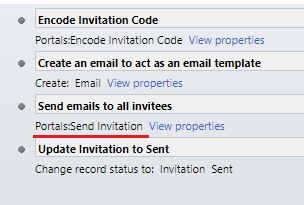
    xzz.JPG

    If the default didn't work for you, it is easy to create a custom workflow as alternative:

    Step 1: It is same to the default.

    Use "Portals:Encode Invitation Code" action to encode original invitation code of invitation record.

    pastedimage1600765680077v1.png

    Step 2: Instead of creating an email record and sending it with "Portals:Send Invitation" action,

    we use "Send email: Create New Message" to send email directly.

    Add the encoded invitation code from step 1 to email body.

    pastedimage1600766145543v2.png

     Step 3:  It is same to the default.

    Change Invitation record status to Sent

     pastedimage1600766199201v3.png

    Regards,

    Clofly

Under review

Thank you for your reply! To ensure a great experience for everyone, your content is awaiting approval by our Community Managers. Please check back later.

Helpful resources

Quick Links

Responsible AI policies

As AI tools become more common, we’re introducing a Responsible AI Use…

Neeraj Kumar – Community Spotlight

We are honored to recognize Neeraj Kumar as our Community Spotlight honoree for…

Leaderboard > Customer experience | Sales, Customer Insights, CRM

#1
Tom_Gioielli Profile Picture

Tom_Gioielli 170 Super User 2025 Season 2

#2
#ManoVerse Profile Picture

#ManoVerse 70

#3
Jimmy Passeti Profile Picture

Jimmy Passeti 50 Most Valuable Professional

Last 30 days Overall leaderboard

Product updates

Dynamics 365 release plans



