web
You’re offline. This is a read only version of the page.
close
Skip to main content

Notifications

Announcements

No record found.

Community site session details

Community site session details

Session Id :
Customer experience | Sales, Customer Insights,...
Suggested Answer

Add domains in D365 Marketing trial version

(0) ShareShare
ReportReport
Posted on by 69

I tried to add domains in the D365 Marketing trial version, but can't get it to work. All the posts I saw so far also show a different form from the one I use. If I want to add a domain a wizard pops up and I can only enter the domain name. Everything else is not enabled or there is no other input field.

pastedimage1669738364159v1.png

After adding the domain name into the wizard, I can only click through all the steps and press the Verify button in the end. There is no input field where I could enter any details. After saving and closing the wizard pop up I see a form, which I haven't seen in any other post regarding that topic. I don't know if it's the updated form or just a bug. Tried to activate any other form, but couldn't find any other form in the dataverse.
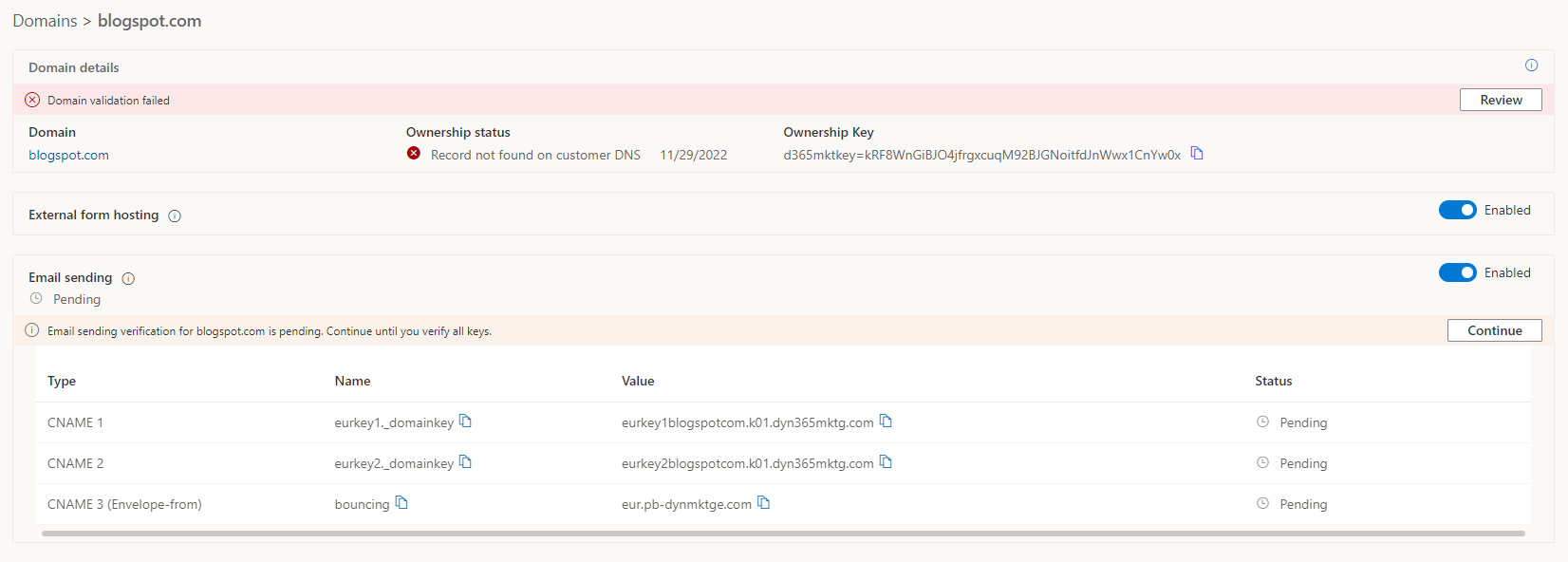
pastedimage1669738509824v2.png

The weird thing is, that I don't have the possibility to add or configure any settings in the domain form. I can only add the domain and thats all what I can do.

I really want to test the marketing modul for our clients.

Hope anyone can help me with that.

Thanks

I have the same question (0)
  • Suggested answer
    Petr Jantac Profile Picture
    Moderator on at

    Hello,

    I see that you added the blogspot.com domain to your list of domains. I assume you want to enable external form hosting for your page hosted on blogspot.com. To enable the external form hosting, you just need to have the domain name on the list of domains. You don't have to finish the domain ownership authentication.

    Your domain setup seems fine, you should be able to see your form embedded in your blogspot.com page.

    Note: if you want to enable the form prefill feature, you need to prove the ownership of the domain.

    Thank you,

    Petr

  • wdsos Profile Picture
    69 on at

    Hi.

    Even after more than 24 hrs later the blogspot.com domain is not available. I still get the error, that this domain is not whitelisted and can't be displayed. The same goes with the localhost or other domains where I don't have the ownership, but added the domain to the list.

    What actually works is to implement the form as an iFrame. If I want to implement the form as a script it does not work.

    That's the temporary solution I came up with.

  • Petr Jantac Profile Picture
    Moderator on at

    Hi,

    The problem may be elsewhere. If the blogspot.com domain wasn't enabled for external form hosting, you would have not received any submission even from the form hosted as iframe.

    Could you please share the link to the page where the form is embedded as script?

    Thank you.

    Petr

  • wdsos Profile Picture
    69 on at

    Here is the link to the blogspot post where I included the form:

    wdkundendev01.blogspot.com/.../d365-marketing-form.html

Under review

Thank you for your reply! To ensure a great experience for everyone, your content is awaiting approval by our Community Managers. Please check back later.

Helpful resources

Quick Links

Responsible AI policies

As AI tools become more common, we’re introducing a Responsible AI Use…

Neeraj Kumar – Community Spotlight

We are honored to recognize Neeraj Kumar as our Community Spotlight honoree for…

Leaderboard > Customer experience | Sales, Customer Insights, CRM

#1
Tom_Gioielli Profile Picture

Tom_Gioielli 70 Super User 2025 Season 2

#2
Gerardo Rentería García Profile Picture

Gerardo Rentería Ga... 33 Most Valuable Professional

#3
Daniyal Khaleel Profile Picture

Daniyal Khaleel 32 Most Valuable Professional

Last 30 days Overall leaderboard

Product updates

Dynamics 365 release plans



