web
You’re offline. This is a read only version of the page.
close
Skip to main content

Notifications

Announcements

No record found.

Community site session details

Community site session details

Session Id :
Customer experience | Sales, Customer Insights,...
Suggested Answer

What is going on with the size of this database? webResourceBase ribbonClientMetatdataBase

(3) ShareShare
ReportReport
Posted on by 195

We have an almost blank D365 Sales org we use for demos. It has steadily grown in size over the last 12 months. Now that we are allocated a certain amount of database space, rather than paying by the environment, this is becoming more of an issue.

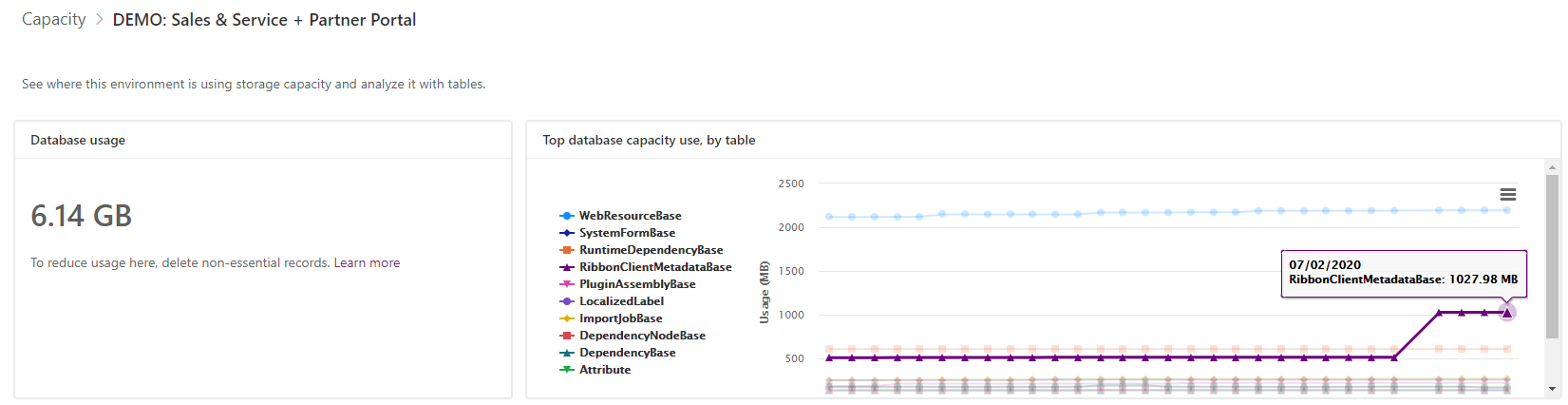
When you create a new D365 Sales app deployment, it sits at about 1GB. Sometimes, things happen that make the space jump massively. For instance on 2nd Feb this year the ribbonClientMetatdataBase table almost doubled overnight for no apparent reason from 600MB to 1+GB. The webResourceBase table is over 2GB!
pastedimage1581073166754v1.png

If you go over you limit you now must pay £30 per GB per month for this database storage. These are Microsoft controlled tables which the app relies on to function. There is nothing we can do about their size and they just seem to grow and grow and grow. I think these tables should be excluded from our database allowances. We are paying on a per user per month basis for the app anyway which should cover these essential tables. It is very unfair to make us pay twice. Either that or we need to be given tools to allow us to reduce the size of these talbes. I mean really, what could possible be stored about ribbon meta data that takes up more than 1GB in a database? It's crazy!

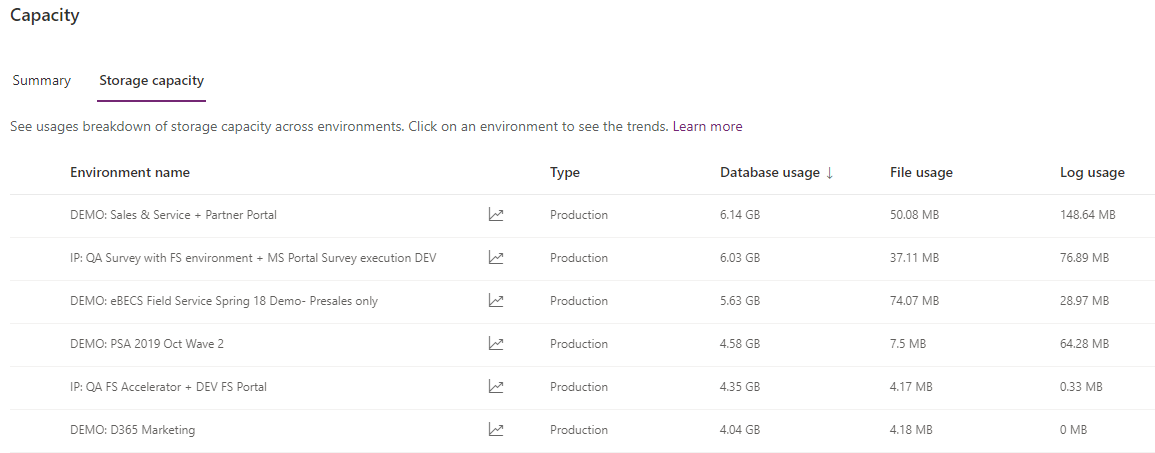
I have these problems in about 5 different environments in the same tenant. Basically blank D365 apps which take up over 5GB each and they didn't start out that way. They have just grown over time with nothing we can do about it. I have tried all the usual steps of cleaning them up by running bulk delete jobs etc. 
pastedimage1581073466957v2.png

I have the same question (0)
  • LuHao Profile Picture
    40,892 on at

    Hi Matt,

    I would recommend you raise a support ticket to contact the Microsoft team to check your environment.

  • MattFJohnson Profile Picture
    195 on at

    Tried it, they won't do anything about it and just point you to the "top 10 ways to clear space in your CRM" article which I think was written in about 2011.

    What I'm trying to do is raise some awareness of this issue and get a bit of community support so we can try and get something done about it.

  • sclarebout Profile Picture
    180 on at

    Hi I was about to post the same question. My instances are growing to 5GB without a significant change!

    I deleted unnecessary solutions in these instances but that doesn't help either; like deleting system jobs...

  • thomasjs Profile Picture
    User Group Leader on at

    Was just made aware of this myself!! I have no idea what is driving the MB increase, and how I can do anything about it.

    I agree that certain tables should not count toward storage. Did you create a suggestion for MS on this, or should we do it now?

  • MattFJohnson Profile Picture
    195 on at

    By all means create a new Idea/Suggestion. I'm surprised there's not more of a fuss being made of this to be honest.

  • Suggested answer
    Paul_Owen Profile Picture
    2,027 on at

    The web resource table is because of the new PCF controls I believe of which there are a lot, however they shouldn't be part of your storage IMO. As for the ribbonmetadata, if you create a support case MSFT should be able to help with reindexing that.

    Regards

    Paul

  • MattFJohnson Profile Picture
    195 on at

    I've asked support (via a case) about this issue previously and just been told it is all required for the system to run. The point of this post is really to highlight the issue and get a bit of community support around petitioning Microsoft to do something about it. Also to spread awareness of this issue too. I think it is very unfair that microsoft charge us for these tables to be stored in the most expensive way £30+ per month per GB. Maybe even just categorising it to the File Usage data type would be acceptable.

    Just to cover all bases I have created a support ticket today to see if there is anything that can be done which hasn't already been tried or might be new.

    Case Number: 120031924002879

  • MattFJohnson Profile Picture
    195 on at

    As I suspected, even THEY can't do anything about it. This is why I think it's doubly unfair that we should bear the cost of this spiralling data size. The article they link to pretty much just says reduce the amount of columns in your quick find views and remove multi line fields. I find this table particularly egregious as it's seemingly badly names. how could ribbon metadata take up over 1GB unless it's just being stored in the most inefficient way possible. Also, webresources taking up so much space when individual solutions are in the low MB's so it can't be actual webresources. It must be something else stored in there.  

    Here is the response form the case:

    I have reviewed the case details and understand that you would like to reduce the size of the RibbonClientMetadatabase table.

    RibbonClientMetadataBase: Consists of a collection of parameters and metadata information about ribbons. It also contains information about dependencies, runtime elements between entities. It is a system generated table and we don't have control over it.

    There are few implementations made to include new features to the online organizations which has resulted in spike in storage of this table.

    This has been reported by other customers on whose organizations the deployment has happened.

    Please consult the following documentation to know more about the improvements:

    docs.microsoft.com/.../capacity-storage

    Please feel free to reach out for any further assistance with regard to this support request.

  • thomasjs Profile Picture
    User Group Leader on at

    experience.dynamics.com/.../

  • MattFJohnson Profile Picture
    195 on at

    Hi Thomas, Did you mean to title your post "We should pay for system tables in our storage"?

    Surely you meant "We should NOT pay for system tables in our storage"

Under review

Thank you for your reply! To ensure a great experience for everyone, your content is awaiting approval by our Community Managers. Please check back later.

Helpful resources

Quick Links

Responsible AI policies

As AI tools become more common, we’re introducing a Responsible AI Use…

Neeraj Kumar – Community Spotlight

We are honored to recognize Neeraj Kumar as our Community Spotlight honoree for…

Leaderboard > Customer experience | Sales, Customer Insights, CRM

#1
Tom_Gioielli Profile Picture

Tom_Gioielli 96 Super User 2025 Season 2

#2
Jimmy Passeti Profile Picture

Jimmy Passeti 50 Most Valuable Professional

#3
Gerardo Rentería García Profile Picture

Gerardo Rentería Ga... 49 Most Valuable Professional

Last 30 days Overall leaderboard

Product updates

Dynamics 365 release plans



