web
You’re offline. This is a read only version of the page.
close
Skip to main content

Announcements

News and Announcements icon
Community site session details

Community site session details

Session Id :
Small and medium business | Business Central, N...
Suggested Answer

RDLC report layout lines

(0) ShareShare
ReportReport
Posted on by 135

Hi All

How do I modify the lines on the RDLC report to be pulled in one page.

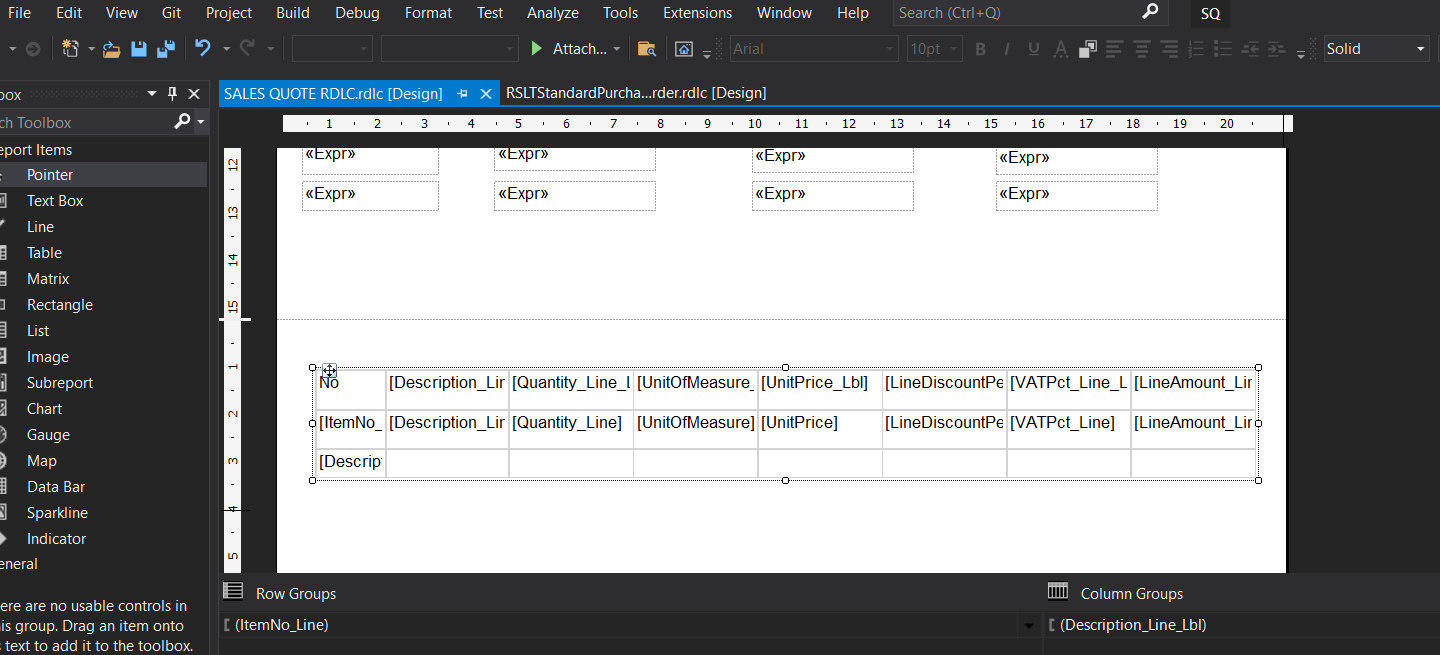
My report is currently splitting the line table into different pages. See screennshot.

This is the table on RDLC VS code.
pastedimage1660908393480v1.png

And this is how the final report looks like. Im not a developer Im a consultant.

pastedimage1660908451312v2.png

Please assist.

I have the same question (0)
  • Suggested answer
    THE Italian Profile Picture
    Microsoft Employee on at

    This depends on the dataset.

    RDLC report creation from scratch could be very complex for non-techncial users. This is one of the main reason why Microsoft implemented Word Layout.

    Best suggestion in this case is to poke your developers to let them show you how to create the appropriate RDLC dataset and use it within the layout.

  • Suggested answer
    Amit Baru Profile Picture
    3,043 on at

    Hi,

    Please refer the below link for making RDLC Reports in BC d365.

    erpconsultors.com/.../

  • Suggested answer
    Nitin Verma Profile Picture
    21,812 Moderator on at

    I would suggest, please consult with one of developer. As it requires a lot of efforts to put in.

  • Suggested answer
    YUN ZHU Profile Picture
    102,123 Super User 2026 Season 1 on at

    Hi, I agree with Nitin, you need to contact the developer. RDLC is much more complicated than imagined.

    And hope the following helps.

    https://www.ecanarys.com/Blogs/ArticleID/256/How-to-print-Header-and-Details-Lines-in-different-pages-of-a-RDLC-Report-in-NAV-2013-R2

    Thanks.

    ZHU

Under review

Thank you for your reply! To ensure a great experience for everyone, your content is awaiting approval by our Community Managers. Please check back later.

Helpful resources

Quick Links

Season of Sharing Community Challenge Launch!

Jump in, show your community spirit, and win prizes!

Women in Power Builds Momentum

Expanding mentorship, skilling, and AI innovation

Congratulations to the May Top 10 Community Leaders

These are the community rock stars!

Leaderboard > Small and medium business | Business Central, NAV, RMS

#1
OussamaSabbouh Profile Picture

OussamaSabbouh 1,496 Super User 2026 Season 1

#2
YUN ZHU Profile Picture

YUN ZHU 961 Super User 2026 Season 1

#3
Grigorios Mavrogeorgis Profile Picture

Grigorios Mavrogeorgis 870 Super User 2026 Season 1

Last 30 days Overall leaderboard

Featured topics

Microsoft Training Manuals

Product updates

Dynamics 365 release plans



