web
You’re offline. This is a read only version of the page.
close
Skip to main content

Notifications

Announcements

No record found.

Community site session details

Community site session details

Session Id :
Microsoft Dynamics NAV (Archived)

Identify which Menusuite item is pressed

(0) ShareShare
ReportReport
Posted on by

Hi there,

I am a newbie in NAV development.

I have 2 Object types that are Codeunits and not Reports.

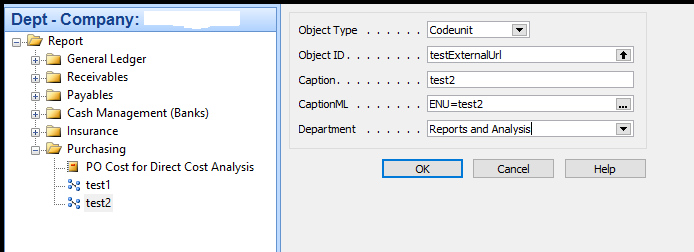
3730.Capture11.PNG        Capture22.PNG

as you can see from my attachments the 2 items links "test1" and  "test2" are calling the same Codeunit "testExternalUrl", however I wanna distinguish within the Codeunit "testExternalUrl", somehow (from the Caption) which one of the two links has been pressed/triggered.

e.g. within "testExternalUrl" Codeunit which of "test1" or "test2" item has been triggered.

Is this feasible ?

*This post is locked for comments

I have the same question (0)
  • Suggested answer
    Amol Salvi Profile Picture
    18,698 on at

    Are you running any process by clicking codeunits?

  • Verified answer
    Prtham Profile Picture
    171 on at

    We can suggest you better way, if you explain what you are trying to achive by this.

    But for your query, I can now think the best way is that you

    1. Create a new function SetOption(OPT) in codeunit 'testExternalUrl' that sets the value in global variable that is option type with optionstring 'OPT1', 'OP2'.

    2. Create 2 new codeunits say 'CD1', 'CD1'.  In each codeunit Create a global variable for codeunit 'testExternalUrl'. Call the function SetOption(OPT) first and then testExternalUrl.run

    3. Write a code in codeunit 'testExternalUrl' using case structure that you want to achive if OPT1 is set or OPT2 is set.

    4. In menusuite use the tw new codeunits CD1 and CD2 instead of 'testExternalUrl'

    Mark this as s solution if this answers your query.

  • Community Member Profile Picture
    on at

    Hi Amol,

    thank you for the reply.

    Yes, simple process... It displays some messages on the screen or opens some external urls.

    But my problem is how to identify from which item (from Menusuite) the trigger is derived. Is this feasible ?

    Kind regards,

    Michalis

  • Community Member Profile Picture
    on at

    Hi Preetham,

    thanks for your answer.

    However, using the above way if I have 20 or more options, I have to create 20 or more Codeunits, I would like to avoid this.

    Let me explain you further:

    I would like to have a lot of items on the Menusuite, when the user presses on a link, he should go directly to an external url.

    For that reason all my links are referencing into the same Codeunit. Within my Codeunit I will have a case statement that send the user to the correct external url.

    However, how can I distinguish which link item is pressed ? can you please provide me with an example code just for this function of trigger item identification ?

  • Suggested answer
    dkatson Profile Picture
    2,263 on at

    Unfortunately you have to create 20 different CU(let say 500001..50021) with 1 line in RUN ,

    and one more CU (let say 50000) with all functions.

    50001...500021 CU are running certain function in 50000 CU.  

    So user clickes on menu item (CU 50001..50021) and certain function in 50000CU is started.

    Other method is to create 1 Page with different actions.

  • Verified answer
    Tharanga Chandrasekara Profile Picture
    23,118 on at

    As I know there is no way to identify which action is clicked by user in the menu. I would create a page and add these in separate action buttons or else create two different codeunits. First method of creating a new page and then adding two buttons is easy and you can control your process logic using one codeunit.

  • Suggested answer
    Alexander Ermakov Profile Picture
    28,096 on at

    I also cannot think of any available method of capturing the exact menu item to pass different parameters to the same code unit... Only those workarounds, provided by other members here already.

  • Suggested answer
    Maneesha Profile Picture
    5,891 on at

    Michaalis ,

    unfortunately this is not available to execute

    even kind of thing very useful but still there are not captured by Microsoft same like as

    any of the entry there no any standard way to tack which user entered / last modified user / posted user(hope this can be track) like those are also very useful but they not really touch those fields      

  • Suggested answer
    4BzSoftware Profile Picture
    6,073 on at

    Hi Michaalis,

    It is not available. In my opinion:

    - You should add Item List page to the menu.

    - Users open Item List, then find or filter Items that they want to view External Links.

    - For External Links, you can utilize standard system Notes and Links features:

    3_2D00_30_2D00_2017-4_2D00_24_2D00_45-PM.png

Under review

Thank you for your reply! To ensure a great experience for everyone, your content is awaiting approval by our Community Managers. Please check back later.

Helpful resources

Quick Links

Responsible AI policies

As AI tools become more common, we’re introducing a Responsible AI Use…

Neeraj Kumar – Community Spotlight

We are honored to recognize Neeraj Kumar as our Community Spotlight honoree for…

Leaderboard > 🔒一 Microsoft Dynamics NAV (Archived)

#1
HoangNam Profile Picture

HoangNam 7

Last 30 days Overall leaderboard

Featured topics

Product updates

Dynamics 365 release plans