web
You’re offline. This is a read only version of the page.
close
Skip to main content

Notifications

Announcements

No record found.

Community site session details

Community site session details

Session Id :
Microsoft Dynamics AX (Archived)

error 50109 code while doing inventory registration for purchase order line

(0) ShareShare
ReportReport
Posted on by 434

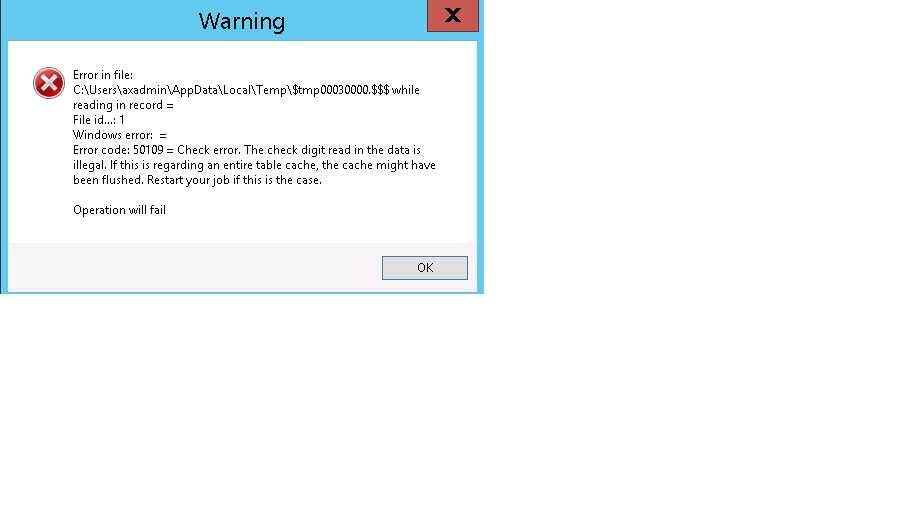
2425.Untitled.png

error in file:

c:\user\axadmin\appdata\local\temp\$tmp30000.$$$ while reading in record=

file id..1

windows error:...=

Error Code 50109-check error :-the check digit read in the data is illegal. if this is regarding an entire table cache,the cache might have been flushed. restart your job if this is in the case.

operation failed.

Above  is error when i am doing inventory registration from purchase line through x++ code.

I have 3 different batches for 1 line in purchase order having 3 qty.

when my code runs it successfully register 1st batch for line1.

but when it reads second batch and tries to register for line1 again , it gives the above error message.

After clicking ok. it gives error message

Cannot edit a record in Registration/picking (TmpInventTransWMS).The record has been deleted by another user.

i am using this method

inventTransWMS_Register.writeTmpInventTransWMS(tmpInventTransWMS, inventTrans, InventDim::find(tmpInventTransWMS.InventDimId));

Following steps tried for resolution

also tried by changing cachelookup property of table tmpinventtranswms to none, found, foundandempty

i have stopped service 

deleted xppil folder, auc files, kti files but it didn't worked for me.

Please help.

*This post is locked for comments

I have the same question (0)
  • Suggested answer
    André Arnaud de Calavon Profile Picture
    300,911 Super User 2025 Season 2 on at

    Hi Raj,

    I have seen this error before. Please check on the AOS if the disk is full. Then it cannot complete writing some caching to the disk. If you have multiple AOS machines, check all of them.

  • Martin Dráb Profile Picture
    237,803 Most Valuable Professional on at

    It's a temporary table, therefore playing with CacheLookup isn't likely to help.

    First of all, please check that there is enough space on disk, as André mentioned.

    If it is, it seems that a piece of code tries to use a temporary buffer that isn't valid anymore.

    If you're reusing the same temporary buffer and it's not necessary, please stop doing that and create a new instance for each batch.

    If it doesn't help, I would focus debugging on changes in linking to temporary buffers (e.g. setTmpData() in InventTransWMS.writeTmp()).

  • rajeev tiwari Profile Picture
    434 on at

    Hi Andre,

    Disk is not full and sql server and AOS are in same server.

    do you have any other suggestion for me

    i am stuck doing user acceptance testing.

  • rajeev tiwari Profile Picture
    434 on at

    while select tmpbatch

    {

                inventTransWMS_Register = InventTransWMS_Register::newStandard(tmpInventTransWMS);

                inventTrans             = InventTrans::findTransId(purchLine.InventTransId);

                PurchTable = PurchTable::find(purchid,true);

                    if(purchLine.ItemId ==itemcode)

                      {

                         if(purchLine.RemainPurchPhysical >=Qty)

                          {

              select  inventBatch where inventBatch.inventBatchId==inventBatchId  &&         inventBatch.itemid==purchLine.ItemId;

              if(!inventBatch)

              {

                inventBatch.inventBatchId=inventBatchId;

                inventBatch.itemId=purchLine.ItemId;

                inventBatch.insert();

              }

               invendim = InventDim::find(purchLine.InventDimId);

               invendim.inventBatchId = inventBatch.inventBatchId;

               purchLine.InventDimId = InventDim::findOrCreate(invendim).inventDimId;

               tmpInventTransWMS.initFromInventTrans(inventTrans);

               tmpInventTransWMS.InventQty     = Qty;//purchLine.QtyOrdered;

               tmpInventTransWMS.LineNum       = int642int(purchLine.LineNumber);

               // You can specify a different InventDimId with your specific dimension like batch number

               tmpInventTransWMS.InventDimId   = purchLine.InventDimId;

               tmpInventTransWMS.ItemId        = purchLine.ItemId;

               ttsBegin;

               inventTransWMS_Register.writeTmpInventTransWMS(tmpInventTransWMS, inventTrans, InventDim::find(tmpInventTransWMS.InventDimId));

               ttsCommit;

    }

    this is the code I am using , it runs good for the first time and when it enters in loop for second line it gives error, then i have to close error infolog and run again and same happens again it works for next line but not for after this line.

    I am storing all batches and qty and purchase order and line number in table and run batch to register purchase line from this code.

  • André Arnaud de Calavon Profile Picture
    300,911 Super User 2025 Season 2 on at

    Hi Raj,

    How many records are expected to be in this temporary table? Is the temp table in memory or is it set to tempdb? You can try to use the tempdb option.

  • Verified answer
    rajeev tiwari Profile Picture
    434 on at

    Hi Andre,

    It is inmemory table , i check in my code if any data exists in this table then it should be deleted and it resolved my issue...but this should not be the case as it is standard table without and customisation.

  • Community Member Profile Picture
    on at

    Hi raj

    I am also the same phenomenon has occurred.

    I review the source of InventTransRegister form, it has been resolved.

    When I use the InventTransWMS_Register, it calls the "newStandard method" in units of InventTransOrigin.

    InventTransOrigin I think to be the same units as PurchLine.

    In addition, it is better you make at the beginning tmpInventTransWMS.clear () in the loop.

Under review

Thank you for your reply! To ensure a great experience for everyone, your content is awaiting approval by our Community Managers. Please check back later.

Helpful resources

Quick Links

Responsible AI policies

As AI tools become more common, we’re introducing a Responsible AI Use…

Neeraj Kumar – Community Spotlight

We are honored to recognize Neeraj Kumar as our Community Spotlight honoree for…

Leaderboard > 🔒一 Microsoft Dynamics AX (Archived)

#1
Martin Dráb Profile Picture

Martin Dráb 4 Most Valuable Professional

#1
Priya_K Profile Picture

Priya_K 4

#3
MyDynamicsNAV Profile Picture

MyDynamicsNAV 2

Last 30 days Overall leaderboard

Featured topics

Product updates

Dynamics 365 release plans
