web
You’re offline. This is a read only version of the page.
close
Skip to main content

Notifications

Announcements

No record found.

Community site session details

Community site session details

Session Id :
Microsoft Dynamics AX (Archived)

Transforming a form vertically

(0) ShareShare
ReportReport
Posted on by

Hi

I have an issue where I have a excel doc. with some columns. The AX form that I want to create must look like the excel table.

The form will be based on the tables Projtable and ProjForescastCost.

5228.Screenshot_5F00_12.png

ProjForecastCost form looks like this now:
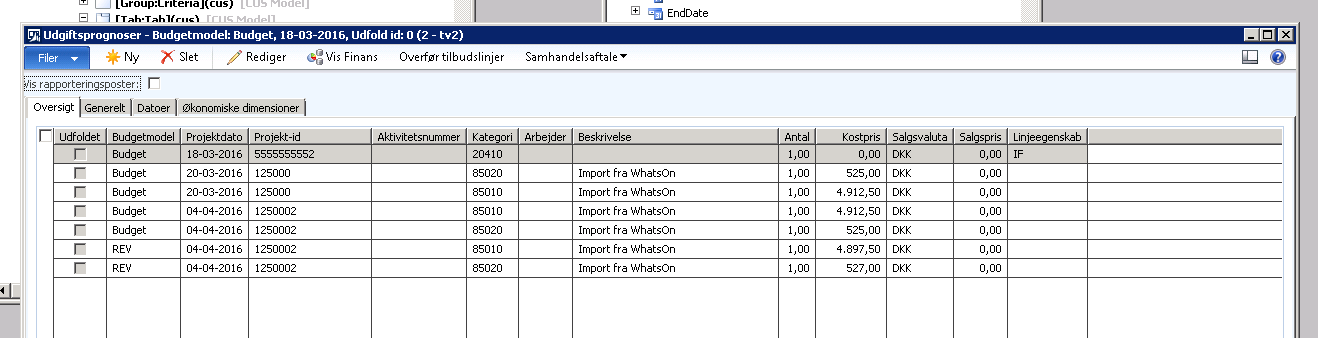
Screenshot_5F00_11.png

But I want to  change it to look like the excel doc.

Question:

How can I do this?

1. I want to create a column that is called "Budget".

Conditions:

If ProjForeCastCost.ModelId  = "Budget"

then the column "Budget" = ProjForeCastCost.ModelI

*This post is locked for comments

I have the same question (0)
  • Suggested answer
    Community Member Profile Picture
    on at

    hi

    Yes, it should be possible without much work. You can write your logic in Modified field method in table. populate the column "Budget" with an if condition else clear that value.

    I cannot see any challenge in this

  • Suggested answer
    Martin Dráb Profile Picture
    237,965 Most Valuable Professional on at

    Designing AX form as Excel sheets isn't a good idea, because it usually violates rules of AX form design. What you've shown already violates UX style of AX 2012.

    Nevertheless your question doesn't seem to be about "Transforming a form vertically"; you want to know how to add a calculated field. In that case, simply add a display method with your logic and add a control to the grid bound to your new display method.

Under review

Thank you for your reply! To ensure a great experience for everyone, your content is awaiting approval by our Community Managers. Please check back later.

Helpful resources

Quick Links

Responsible AI policies

As AI tools become more common, we’re introducing a Responsible AI Use…

Neeraj Kumar – Community Spotlight

We are honored to recognize Neeraj Kumar as our Community Spotlight honoree for…

Leaderboard > 🔒一 Microsoft Dynamics AX (Archived)

#1
Martin Dráb Profile Picture

Martin Dráb 4 Most Valuable Professional

#1
Priya_K Profile Picture

Priya_K 4

#3
MyDynamicsNAV Profile Picture

MyDynamicsNAV 2

Last 30 days Overall leaderboard

Featured topics

Product updates

Dynamics 365 release plans



