web
You’re offline. This is a read only version of the page.
close
Skip to main content

Notifications

Announcements

No record found.

Community site session details

Community site session details

Session Id :
Finance | Project Operations, Human Resources, ...
Unanswered

Error Saving an XPP File

(0) ShareShare
ReportReport
Posted on by 66

Hi all,

I need some help I don't understand and don't know what else to try. I wrote a custom class and am updating the class and getting the following error
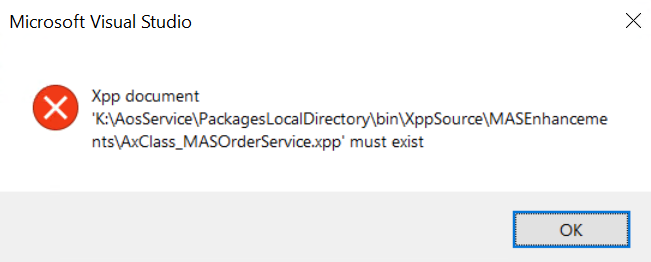
pastedimage1670743436583v1.png
Things I've tried
Clean and Rebuild project
Restarted IIS and IIS express
Refreshed refereces
Refreshed Models
Build Model

Everything is successful but still getting the above

I have even manually confirmed the file in question does exist int he folder specified, with the specified file name

Please advise

I have the same question (0)
  • Martin Dráb Profile Picture
    237,801 Most Valuable Professional on at

    Why are you trying to save an .xpp file? This file isn't your source code; it's a file generated for debugging purposes.

    The source code file will be somewhere like K:\AosService\PackagesLocalDirectory\MASEnhacements\MASEnhacements\AxClass\MasOrderService.xml.

  • Nze Profile Picture
    66 on at

    Hi

    Not trying to save an xpp file. Just his save in visual studio after modifying the class and got the message

  • André Arnaud de Calavon Profile Picture
    300,911 Super User 2025 Season 2 on at

    Hi Nze,

    I have not seen this error before. Have you opened Visual Studio with the option 'Run as administrator'?

  • Nze Profile Picture
    66 on at

    Yes, I always run VS as admin. I even ran a repair on visual studio and when I reopened the project and attempted to open the class for editing, I get the following error

    "The operation could not be completed. Unspecified error"

  • André Arnaud de Calavon Profile Picture
    300,911 Super User 2025 Season 2 on at

    Was there a recent change on this environment? In case you have access to another development environment, can you get latest over there and check if it is working correctly?

  • Deepak Agarwal Profile Picture
    8,598 on at

    By any chance , have you made changes in Models like creating object in one model and later moved to another model.  How many custom model are there in your instance.

  • Nze Profile Picture
    66 on at

    No changes and I don't have another environment to import the project and test there

  • Nze Profile Picture
    66 on at

    There is only one custom model. I am going to export the project, delete the model and create another model and reimport the project

  • Deepak Agarwal Profile Picture
    8,598 on at

    Why you need to delete the model and create another model. Or you are saying you will do this to overcome this issue.

Under review

Thank you for your reply! To ensure a great experience for everyone, your content is awaiting approval by our Community Managers. Please check back later.

Helpful resources

Quick Links

Responsible AI policies

As AI tools become more common, we’re introducing a Responsible AI Use…

Neeraj Kumar – Community Spotlight

We are honored to recognize Neeraj Kumar as our Community Spotlight honoree for…

Leaderboard > Finance | Project Operations, Human Resources, AX, GP, SL

#1
Martin Dráb Profile Picture

Martin Dráb 664 Most Valuable Professional

#2
André Arnaud de Calavon Profile Picture

André Arnaud de Cal... 522 Super User 2025 Season 2

#3
Sohaib Cheema Profile Picture

Sohaib Cheema 303 User Group Leader

Last 30 days Overall leaderboard

Product updates

Dynamics 365 release plans



