web
You’re offline. This is a read only version of the page.
close
Skip to main content

Announcements

No record found.

News and Announcements icon
Community site session details

Community site session details

Session Id :
Finance | Project Operations, Human Resources, ...
Unanswered

Excel sheet lookup value is mandatory error while import export through data entity

(0) ShareShare
ReportReport
Posted on by 152

Hi , 

I am getting an error while doing export and import in ax2012 by DIXF . Can please suggest me what should i do to resolve it.

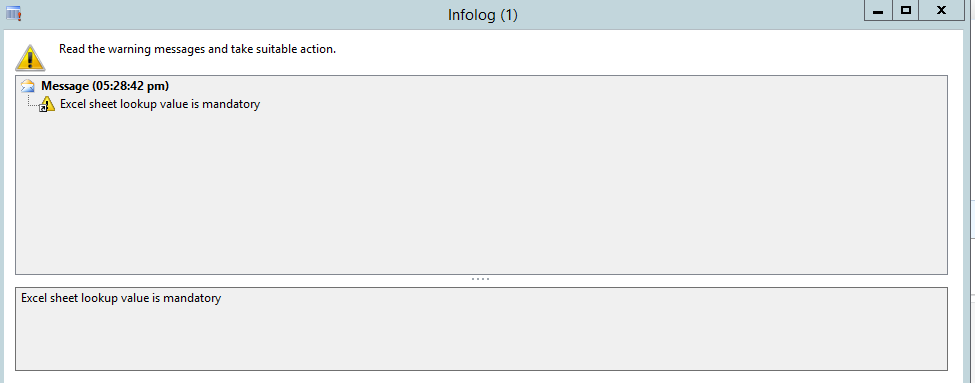
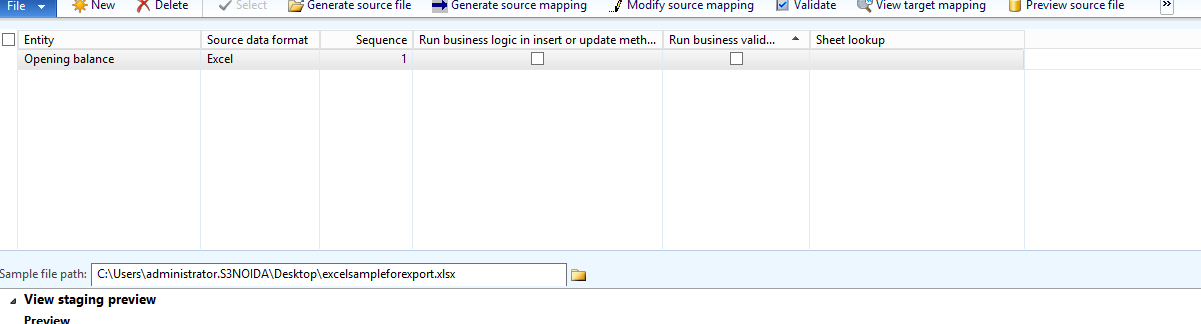
I am creating Processing Group where i Add entity and select those all field which i need and then generate the sample files and use it as sample path in the DIXF , but it showing error when i go to the GENRATE SOURCE MAPPING
pastedimage1666094676141v3.png

This excel error is displaying

pastedimage1666094543209v1.png

suggest me the solution to resolve it. 

I have the same question (0)
  • Martin Dráb Profile Picture
    239,451 Most Valuable Professional on at

    Use the "Sheet lookup" field (the right-most field in the grid in your screenshot) to select a sheet that you want to use.

  • CU01020909-0 Profile Picture
    4 on at
    Hi Martin,
    I know this is an old thread, but I have the same issue.
    The Sheet lookup list is empty!
    On my TEST server, when I select the sample file path, it filles the Sheet lookup field automatically.
    But on Production server it comes as empty (Check the attached screenshot)
    The deferent only is:
    - On TEST server it includes all DIXF components (Service, AOS, and Client)
    - On Production server, I have a separate database server, so I installed only AOS on Production server, but the Service and Client components on DB server.
  • Martin Dráb Profile Picture
    239,451 Most Valuable Professional on at
    @CU01020909-0 Please create a new thread about your problem of the lookup not working in production. There we can also talked about where a client should be installed (it's likely not related to your problem but it's something you should reconsider anyway).

Under review

Thank you for your reply! To ensure a great experience for everyone, your content is awaiting approval by our Community Managers. Please check back later.

Helpful resources

Quick Links

Introducing the 2026 Season 1 community Super Users

Congratulations to our 2026 Super Stars!

Meet the Microsoft Dynamics 365 Contact Center Champions

We are thrilled to have these Champions in our Community!

Congratulations to the April Top 10 Community Leaders

These are the community rock stars!

Leaderboard > Finance | Project Operations, Human Resources, AX, GP, SL

#1
André Arnaud de Calavon Profile Picture

André Arnaud de Cal... 593 Super User 2026 Season 1

#2
Giorgio Bonacorsi Profile Picture

Giorgio Bonacorsi 543

#3
CP04-islander Profile Picture

CP04-islander 430

Last 30 days Overall leaderboard

Product updates

Dynamics 365 release plans