web
You’re offline. This is a read only version of the page.
close
Skip to main content

Notifications

Announcements

No record found.

Community site session details

Community site session details

Session Id :
Microsoft Dynamics AX (Archived)

String Edit field not updating records.

(0) ShareShare
ReportReport
Posted on by

Hello All,


I am working on my first AX form modification and am running into a bit of an issue.


For this modification, I am adding a new grid to a tab in the general ledger paramaters form which is displaying a field from a new table I created (Table is named LifeAccountExclusion and field is named LifeAccount.) This field on the grid has been set up as a StrEdit control.


I have sucessfully added this grid and field on the grid, but am running into the issue that that if I try to update the record on the form, the value never gets saved back to the sql table.


A couple of notes:

1) The data source (table LifeAccountExclusion) is set to allow edits

2) As far as I can tell, there are no methods anywhere on this form which might influence this field not saving.

3) Also,  I created another test form which only has the table LifeAccount Exclusion as a data source, with a grid and stredit control displaying the LifeAccont field. This test form works exactally as expected, leading me to believe there is just a paramater I am missing somewhere on the GL paramaters form.


So I am wondering if anyone has a thought on what I should check next to see why this stredit is not actually updating the underlying table?


A screen shot of the form I am trying to modify is below.


Thank you,


Phil
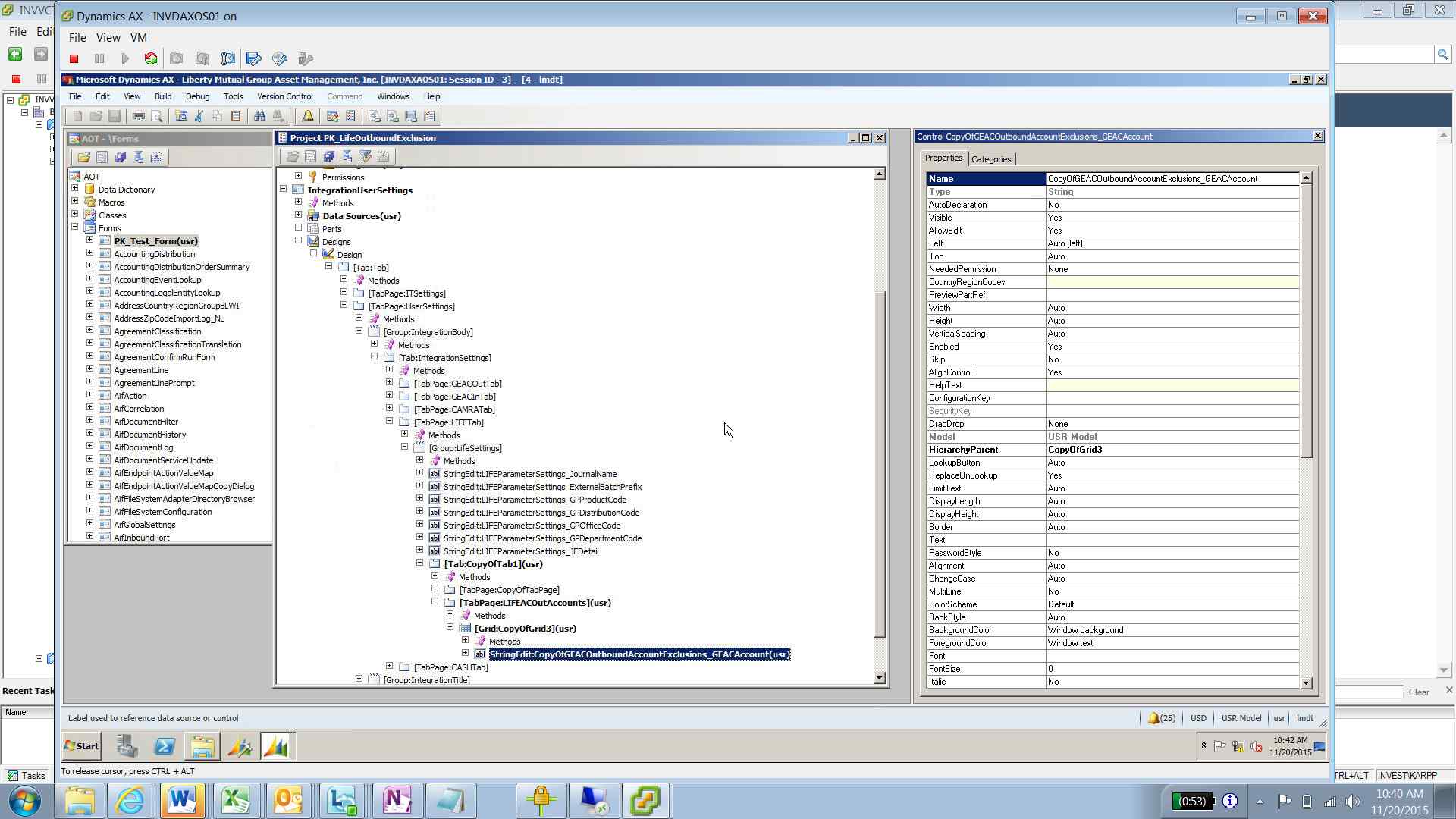
 

2015_2D00_11_2D00_20_5F00_104207.png

*This post is locked for comments

I have the same question (0)
  • Sohaib Cheema Profile Picture
    49,438 User Group Leader on at

    I doubt, if you trying to implement MianAccount Lookup, you should be using segment entity control

    you may provide us little more information about what you are trying to do exactly  

  • Verified answer
    KyleLeBarre Profile Picture
    747 on at

    Is the grid control's datasource property set to the correct datasource?

  • Community Member Profile Picture
    on at

    That was the issue. I did not realize that the data source on the grid has to match the datasource on the stredit contol. But that makes sense.

    Thanks for the help!

  • KyleLeBarre Profile Picture
    747 on at

    Yup...we've all been there, haha. Glad I could help.

Under review

Thank you for your reply! To ensure a great experience for everyone, your content is awaiting approval by our Community Managers. Please check back later.

Helpful resources

Quick Links

Responsible AI policies

As AI tools become more common, we’re introducing a Responsible AI Use…

Neeraj Kumar – Community Spotlight

We are honored to recognize Neeraj Kumar as our Community Spotlight honoree for…

Leaderboard > 🔒一 Microsoft Dynamics AX (Archived)

#1
Martin Dráb Profile Picture

Martin Dráb 4 Most Valuable Professional

#1
Priya_K Profile Picture

Priya_K 4

#3
MyDynamicsNAV Profile Picture

MyDynamicsNAV 2

Last 30 days Overall leaderboard

Featured topics

Product updates

Dynamics 365 release plans



