web
You’re offline. This is a read only version of the page.
close
Skip to main content

Notifications

Announcements

No record found.

Community site session details

Community site session details

Session Id :
Finance | Project Operations, Human Resources, ...
Answered

Prices of PO’s are not filled in when it’s created from an SO

(0) ShareShare
ReportReport
Posted on by 15

Prices of PO’s are not filled in when it’s created from an SO (# 43, #754)


Dear community,

When I create a purchase order from a sales order the prices are not being filled in on the purchase order. But after I make a random change to the screen, the screen seems to refresh and then fill in the prices in the correct way.

When I create a purchase order (not from a sales order) the prices are being filled in correctly without the workaround. So it only seems to happen when the purchase order is being created from the sales order.

  • All sales orders
  • New
  • Fill in a random customer (f.e. 170)
  • OK
  • Fill in a random item number (f.e. 00.110810)
    • The unit price and net amount are filled in automaticly
  • confirm sales order (on the Sell tab)
    • optional: when you get the screen to adjust the ship dates choose “update requested ship date”
  • OK (in the confirm order screen)
  • New Purchase order (on the Sales Order tab)
  • Put a check mark in the Include box
  • OK
  • In the line details click on the product tab
  • Click on the reference number of the purchase order to open te purchase order
  • Look in the purchase order lines and search for the columns
    • You will notice the unit price and net amount are not filled
  • Make a small change (for example change quantity from 1 to 2)
  • Press enter or tab or something to confirm your input
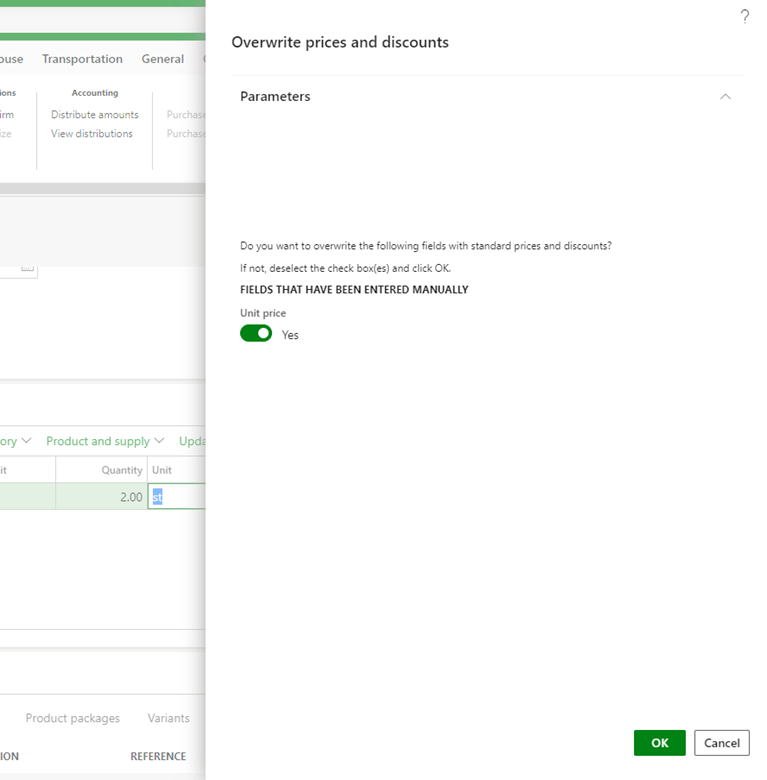
    • A screen appears: Overwrite prices and discounts; Do you want to overwrite the following fields with standard prices and discounts?
    • If you put the Unit price ON and click Yes, then the unit price will get filled correctly
    • If you put the Unit price OFF or click Cancle, then the unit price will remain empty

If I create the sales order the prices do get filled correctly on the sales order (like mentioned above). If I create a manual purchase order, the prices will get filled correctly too. We would like the prices in a PO created from a SO to be filled in correctly too.

I’ve been reading and there seems to be a connection to the trade agreements, but we don’t understand exactly how and why. And there seem to be parameters who control the behavior of the Overwrite prices and discounts screen.

https://community.dynamics.com/ax/f/microsoft-dynamics-ax-forum/280249/sales-order-override-price-and-discount

https://community.dynamics.com/ax/f/microsoft-dynamics-ax-forum/280167/prompt-on-sales-order---do-you-want-to-overwrite-the-following-fields-with-standard-prices-and-discounts?pifragment-96834=1

Could this be a bug in our customization? Or is this something else?

pastedimage1606309547852v1.png

pastedimage1606309572224v2.png

pastedimage1606309595618v3.png

I have the same question (0)
  • Suggested answer
    Junaid Idrees Profile Picture
    on at

    Hi Equinox2,

    In nutshell, When you create Purchase Order from Sales Order, system copy product details and Qty.  from sales order screen and purchase unit price will be picked from product screen.

    In order to fill up purchase unit price automatically, you can also use purchase agreement option (If you have created any in the system) Or system will pick the purchase price defined on Product master screen >> Purchase Tab. In case if you don't maintain latest purchase price on Product card then you have to specify purchase unit price manually. Hope it clarifies.

    For your reference: (Product screen > Purchase Tab)

    7128.png

    System picked 250 as purchase unit price automatically while creating PO:

    36846.PNG

    Can you please share some details about what exactly you have customized and on which particular screen?

  • Equinox2 Profile Picture
    15 on at

    Hi Junaid,

    Yeah this must be the explanation. Thanks alot for your fast and clear reply. It's much appreciated. We will now determine how we will change the situation.

    Thanks alot!

  • Junaid Idrees Profile Picture
    on at

    Sounds Good. Do you need any futher help/information? Please take your time to verify answers by ticking the checkbox in order to close the topic and assist other users with similar problems.

  • Equinox2 Profile Picture
    15 on at

    I'm afraid I concluded too fast. I only checked the purchase agreements (Accounts payable > purchase orders > purchase agreement ), but in our D365FO the purchase agreements are setup on item level. So when i look at the released item > purchase agreement, than I see that the price is setup, but the price is not being transferred to the create PO screen from the SO.

    We also double checked in an D365FO environment without any customization and found out that in that case the purchase price is filled in correctly.

    pastedimage1606388626231v3.png

    The purchase price is not setup on item level,

    pastedimage1606388523331v2.png

    but in a purchase agreement at item level,

    pastedimage1606389001191v5.png

    so we would expect the price to be filled in automatically, which is not the case.

    pastedimage1606388945121v4.png         pastedimage1606389172229v6.png

    In a clean 365FO environment we see different behavior so we expect the rental order customization could be the cause of this 

  • Suggested answer
    Junaid Idrees Profile Picture
    on at

    Hi Equinox2,

    If purchase prices are defined in purchase agreement then that should work also. I think you have created trade agreement not purchase agreement. Please recheck

    Did you enabled "search for purchase agreement" on create purchase order screen? I can see in your screen print you didnt enabled.

    Can you share the details what was the behavior on clean environment? And what kind of rental customization you have done, on which screen?

  • Suggested answer
    Equinox2 Profile Picture
    15 on at

    Hi Junaid,

    Thanks for the reply and sorry for my late reply.

    These purchase agreements were made via: Modules > Product Information Management > Released products > filter on items >Purchase tab > View trade agreements. I assume these are the purchase agreements. Or am I mistaking?

    I tried your suggestion to turn on the option "search for purchase agreement". But this still resulted in empty prices in th purchase order.

    In a test environment I also tried to create a "normal purchase agreement" (Accounts payable > Purchase Orders > Purchase agreements) but i noticed the vendor was not available for picking and Purchase agreement classification (a mandatory field) had no options to select. But this was the same in the clean environment.

    We decided to get a consultant to investigate this further. We think it could be a result of the customization.  Thanks for helping us reach that decision! It is much appreciated.

Under review

Thank you for your reply! To ensure a great experience for everyone, your content is awaiting approval by our Community Managers. Please check back later.

Helpful resources

Quick Links

Responsible AI policies

As AI tools become more common, we’re introducing a Responsible AI Use…

Neeraj Kumar – Community Spotlight

We are honored to recognize Neeraj Kumar as our Community Spotlight honoree for…

Leaderboard > Finance | Project Operations, Human Resources, AX, GP, SL

#1
Martin Dráb Profile Picture

Martin Dráb 565 Most Valuable Professional

#2
André Arnaud de Calavon Profile Picture

André Arnaud de Cal... 450 Super User 2025 Season 2

#3
Sohaib Cheema Profile Picture

Sohaib Cheema 250 User Group Leader

Last 30 days Overall leaderboard

Product updates

Dynamics 365 release plans