web
You’re offline. This is a read only version of the page.
close
Skip to main content

Notifications

Announcements

No record found.

Community site session details

Community site session details

Session Id :
Microsoft Dynamics AX (Archived)

Changing display name of query fields

(0) ShareShare
ReportReport
Posted on by 411

Hi everyone, 

We are currently using queries as document data sources for ad hoc reports for our customer and it's really useful. However the problem we have is that the display names for the columns aren't very explicit. For example, it's quite difficult for the user to guess that PartyLocationRelationships.Name refers to the legal entity (check screenshot). Any chance we could replace that with something a bit more user-friendly ? I've check the properties for the query's field and there is no such thing as an alias or a display name. 
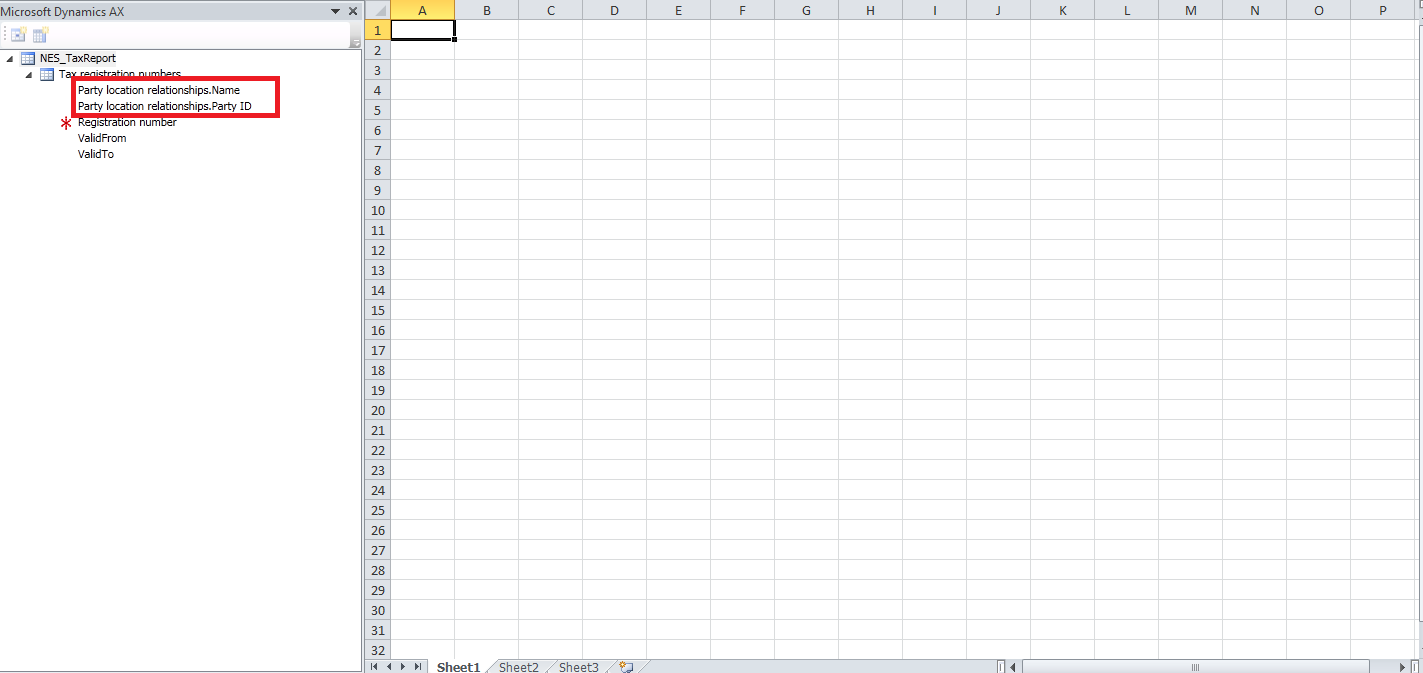
NESReports.png

*This post is locked for comments

I have the same question (0)
  • Verified answer
    syed baber Profile Picture
    11,633 on at

    Hi Jugurnauth,

    I think if you use Views as datasource in your AOT query, you would be able to change the display name of the fields showing inside a query. In Views, I can change the field name to whatever I want and can be different from the original field name in the table.

    Thanks,

    Baber.

  • Ashwin Jugurnauth Profile Picture
    411 on at

    Hello Baber,

    Thanks for this suggestion. I tried it by supplying a view with custom field names to a query. Then I used the query as a query reference in a document data source. Unfortunately, the original table field name still remains, for some weird reason. Did you try to do this too or was it a wild guess ?

    Best regards,

    Ashwin

  • syed baber Profile Picture
    11,633 on at

    Hi Ashwin,

    I just made a guess considering the fact that we can change the field name inside a view. Sorry to hear that it didn't work for you.

    Thanks,

    Baber.

  • Ashwin Jugurnauth Profile Picture
    411 on at

    It's alright. I was just asking in case this solution had worked for you in the past and I was doing something wrong :)

    Best regards,

    A.J

  • Ashwin Jugurnauth Profile Picture
    411 on at

    Any other suggestion guys ? Please ? :)

  • Verified answer
    ColbyGallagher Profile Picture
    3,666 on at

    If you take a table -> View -> Query->Document data source, you need to change the "Label" property on the view field to get it to show correctly in the Add-In.   You also need to deactivate your data source, clear caches in the AOT via Tools -> Caches - Refresh Data / Refresh Dictionary / Refresh Elements, re-activate your data source and then re-launch Excel. 

    Alternatively, if you notice that when in design mode in the Add-In, if you hover over a field, the table.name is displayed.  You can instruct users to use this method to match the field to what they see in the client via a right click -> Personalize.  Then have the user drag the field into the excel table object and re-name it there, while still in design mode, to something meaningful.   The excel table object will persist their name and continue to grab the correct field from the table. 

  • Ashwin Jugurnauth Profile Picture
    411 on at

    Thank you very much for the reply. Your suggestion sounds promising. I did try this before but I didn't refresh data/dictionary/elements. I did it again combined with a server restart. I'll keep you updated about the results.

  • Ashwin Jugurnauth Profile Picture
    411 on at

    Thank you good Sir, it works like a charm. Seems the only thing missing in my approach was a data refresh. Have a nice day.

    Regards,

    Ashwin

  • syed baber Profile Picture
    11,633 on at

    Hi Ashwin,

    So, have you used Views in your query as I mentioned in my first comment?

  • Ashwin Jugurnauth Profile Picture
    411 on at

    Yes, as I told you, I did try it but without the data refresh it was not working. In any case, endorsing your answer right now, and many thanks for the help :)

Under review

Thank you for your reply! To ensure a great experience for everyone, your content is awaiting approval by our Community Managers. Please check back later.

Helpful resources

Quick Links

Responsible AI policies

As AI tools become more common, we’re introducing a Responsible AI Use…

Neeraj Kumar – Community Spotlight

We are honored to recognize Neeraj Kumar as our Community Spotlight honoree for…

Leaderboard > 🔒一 Microsoft Dynamics AX (Archived)

#1
Priya_K Profile Picture

Priya_K 4

#2
Alexey Lekanov Profile Picture

Alexey Lekanov 3

#3
Martin Dráb Profile Picture

Martin Dráb 2 Most Valuable Professional

Last 30 days Overall leaderboard

Featured topics

Product updates

Dynamics 365 release plans
