web
You’re offline. This is a read only version of the page.
close
Skip to main content

Notifications

Announcements

No record found.

Community site session details

Community site session details

Session Id :
Customer experience | Sales, Customer Insights,...
Suggested Answer

Unable to use marketing form for event registration

(0) ShareShare
ReportReport
Posted on by 15

We would like to use marketing forms for event registration.

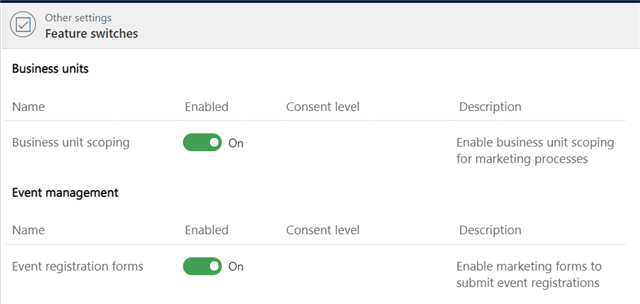
We've enabled event registration forms in settings (manually in Settings > Other settings > Feature switches)
pastedimage1620044183557v4.png

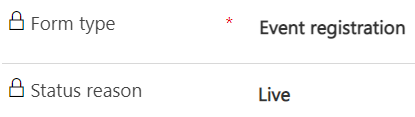
and created a live event registration form
pastedimage1620044176351v3.png

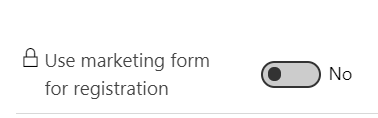
but we cannot enable marketing form for event registration for our event. When we navigate to an event to connect it there, the option is blacked out. We've been unable to find any solutions in the forums or documentation, can you please help us?
pastedimage1620043686568v2.png

I have the same question (0)
  • Angele Profile Picture
    40 on at

    I ran into this same issue and was told that it is not possible.  I got the below reply to my question.

    Hi,

    It cannot be achieved unfortunately as the type of the form host in a landing page is land page form and the type for registering an event is Event Registration Form.

    The landing page form is used to create / update contacts / leads with the information submitted.

    The Event Registration Form will create a record of Event Registration in addition to the creation / updating, which is not able to be inserted into a landing page however.

    Here are two related documentations about the two types of form which you can refer to:

    Set up and manage marketing forms for use in marketing pages (Dynamics 365 Marketing) | Microsoft Docs

    Use marketing forms for event registration (Dynamics 365 Marketing) | Microsoft Docs

  • Suggested answer
    Nya Profile Picture
    29,060 on at

    Hi,

    Please check if the event in which you’d like to use the form have gone live.

    If yes, the option cannot be modified unless the event has been stopped.

    You can stop it temporarily if the suspension has no effect on your event and go live it again after changing this option and selecting the correct form.

     pastedimage1620610521519v1.png

    If this helped you, I'd appreciate it if you'd mark this as a Verified Answer, which may in turn help others as well.

    Best Regards,

    Nya

  • SofiaJ Profile Picture
    15 on at

    Thanks Nya! The event was live. It turns out we had enabled the event registration forms in feature switches very early on and we needed to disable them and enable them again for it to work.

  • Nya Profile Picture
    29,060 on at

    Hi,

    It's great to hear that the issue has been resolved.

    Best Regards,

    Nya

Under review

Thank you for your reply! To ensure a great experience for everyone, your content is awaiting approval by our Community Managers. Please check back later.

Helpful resources

Quick Links

Responsible AI policies

As AI tools become more common, we’re introducing a Responsible AI Use…

Neeraj Kumar – Community Spotlight

We are honored to recognize Neeraj Kumar as our Community Spotlight honoree for…

Leaderboard > Customer experience | Sales, Customer Insights, CRM

#1
Tom_Gioielli Profile Picture

Tom_Gioielli 73 Super User 2025 Season 2

#2
Gerardo Rentería García Profile Picture

Gerardo Rentería Ga... 43 Most Valuable Professional

#3
Daniyal Khaleel Profile Picture

Daniyal Khaleel 32 Most Valuable Professional

Last 30 days Overall leaderboard

Product updates

Dynamics 365 release plans
