web
You’re offline. This is a read only version of the page.
close
Skip to main content

Notifications

Announcements

No record found.

Community site session details

Community site session details

Session Id :
Finance | Project Operations, Human Resources, ...
Answered

Post Packing Slip through X++ Code Permissions

(0) ShareShare
ReportReport
Posted on by 2,346

Hi All

I have added a button with following code to post packing slip for all sales order lines (SalesLine) with quantity in 'Delivery now' field.

void clicked()
{
    CustPackingSlipJour         custPackingSlipJour;
    SalesFormLetter             salesFormLetter;
    System.Exception            error;
    String255                   strError;

    ttsBegin;

    try
    {
        if (SalesTable.SalesStatus == SalesStatus::BackOrder)
        {
            salesFormLetter = SalesFormLetter::construct(DocumentStatus::PackingSlip);

            salesFormLetter.update(
                                    SalesTable,
                                    systemDateGet(),
                                    SalesUpdate::DeliverNow,
                                    AccountOrder::None,
                                    NoYes::No,
                                    NoYes::Yes,
                                    NoYes::No
                                  );

            if (salesFormLetter.parmJournalRecord().TableId == tableNum(CustPackingSlipJour))
            {
                custPackingSlipJour = salesFormLetter.parmJournalRecord();

                info(strFmt('New Packing Slip #:%1 successfully created for Sales Order #:%2', custPackingSlipJour.PackingSlipId, custPackingSlipJour.SalesId));
            }
            else
            {
                warning('Error posting packing slip, try again');
            }
        }
        else
        {
            warning('Order status must be \'Open order\' before posting packing slip');
        }
    }
    catch (Exception::CLRError)
    {
        error = CLRInterop::getLastException();
        strError = error.ToString();

        info(strfmt('%1', strError));
        info(strFmt('%1 failed to delivered, please try again!', SalesTable.SalesId));
    }

    ttsCommit;
}

I have added all methods of 'SalesFormLetter' and 'SalesFormLetter_PackingSlip' classes in users permission but still packing slip is not getting posted when the user is clicking on the button. .

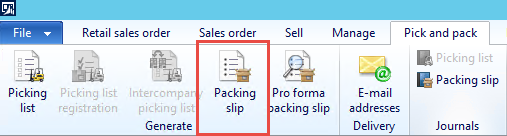
Moreover, the user can post packing slip through 'Packing slip' button available in 'Pick and pack' tab.
pastedimage1622533538373v1.png

Can anybody let me know possible solution for this issue.

Thanks in advance.

Haroon

I have the same question (0)
  • Suggested answer
    André Arnaud de Calavon Profile Picture
    301,020 Super User 2025 Season 2 on at

    Hi Haroon,

    Is the code working for a user with the system administrator role? If not, it might be related to the coding itself.

    If it is working with system administrator rights, you have to check the permissions in the tables used and also check if the privilege has explicit access to the salesFormLetter methods (update()).

  • Verified answer
    haroonattari Profile Picture
    2,346 on at

    Hi Andrew

    Thanks for your reply. I already added that methods and all related tables in custom privilege but it did not help.  Debugging the code revealed that the user did not have required permission on report server. Adding user did the trick and clicking the button worked as intended.

  • André Arnaud de Calavon Profile Picture
    301,020 Super User 2025 Season 2 on at

    Thanks for providing your own solution. I have verified your answer to change the status of the question to 'answered'.

Under review

Thank you for your reply! To ensure a great experience for everyone, your content is awaiting approval by our Community Managers. Please check back later.

Helpful resources

Quick Links

Responsible AI policies

As AI tools become more common, we’re introducing a Responsible AI Use…

Neeraj Kumar – Community Spotlight

We are honored to recognize Neeraj Kumar as our Community Spotlight honoree for…

Leaderboard > Finance | Project Operations, Human Resources, AX, GP, SL

#1
Martin Dráb Profile Picture

Martin Dráb 646 Most Valuable Professional

#2
André Arnaud de Calavon Profile Picture

André Arnaud de Cal... 529 Super User 2025 Season 2

#3
Sohaib Cheema Profile Picture

Sohaib Cheema 285 User Group Leader

Last 30 days Overall leaderboard

Product updates

Dynamics 365 release plans
