web
You’re offline. This is a read only version of the page.
close
Skip to main content

Notifications

Announcements

No record found.

Community site session details

Community site session details

Session Id :
Microsoft Dynamics AX (Archived)

Table synchronize error. Cannot drop the index because it does not exist or you do not have permission.

(0) ShareShare
ReportReport
Posted on by 2,162

Hi,

I added a field to this table: STG_INVOICE_SUP_VW

But then I wasn't able to synchronize the table so I deleted it. Now if I'm trying to synchronize any table it's throwing this error below:

Cannot execute a data definition language command on ().
The SQL database has issued an error.

SQL error description: [Microsoft][SQL Server Native Client 11.0][SQL Server]Cannot drop the index
'STG_INVOICE_SUP_VW._dta_index_STG_INVOICE_SUP_VW_25_692157136__K7_1_2_3_4_5_6_8_9_10_11_12_13_14_15_16_17_1',
because it does not exist or you do not have permission.

SQL statement: DROP INDEX
STG_INVOICE_SUP_VW._dta_index_STG_INVOICE_SUP_VW_25_692157136__K7_1_2_3_4_5_6_8_9_10_11_12_13_14_15_16_17_1

Problems during SQL data dictionary synchronization.
The operation failed.

Synchronize failed on 1 table(s)
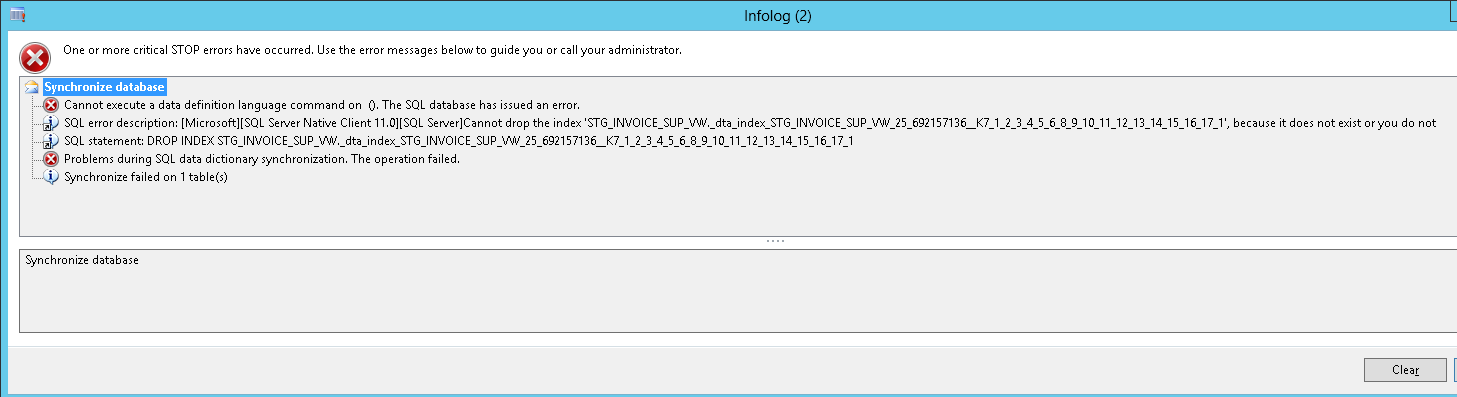
8546.SyncError.png

Any tips on how to resolve this?

*This post is locked for comments

I have the same question (0)
  • Verified answer
    nmaenpaa Profile Picture
    101,160 Moderator on at

    You could try to manually remove the index directly on the SQL Server side.

    Then synchronize the table again from AX.

  • Verified answer
    feelyd Profile Picture
    260 on at

    Looks like the AOT and SQL could have got out of SYNC.

    Login directly onto SQL Server and check the table manually.

    If the index exists try and delete it manually.

    Synchronizing the table again should then get you int sync

  • Suggested answer
    Denis Macchinetti Profile Picture
    16,444 on at

    Hi,

    it seems you are using the Sql DTA Tool for the tuning task.

    however, take a look to the link below that explain better your scenario.

    intoax.blogspot.com/.../database-engine-tuning-advisor-dta.html

  • MYGz Profile Picture
    2,162 on at

    Thank you Nikolaos.

    Deleted the index from SSMS and then synchronize worked perfectly.

    It also solved one more issue. Incremental CIL was throwing an error below:

    Cannot create a record in SysXppAssembly (SysXppAssembly). The record already exists.

    For incremental CIL issue I had already done the steps pointed here but it didn't fix it:

    https://community.dynamics.com/ax/b/axhari/archive/2016/08/18/cannot-create-a-record-in-sysxppassembly-sysxppassembly-the-record-already-exists


    After fixing the table sync issue, Incremental CIL ran without issue.

Under review

Thank you for your reply! To ensure a great experience for everyone, your content is awaiting approval by our Community Managers. Please check back later.

Helpful resources

Quick Links

Responsible AI policies

As AI tools become more common, we’re introducing a Responsible AI Use…

Neeraj Kumar – Community Spotlight

We are honored to recognize Neeraj Kumar as our Community Spotlight honoree for…

Leaderboard > 🔒一 Microsoft Dynamics AX (Archived)

#1
Martin Dráb Profile Picture

Martin Dráb 4 Most Valuable Professional

#1
Priya_K Profile Picture

Priya_K 4

#3
MyDynamicsNAV Profile Picture

MyDynamicsNAV 2

Last 30 days Overall leaderboard

Featured topics

Product updates

Dynamics 365 release plans
