web
You’re offline. This is a read only version of the page.
close
Skip to main content

Notifications

Announcements

No record found.

Community site session details

Community site session details

Session Id :
Finance | Project Operations, Human Resources, ...
Answered

How to retain cursor on selected record in Parent form when closing child form ?

(0) ShareShare
ReportReport
Posted on by

Hi,

I have another issue with reference to my last Question "How to highlight selected record in Child form in D365 fo" 

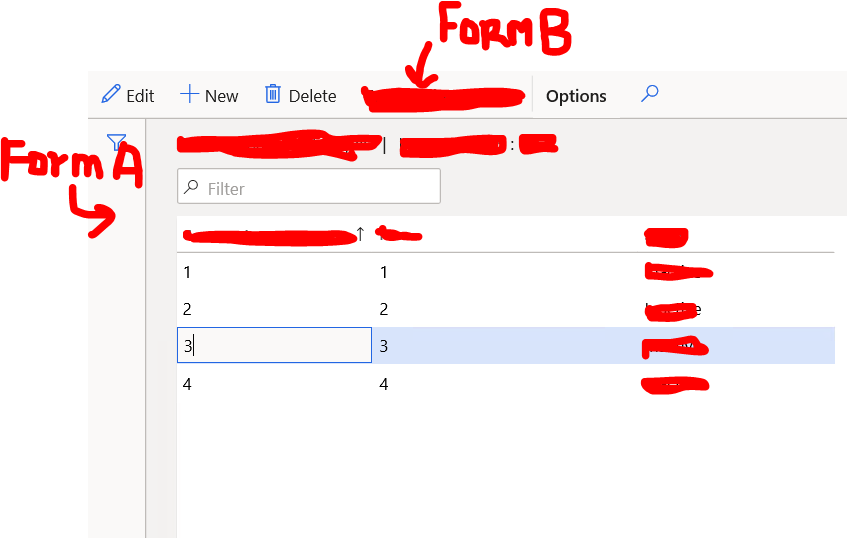
1. I have created 2 custom form  FormA and FormB .

2. FormB is child form of FormA and its calling by passing args in clicked method of FormB button on Action pane.
3312.pastedimage1598609030553v1.png

3. After opening FormB and coming back to FormA, the cursor should highlight the previously selected record in  FormA  e.g in this case "3" should be highlighted but now first record is highlighting. 

How can I achieve this functionality??

I have the same question (0)
  • Martin Dráb Profile Picture
    237,978 Most Valuable Professional on at

    For reference, here is a link to the related thread: How to highlight selected record in Child form in D365 fo.

    Because the question is about D365FO, I'm also going to move it to the Dynamics 365 Finance forum. Please make sure you use the right forum next time; then you also won't need attaching "D365 FO" to thread titles, because it'll be obvious from the forum.

  • Community Member Profile Picture
    on at

    Okay, Martin Dráb. I'll keep in my mind  next time.

    Please suggest me anything regarding this thread..

  • Martin Dráb Profile Picture
    237,978 Most Valuable Professional on at

    How do you "come back to FormA"? Does it mean simply closing FormB? If so, what you want is the standard behavior that you can see across D365FO and it's broken by something in your forms. Don't you call research() or executeQuery() on the data source of FormA?

    By the way, let me again recommend using a menu item instead of writing code on clicked(). Not only it's unnecessary, but it's also bad for security setup (security is set primarily for menu items) and consistency (the button would take the label and other properties from the menu item).

  • Community Member Profile Picture
    on at

    Yes, by simplying closing FormB. Yes, I have used closed() of FormB  to update some fields of FormA which depends upon some fields in FormB.

    But its updating the value in FormA but not retaining the cursor in FormA

     public boolean closed()
        {
            boolean ret;
        
            ret = super();
    
            if (ret)
            {
                tableA.executeQuery();//TtableA is datasource of FormA
                tableA.refresh();
            }
        
            return ret;
        }

  • Suggested answer
    nmaenpaa Profile Picture
    101,162 Moderator on at

    The cursor / selected record is not changed unless you have written some code that does it. For example you might have written some code that refreshes form A data source, but this is just a guess. Please share all your custom code on this area. Thanks! 

  • Verified answer
    Gunjan Bhattachayya Profile Picture
    35,423 on at

    The statement - "tableA.executeQuery();" will always take the focus to the fist record on for A.

    Can you try doing tableA.reread() instead?

  • Verified answer
    nmaenpaa Profile Picture
    101,162 Moderator on at

    You should first call table1_ds.refresh, then table1_ds.research(true).

    But there's a property on the menu item button (which you should use to open form B) to refresh data source automatically, not needing to develop any code.

  • Suggested answer
    Community Member Profile Picture
    on at

    Yes Thank you Nikolaos Mäenpää .. It works for me.. Sharing my code so that it may help others also..

    public boolean closed()
        {
            boolean ret;
        
            ret = super();
    
            if (ret)
            {           
                tableA.refresh();//tableA is datasource of FormA
                tableA.research(true);
            }
        
            return ret;
        }

    As suggested by Gunjan Bhattacharyya , reRead() also works but I used research(true) to update all other records except current one in my FormA.

Under review

Thank you for your reply! To ensure a great experience for everyone, your content is awaiting approval by our Community Managers. Please check back later.

Helpful resources

Quick Links

Responsible AI policies

As AI tools become more common, we’re introducing a Responsible AI Use…

Neeraj Kumar – Community Spotlight

We are honored to recognize Neeraj Kumar as our Community Spotlight honoree for…

Leaderboard > Finance | Project Operations, Human Resources, AX, GP, SL

#1
André Arnaud de Calavon Profile Picture

André Arnaud de Cal... 449 Super User 2025 Season 2

#2
Martin Dráb Profile Picture

Martin Dráb 422 Most Valuable Professional

#3
BillurSamdancioglu Profile Picture

BillurSamdancioglu 239 Most Valuable Professional

Last 30 days Overall leaderboard

Product updates

Dynamics 365 release plans



