web
You’re offline. This is a read only version of the page.
close
Skip to main content

Notifications

Announcements

No record found.

Community site session details

Community site session details

Session Id :
Customer experience | Sales, Customer Insights,...
Answered

Text and layout issues in marketing emails

(0) ShareShare
ReportReport
Posted on by 5

Hi! 

We are having major issues with how our marketing emails come out looking. It seems like the emails look good on MAC computers, but all text gets centered on PC. On mobile the text overlaps completely (the screenshot is with the outlook app). 

We do not use custom HTML, just build the email using the building blocks provided in the tool. Any suggestions on how to fix this? 
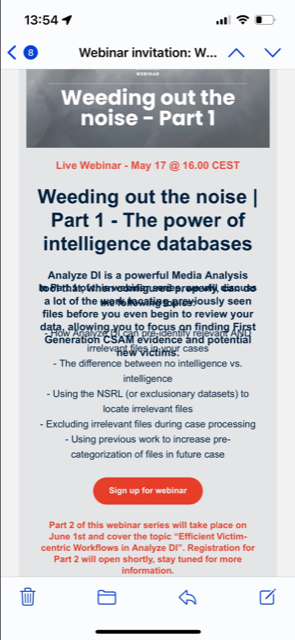
Webinar-invitation-Weeding-out-the-noise-_2D00_-Part-1.png

I have the same question (0)
  • Verified answer
    Nya Profile Picture
    29,060 on at

    Hi,

    There is an option in Settings >  Email Marketing > Default Settings > Marketing email tab called "Enable Litmus integration" and you can enable it.

    pastedimage1651559360996v1.png

    Then you can see the effect in different email clients in Preview and test tab of the email.

    pastedimage1651559457666v2.png

    You can adjust the layout based on the preview for a certain client before going it live.

    Or you can provide the code snippet and I'll try to adjust it for you.

  • Saad Farooq Profile Picture
    65 on at

    I am also experiencing similar issue where the content is all messy when viewed on a mobile device. The emails were rendering correctly but have noticed in last one month or so that the display on mobile overlays all columns (could be related to "Wrap columns on mobile" being checked. I unchecked the option but still not fixed).

    Any idea of a main setting I am missing which has changed/released by Microsoft in last few months which is causing this?

  • Aitana Profile Picture
    5 on at

    We are having the same issues. It seems to have started with our June newsletter.

    I've tried reusing the HTML code from previous newsletters, but as soon as we edit something (image or copy), the layout on mobile looks jumbled.

    All our templates react the same way, so it could be a Dynamics Marketing change rather than an internal one.

    Any help would be welcome!

  • CaseyG Profile Picture
    15 on at

    There was an update to the email builder in the past few months and some of our templates or emails (save as then update) that we used previously are having some issues. Not all emails but just once and awhile things do not line up or overlap. I would rebuild the email from scratch. Build in sections from the top down and test each section to ensure it is rendering properly. I would also set a line height for all copy. Good luck and let us know how it comes along.

  • umafas Profile Picture
    5 on at

    This kind of advertising, as far as I'm concerned, is a thing of the past. I have now started to use countdown clock on my sites and it is much more effective than email marketing. A countdown clock for websites is a tool that can help create a sense of urgency and encourage visitors to take action. By displaying a countdown clock on your website, you can create a sense of excitement and anticipation around a specific event or promotion. 

Under review

Thank you for your reply! To ensure a great experience for everyone, your content is awaiting approval by our Community Managers. Please check back later.

Helpful resources

Quick Links

Responsible AI policies

As AI tools become more common, we’re introducing a Responsible AI Use…

Neeraj Kumar – Community Spotlight

We are honored to recognize Neeraj Kumar as our Community Spotlight honoree for…

Leaderboard > Customer experience | Sales, Customer Insights, CRM

#1
Tom_Gioielli Profile Picture

Tom_Gioielli 170 Super User 2025 Season 2

#2
#ManoVerse Profile Picture

#ManoVerse 61

#3
Gerardo Rentería García Profile Picture

Gerardo Rentería Ga... 52 Most Valuable Professional

Last 30 days Overall leaderboard

Product updates

Dynamics 365 release plans



